







Question: Help to fix this script There are four (4) problems with this script. Below is example output of the script. tmoyer2@itis-3246:~/scripting-2$ ./3-loops.sh The current value
Help to fix this script
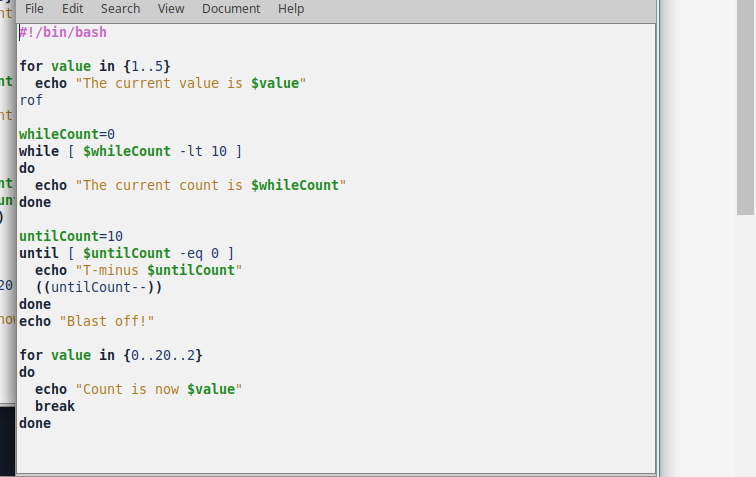
There are four (4) problems with this script. Below is example output of the script.
tmoyer2@itis-3246:~/scripting-2$ ./3-loops.sh The current value is 1 The current value is 2 The current value is 3 The current value is 4 The current value is 5 The current count is 0 The current count is 1 The current count is 2 The current count is 3 The current count is 4 The current count is 5 The current count is 6 The current count is 7 The current count is 8 The current count is 9 T-minus 10 T-minus 9 T-minus 8 T-minus 7 T-minus 6 T-minus 5 T-minus 4 T-minus 3 T-minus 2 T-minus 1 Blast off! Count is now 0 Count is now 2 Count is now 4 Count is now 6 Count is now 8 Count is now 10 Count is now 12 Count is now 14 Count is now 16 Count is now 18 Count is now 20
File Edit Search View Document Help #!/bin/bash for value in f1..5 echo "The current value is $value rof whileCount-o while [ $whileCount -lt 10 ] do echo The current count is SwhileCount in done untilcount-10 until [ $unti!count -eq ] echo "T-minus $untLCount" done echo "Blast off!' for value in ..29..2) do echo "Count is now $value" break done
Step by Step Solution
There are 3 Steps involved in it
1 Expert Approved Answer
Step: 1 Unlock

Question Has Been Solved by an Expert!
Get step-by-step solutions from verified subject matter experts
Step: 2 Unlock
Step: 3 Unlock
 Study Help