







Question: help with 1.9 and 1.10 step by step on excel. (1.9) Use Color Scales to highlight the number of followers for each streamer. a. Apply
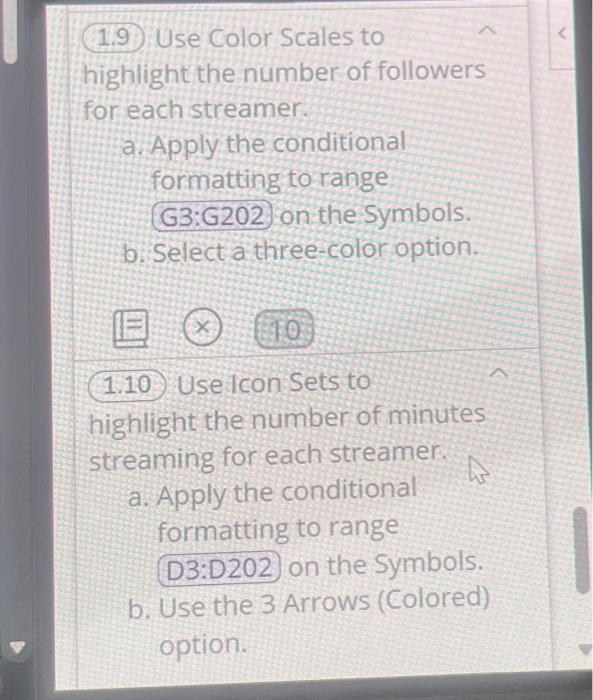
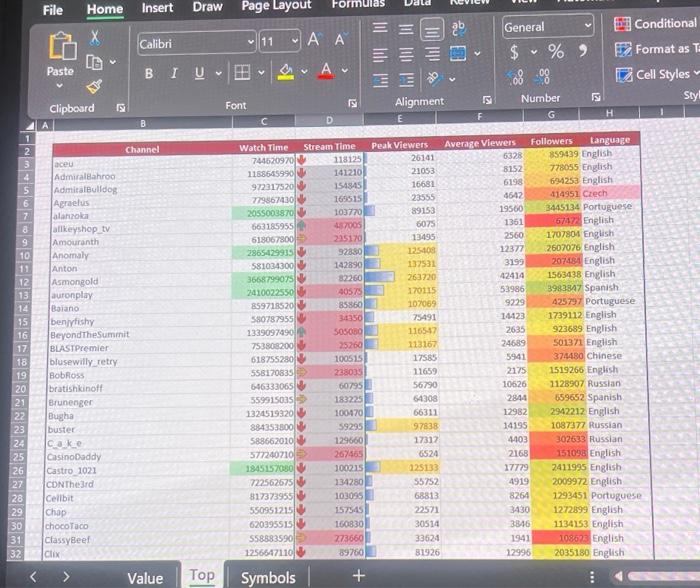
(1.9) Use Color Scales to highlight the number of followers for each streamer. a. Apply the conditional formatting to range on the symbols. b. Select a three-color option. (1.10) Uselcon Sets to highlight the number of minutes streaming for each streamer. a. Apply the conditional formatting to range on the symbols. b. Use the 3 Arrows (Colored) option. File Home Insert Draw Value Top Symbols (1.9) Use Color Scales to highlight the number of followers for each streamer. a. Apply the conditional formatting to range on the symbols. b. Select a three-color option. (1.10) Uselcon Sets to highlight the number of minutes streaming for each streamer. a. Apply the conditional formatting to range on the symbols. b. Use the 3 Arrows (Colored) option. File Home Insert Draw Value Top Symbols
Step by Step Solution
There are 3 Steps involved in it

Get step-by-step solutions from verified subject matter experts
 Study Help