Question: help with 8 8. In order to relate the data in the Products and Purchases tables to make a proper comparison, use the Power Pivot

help with 8 help with 8 8. In order to relate the data in the

help with 8 8. In order to relate the data in the
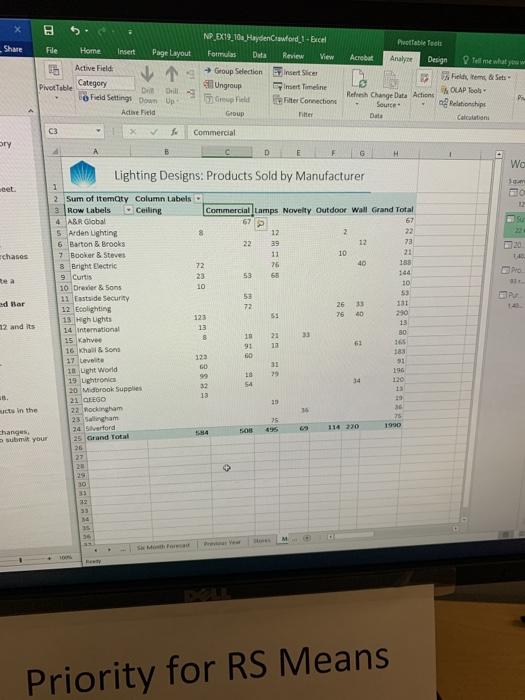
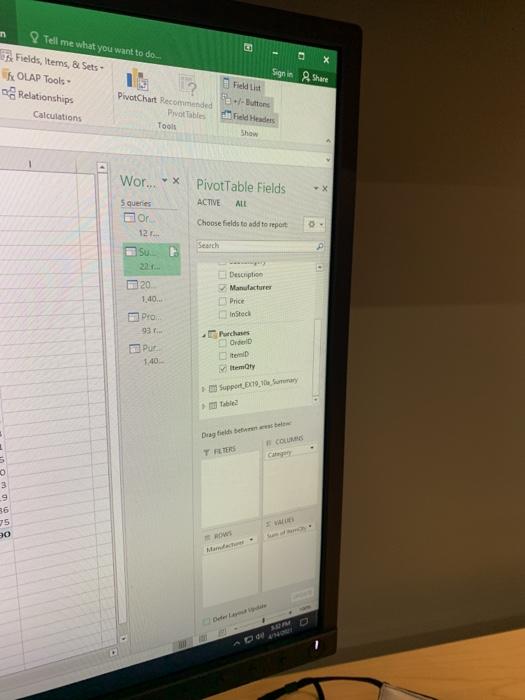
8. In order to relate the data in the Products and Purchases tables to make a proper comparison, use the Power Pivot window to create a relationship between the Purchases and Products tables based on the ItemId field. B Share NP EX19.10 Hayden Crawford 1-Excel Formulas Data Review View 5 Group Selection Fide Home Insert Page Layout Active Field Category Pivot Table Di Grill Field Settings Down Up Active Fitid Petrable facts Acrobat Analyse Design Time what Piektem & Sets Refresh Change Date Action MOLAP Tools Source Pelationships Date Calcuni Insert Slice mert Timeline leiter Connection Titter Unge Group Commercial Bry F 6 H Wa Lighting Designs: Products Sold by Manufacturer cet. Echases Rea dar m2 and its 2 2 Sum of itemty Column Labels 3 Row Labels Ceiling Commercial Lamps Novelty Outdoor Wall Grand Total 4 ABR Global 67 67 5 Arden ughting 12 2 6 Barton & Brooks 22 29 12 73 7 Booker & Steves 11 10 21 8 Bright Electric 72 25 40 185 9 Curtis 53 68 144 10 Drever & Sons 10 10 11 Eastside Security 53 12 Ecolighting 72 26 33 131 13 High ughts 123 53 76 10 290 14 international 13 13 15 Kahve 8 21 80 91 16 & Sons 165 12 183 122 17 Level GO 31 51 10 Light World 99 29 196 15 Lightronics 32 120 54 20 Midbrook Supplies 13 13 21 EGO 29 10 22. hockingham 16 36 2 Sallingham 25 75 24 Srlord 114 220 1900 25 Grand Total 26 127 2 14 ut in the S Changes submit your 29 30 22 33 M Priority for RS Means m X Tell me what you want to do Fields, Items, 8 Sets OLAP Tools PivotChart Recommended Relationships Prvot Tables Calculations Tools Sign in Share Field List - Buttons Field Hades Wor... Pivot Table Fields ACTIVE ATE 5 queries or Choose fields to add to report 121- Search P 5 20 Description Manufacturer o Price 1.40 Intech Pro 931 Picha OD tem 1402 Sapport 2016 Sunary Drag te beste COS Y FER 0 3 9 36 35 20 8. In order to relate the data in the Products and Purchases tables to make a proper comparison, use the Power Pivot window to create a relationship between the Purchases and Products tables based on the ItemId field. B Share NP EX19.10 Hayden Crawford 1-Excel Formulas Data Review View 5 Group Selection Fide Home Insert Page Layout Active Field Category Pivot Table Di Grill Field Settings Down Up Active Fitid Petrable facts Acrobat Analyse Design Time what Piektem & Sets Refresh Change Date Action MOLAP Tools Source Pelationships Date Calcuni Insert Slice mert Timeline leiter Connection Titter Unge Group Commercial Bry F 6 H Wa Lighting Designs: Products Sold by Manufacturer cet. Echases Rea dar m2 and its 2 2 Sum of itemty Column Labels 3 Row Labels Ceiling Commercial Lamps Novelty Outdoor Wall Grand Total 4 ABR Global 67 67 5 Arden ughting 12 2 6 Barton & Brooks 22 29 12 73 7 Booker & Steves 11 10 21 8 Bright Electric 72 25 40 185 9 Curtis 53 68 144 10 Drever & Sons 10 10 11 Eastside Security 53 12 Ecolighting 72 26 33 131 13 High ughts 123 53 76 10 290 14 international 13 13 15 Kahve 8 21 80 91 16 & Sons 165 12 183 122 17 Level GO 31 51 10 Light World 99 29 196 15 Lightronics 32 120 54 20 Midbrook Supplies 13 13 21 EGO 29 10 22. hockingham 16 36 2 Sallingham 25 75 24 Srlord 114 220 1900 25 Grand Total 26 127 2 14 ut in the S Changes submit your 29 30 22 33 M Priority for RS Means m X Tell me what you want to do Fields, Items, 8 Sets OLAP Tools PivotChart Recommended Relationships Prvot Tables Calculations Tools Sign in Share Field List - Buttons Field Hades Wor... Pivot Table Fields ACTIVE ATE 5 queries or Choose fields to add to report 121- Search P 5 20 Description Manufacturer o Price 1.40 Intech Pro 931 Picha OD tem 1402 Sapport 2016 Sunary Drag te beste COS Y FER 0 3 9 36 35 20

Step by Step Solution

There are 3 Steps involved in it

1 Expert Approved Answer
Step: 1 Unlock blur-text-image

Question Has Been Solved by an Expert!

Get step-by-step solutions from verified subject matter experts

Step: 2 Unlock
Step: 3 Unlock

Students Have Also Explored These Related General Management Questions!