







Question: Help with a java project please: User Request Create a simple system to read, search, remove, and write restaurant data. Objectives: 1. 2. 3. 4.
Help with a java project please:
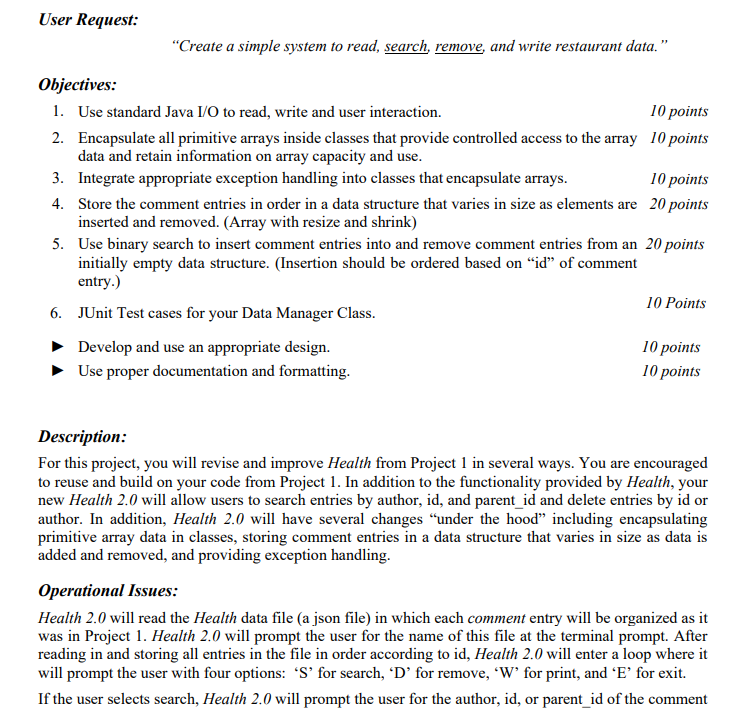
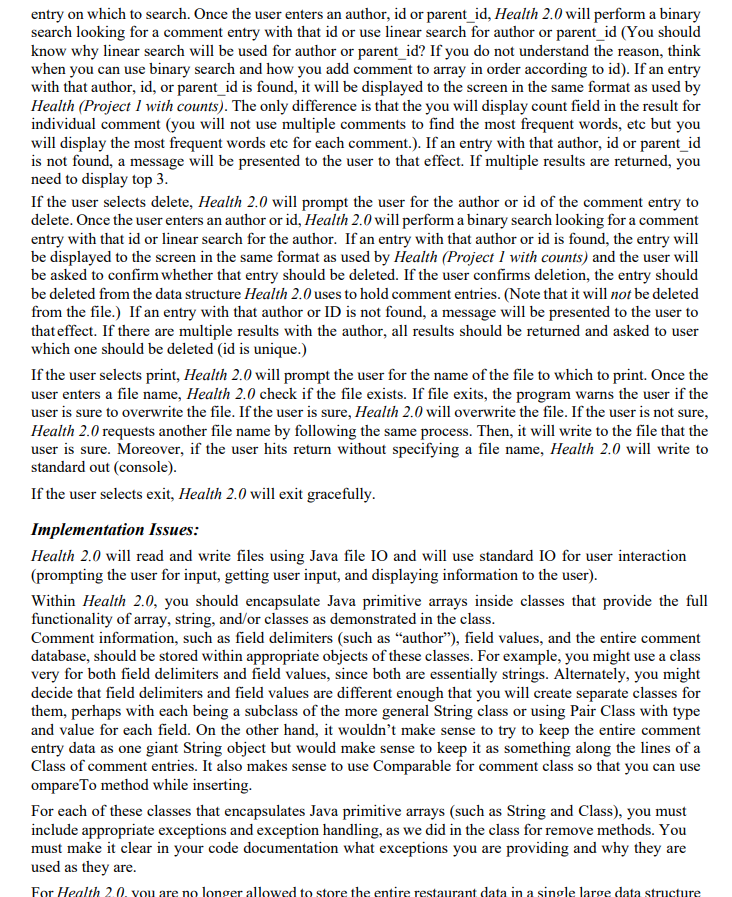
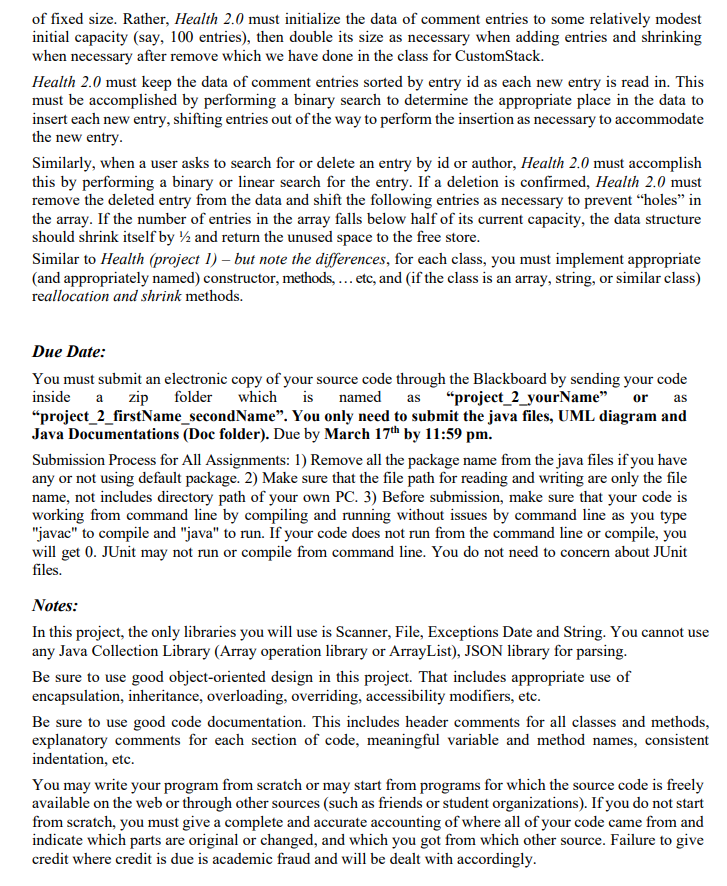
User Request "Create a simple system to read, search, remove, and write restaurant data." Objectives: 1. 2. 3. 4. 5. 10 points 10 points Use standard Java I/O to read, write and user interaction. Encapsulate all primitive arrays inside classes that provide controlled access to the array data and retain information on array capacity and use Integrate appropriate exception handling into classes that encapsulate arrays. 10 points Store the comment entries in order in a data structure that varies in size as elements are 20 points inserted and removed. (Array with resize and shrink) Use binary search to insert comment entries into and remove comment entries from an 20 points initially empty data structure. (Insertion should be ordered based on "id" of comment entr 10 Point.s 6. JUnit Test cases for your Data Manager Class. Develop and use an appropriate desigrn. 10 points 10 points se proper documentation and formatting Description: For this project, you will revise and improve Health from Project 1 in several ways. You are encourageed to reuse and build on your code from Project 1. In addition to the functionality provided by Health, your new Health 2.0 will allow users to search entries by author, id, and parent id and delete entries by id or author. In addition, Health 2.0 will have several changes "under the hood" including encapsulating primitive array data in classes, storing comment entries in a data structure that varies in size as data is added and removed, and providing exception handling. Operational Issues: Health 2.0 will read the Health data file (a json file) in which each comment entry will be organized as it was in Project 1. Health 2.0 will prompt the user for the name of this file at the terminal prompt. After reading in and storing all entries in the file in order according to id, Health 2.0 will enter a loop where it will prompt the user with four options: 'S' for search, 'D' for remove, 'W' for print, and 'E' for exit. If the user selects search, Health 2.0 will prompt the user for the author, id, or parent id of the comment entry on which to search. Once the user enters an author, id or parent id, Health 2.0 will perform a binary search looking for a comment entry with that id or use linear search for author or parent id (You should know why linear search will be used for author or parent id? If you do not understand the reason, think when you can use binary search and how you add comment to array in order according to id). If an entry with that author, id, or parent id is found, it will be displayed to the screen in the same format as used by Health (Project 1 with counts). The only difference is that the you will display count field in the result for individual comment (you will not use multiple comments to find the most frequent words, etc but you will display the most frequent words etc for each comment.). If an entry with that author, id or parent id is not found, a message will be presented to the user to that effect. If multiple results are returned, you need to display top 3 If the user selects delete, Health 2.0 will prompt the user for the author or id of the comment entry to delete. Once the user enters an author or id, Health 2.0 will perform a binary search looking for a comment entry with that id or linear search for the author. If an entry with that author or id is found, the entry will be displayed to the screen in the same format as used by Health (Project I with counts) and the user wil be asked to confirm whether that entry should be deleted. If the user confirms deletion, the entry should be deleted from the data structure Health 2.0 uses to hold comment entries. (Note that it will not be deleted from the file.) If an entry with that author or ID is not found, a message will be presented to the user to that effect. If there are multiple results with the author, all results should be returned and asked to user which one should be deleted (id is unique.) If the user selects print, Health 2.0 will prompt the user for the name of the file to which to print. Once the user enters a file name, Health 2.0 check if the file exists. If file exits, the program warns the user if the user is sure to overwrite the file. If the user is sure, Health 2.0 will overwrite the file. If the user is not sure Health 2.0 requests another file name by following the same process. Then, t will write to the file that the user is sure. Moreover, if the user hits return without specifying a file name, Health 2.0 will write to standard out (console) If the user selects exit, Health 2.0 will exit gracefully Implementation Issues: Health 2.0 will read and write files using Java file IO and will use standard IO for user interaction (prompting the user for input, getting user input, and displaying information to the user). Within Health 2.0, you should encapsulate Java primitive arrays inside classes that provide the full functionality of array, string, and/or classes as demonstrated in the class Comment information, such as field delimiters (such as "author"), field values, and the entire comment database, should be stored within appropriate objects of these classes. For example, you might use a class very for both field delimiters and field values, since both are essentially strings. Alternately, you might decide that field delimiters and field values are different enough that you will create separate classes for them, perhaps with each being a subclass of the more general String class or using Pair Class with type and value for each field. On the other hand, it wouldn't make sense to try to keep the entire comment entry data as one giant String object but would make sense to keep it as something along the lines ofa Class of comment entries. It also makes sense to use Comparable for comment class so that you can use ompareTo method while inserting For each of these classes that encapsulates Java primitive arrays (such as String and Class), you must include appropriate exceptions and exception handling, as we did in the class for remove methods. You must make it clear in your code documentation what exceptions you are providing and why they are used as they are For Health 2.0, you are no longer allowed to store the entire restaurant data in a single large data structure of fixed size. Rather, Health 2.0 must initialize the data of comment entries to some relatively modest initial capacity (say, 100 entries), then double its size as necessary when adding entries and shrinking when necessary after remove which we have done in the class for CustomStack. Health 2.0 must keep the data of comment entries sorted by entry id as each new entry is read in. This must be accomplished by performing a binary search to determine the appropriate place in the data to insert each new entry, shifting entries out of the way to perform the insertion as necessary to accommodate the new entry Similarly, when a user asks to search for or delete an entry by id or author, Health 2.0 must accomplish this by performing a binary or linear search for the entry. If a deletion is confirmed, Health 2.0 must remove the deleted entry from the data and shift the following entries as necessary to prevent "holes" in the array. If the number of entries in the array falls below half of its current capacity, the data structure should shrink itself by 2 and return the unused space to the free store Similar to Health (project 1) - but note the differences, for each class, you must implement appropriate (and appropriately named) constructor, methods,... etc, and (if the class is an array, string, or similar class) reallocation and shrink methods. Due Date: You must submit an electronic copy of your source code through the Blackboard by sending your code inside a zip folder which is named s"project 2_yourName or as "project 2 firstName secondName". You only need to submit the java files, UML diagram and Java Documentations (Doc folder). Due by March 17th by 11:59 pm. Submission Process for All Assignments: 1) Remove all the package name from the java files if you have any or not using default package. 2) Make sure that the file path for reading and writing are only the file name, not includes directory path of your own PC. 3) Before submission, make sure that your code is working from command line by compiling and running without issues by command line as you type "javac" to compile and "java" to run. If your code does not run from the command line or compile, you will get 0. JUnit may not run or compile from command line. You do not need to concern about JUnit es. Notes: In this project, the only libraries you will use is Scanner, File, Exceptions Date and String. You cannot use any Java Collection Library (Array operation library or ArrayList), JSON library for parsing Be sure to use good object-oriented design in this project. That includes appropriate use of encapsulation, inheritance, overloading, overriding, accessibility modifiers, etc Be sure to use good code documentation. This includes header comments for all classes and methods explanatory comments for each section of code, meaningful variable and method names, consistent indentation, etc. You may write your program from scratch or may start from programs for which the source code is freely available on the web or through other sources (such as friends or student organizations). If you do not start from scratch, you must give a complete and accurate accounting of where all of your code came from and indicate which parts are original or changed, and which you got from which other source. Failure to give credit where credit is due is academic fraud and will be dealt with accordingly User Request "Create a simple system to read, search, remove, and write restaurant data." Objectives: 1. 2. 3. 4. 5. 10 points 10 points Use standard Java I/O to read, write and user interaction. Encapsulate all primitive arrays inside classes that provide controlled access to the array data and retain information on array capacity and use Integrate appropriate exception handling into classes that encapsulate arrays. 10 points Store the comment entries in order in a data structure that varies in size as elements are 20 points inserted and removed. (Array with resize and shrink) Use binary search to insert comment entries into and remove comment entries from an 20 points initially empty data structure. (Insertion should be ordered based on "id" of comment entr 10 Point.s 6. JUnit Test cases for your Data Manager Class. Develop and use an appropriate desigrn. 10 points 10 points se proper documentation and formatting Description: For this project, you will revise and improve Health from Project 1 in several ways. You are encourageed to reuse and build on your code from Project 1. In addition to the functionality provided by Health, your new Health 2.0 will allow users to search entries by author, id, and parent id and delete entries by id or author. In addition, Health 2.0 will have several changes "under the hood" including encapsulating primitive array data in classes, storing comment entries in a data structure that varies in size as data is added and removed, and providing exception handling. Operational Issues: Health 2.0 will read the Health data file (a json file) in which each comment entry will be organized as it was in Project 1. Health 2.0 will prompt the user for the name of this file at the terminal prompt. After reading in and storing all entries in the file in order according to id, Health 2.0 will enter a loop where it will prompt the user with four options: 'S' for search, 'D' for remove, 'W' for print, and 'E' for exit. If the user selects search, Health 2.0 will prompt the user for the author, id, or parent id of the comment entry on which to search. Once the user enters an author, id or parent id, Health 2.0 will perform a binary search looking for a comment entry with that id or use linear search for author or parent id (You should know why linear search will be used for author or parent id? If you do not understand the reason, think when you can use binary search and how you add comment to array in order according to id). If an entry with that author, id, or parent id is found, it will be displayed to the screen in the same format as used by Health (Project 1 with counts). The only difference is that the you will display count field in the result for individual comment (you will not use multiple comments to find the most frequent words, etc but you will display the most frequent words etc for each comment.). If an entry with that author, id or parent id is not found, a message will be presented to the user to that effect. If multiple results are returned, you need to display top 3 If the user selects delete, Health 2.0 will prompt the user for the author or id of the comment entry to delete. Once the user enters an author or id, Health 2.0 will perform a binary search looking for a comment entry with that id or linear search for the author. If an entry with that author or id is found, the entry will be displayed to the screen in the same format as used by Health (Project I with counts) and the user wil be asked to confirm whether that entry should be deleted. If the user confirms deletion, the entry should be deleted from the data structure Health 2.0 uses to hold comment entries. (Note that it will not be deleted from the file.) If an entry with that author or ID is not found, a message will be presented to the user to that effect. If there are multiple results with the author, all results should be returned and asked to user which one should be deleted (id is unique.) If the user selects print, Health 2.0 will prompt the user for the name of the file to which to print. Once the user enters a file name, Health 2.0 check if the file exists. If file exits, the program warns the user if the user is sure to overwrite the file. If the user is sure, Health 2.0 will overwrite the file. If the user is not sure Health 2.0 requests another file name by following the same process. Then, t will write to the file that the user is sure. Moreover, if the user hits return without specifying a file name, Health 2.0 will write to standard out (console) If the user selects exit, Health 2.0 will exit gracefully Implementation Issues: Health 2.0 will read and write files using Java file IO and will use standard IO for user interaction (prompting the user for input, getting user input, and displaying information to the user). Within Health 2.0, you should encapsulate Java primitive arrays inside classes that provide the full functionality of array, string, and/or classes as demonstrated in the class Comment information, such as field delimiters (such as "author"), field values, and the entire comment database, should be stored within appropriate objects of these classes. For example, you might use a class very for both field delimiters and field values, since both are essentially strings. Alternately, you might decide that field delimiters and field values are different enough that you will create separate classes for them, perhaps with each being a subclass of the more general String class or using Pair Class with type and value for each field. On the other hand, it wouldn't make sense to try to keep the entire comment entry data as one giant String object but would make sense to keep it as something along the lines ofa Class of comment entries. It also makes sense to use Comparable for comment class so that you can use ompareTo method while inserting For each of these classes that encapsulates Java primitive arrays (such as String and Class), you must include appropriate exceptions and exception handling, as we did in the class for remove methods. You must make it clear in your code documentation what exceptions you are providing and why they are used as they are For Health 2.0, you are no longer allowed to store the entire restaurant data in a single large data structure of fixed size. Rather, Health 2.0 must initialize the data of comment entries to some relatively modest initial capacity (say, 100 entries), then double its size as necessary when adding entries and shrinking when necessary after remove which we have done in the class for CustomStack. Health 2.0 must keep the data of comment entries sorted by entry id as each new entry is read in. This must be accomplished by performing a binary search to determine the appropriate place in the data to insert each new entry, shifting entries out of the way to perform the insertion as necessary to accommodate the new entry Similarly, when a user asks to search for or delete an entry by id or author, Health 2.0 must accomplish this by performing a binary or linear search for the entry. If a deletion is confirmed, Health 2.0 must remove the deleted entry from the data and shift the following entries as necessary to prevent "holes" in the array. If the number of entries in the array falls below half of its current capacity, the data structure should shrink itself by 2 and return the unused space to the free store Similar to Health (project 1) - but note the differences, for each class, you must implement appropriate (and appropriately named) constructor, methods,... etc, and (if the class is an array, string, or similar class) reallocation and shrink methods. Due Date: You must submit an electronic copy of your source code through the Blackboard by sending your code inside a zip folder which is named s"project 2_yourName or as "project 2 firstName secondName". You only need to submit the java files, UML diagram and Java Documentations (Doc folder). Due by March 17th by 11:59 pm. Submission Process for All Assignments: 1) Remove all the package name from the java files if you have any or not using default package. 2) Make sure that the file path for reading and writing are only the file name, not includes directory path of your own PC. 3) Before submission, make sure that your code is working from command line by compiling and running without issues by command line as you type "javac" to compile and "java" to run. If your code does not run from the command line or compile, you will get 0. JUnit may not run or compile from command line. You do not need to concern about JUnit es. Notes: In this project, the only libraries you will use is Scanner, File, Exceptions Date and String. You cannot use any Java Collection Library (Array operation library or ArrayList), JSON library for parsing Be sure to use good object-oriented design in this project. That includes appropriate use of encapsulation, inheritance, overloading, overriding, accessibility modifiers, etc Be sure to use good code documentation. This includes header comments for all classes and methods explanatory comments for each section of code, meaningful variable and method names, consistent indentation, etc. You may write your program from scratch or may start from programs for which the source code is freely available on the web or through other sources (such as friends or student organizations). If you do not start from scratch, you must give a complete and accurate accounting of where all of your code came from and indicate which parts are original or changed, and which you got from which other source. Failure to give credit where credit is due is academic fraud and will be dealt with accordingly
Step by Step Solution
There are 3 Steps involved in it

Get step-by-step solutions from verified subject matter experts
 Study Help