







Question: Help with python!! Implement each of the following functions. def simple_pig_latin(input, sep= end=.): Accept a string input, which might include multiple words separated by a
Help with python!!
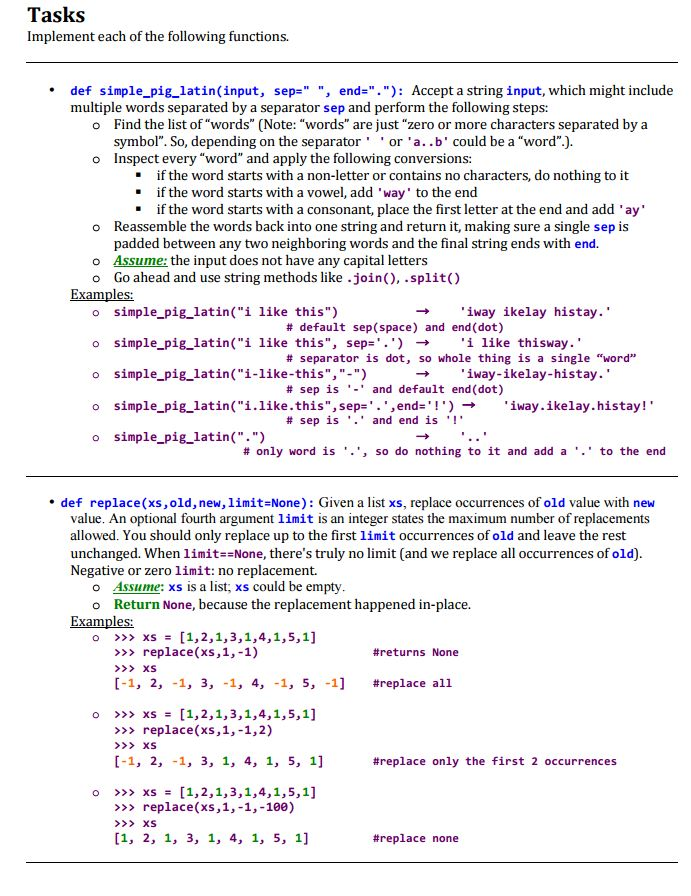
Implement each of the following functions. def simple_pig_latin(input, sep=" end="."): Accept a string input, which might include multiple words separated by a separator sep and perform the following steps: Find the list of "words" Inspect every "word" and apply the following conversions: if the word starts with a non-letter or contains no characters, do nothing to it if the word starts with a vowel, add 'way' to the end if the word starts with a consonant, place the first letter at the end and add 'ay' Reassemble the words back into one string and return it, making sure a single sep is padded between any two neighboring words and the final string ends with end. Assume: the input does not have any capital letters Go ahead and use string methods like .join(), .split() Examples: simple_pig_latin("i like this") rightarrow 'iway ikelay histay.' #default sep (space) and end(dot) simple_pig_latin("i like this", sep='.') 'i like thisway.' #separator is dot, so whole thing is a single "word" simple_pig_latin("i-like-this", "-") rightarrow 'iway-ikelay-histay.' #sep is '.' and default end(dot) simple_pig_latin ("i.like.this", sep='.', end='!') rightarrow 'iway.ikelay.histay!' #sep is '.' and end is 'l' simple_pig_latin(".") rightarrow '..' #only word is '.', so do nothing to it and add a '.' to the end def replace(xs, old, new, limit =None): Given a list xs, replace occurrences of old value with new value. An optional fourth argument limit is an integer states the maximum number of replacements allowed. You should only replace up to the first limit occurrences of old and leave the rest unchanged. When limit==None, there's truly no limit (and we replace all occurrences of old). Negative or zero limit: no replacement Assume: xs is a list; xs could be empty. Return None, because the replacement happened in-place. Examples: >>> xs = [1, 2, 1, 3, 1, 4, 1, 5, 1] >>> replace(xs, 1, -1) #returns None >>> xs [-1, 2, -1, 3, -1, 4, -1, 5, -1] #replace all >>> xs = [1, 2, 1, 3, 1, 4, 1, 5, 1] >>> replace(xs, 1, -1, 2) >>> xs [-1, 2, -1, 3, 1, 4, 1, 5, 1] #replace only the first 2 occurrences >>> xs = [1, 2, 1, 3, 1, 4, 1, 5, 1] >>> replace(xs, 1, -1, -100) >>> xs [1, 2, 1, 3, 1, 4, 1, 5, 1] #replace none
Step by Step Solution
There are 3 Steps involved in it

Get step-by-step solutions from verified subject matter experts
 Study Help