







Question: Help with questions about SQL queries using this ER Diagram Questions How many customers have placed an order? (Hint: count a customer one time if
Help with questions about SQL queries using this ER Diagram
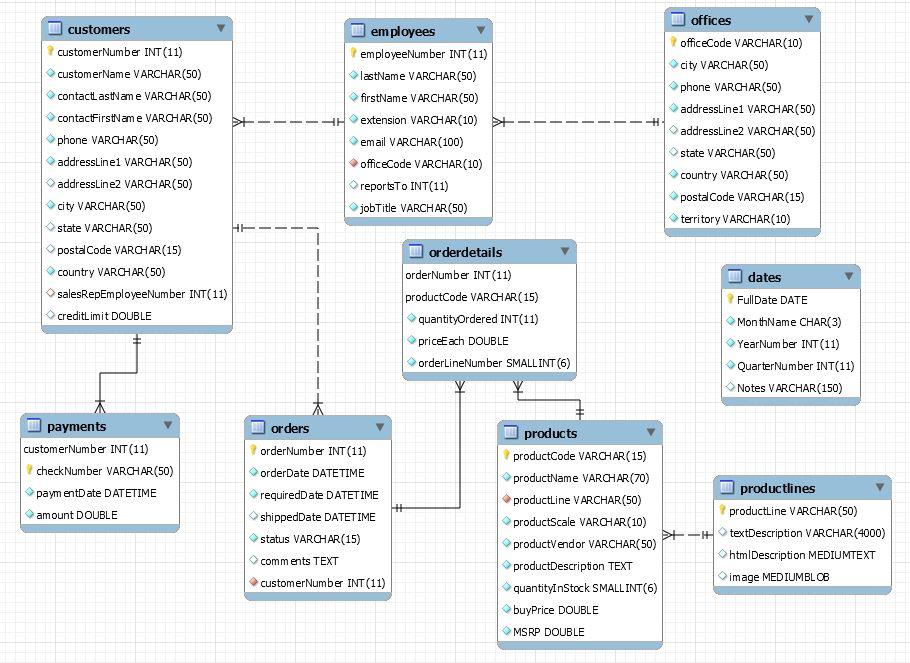
Questions
-
How many customers have placed an order?
(Hint: count a customer one time if the customer has multiple orders)
-
List the names (customer name, not contact names) of all customers who have placed an order. (Hint: list a customer one time if the customer has multiple orders)
-
List the names of all customers who have not placed an order.
(Hint: this is an anti-join)
-
List all customer orders where the order has not been Cancelled. Include the order number, order date, order status and customers name.
-
List all customers names with each product that customer has ordered. Include customers who do not have an order. Include the product name of the item ordered. If a customer has ordered the same product multiple times, only list the product once for that customer.
(Hint: you will need to join 4 tables.)
-
List products for Motorcycle, Ship, and Train product lines that have quantity in stock.
(Hint: You can do this with a combination of AND/OR constructs. If you do, be sure to use parentheses to group the operations. Otherwise, you can do this with a single AND and an IN comparison operator. You can look up the IN operator in the MySQL reference manual.)
-
List product line, product code, product name, and total ordered quantity sorted by total ordered quantity in decreasing order. Include products with no orders (return 0 total quantity ordered for products with no orders).
-
List the names of customers and how many distinct products they have ordered where that customer has ordered 40 or more distinct products.
(Hint: Make sure you get only distinct products.)
-
List the names of all customers who have placed an order and the total dollar amount ordered by that customer.
(Hint: To get the dollar amount for an order, you will need to multiply the order quantity by the price each in the order detail table.)
-
List the names and customer numbers of all customers and the total dollar amount paid by that customer. If the customer hasnt made any payments, list 0 for the total amount paid for that customer.
-
List the names of all customers who have placed an order, the total dollar amount ordered for all orders for that customer, the dollar amount paid for all orders for that customer and the outstanding balance (amount that has not yet been paid) for each customer.
(Hint: If you try to mix the inner and outer joins for this query in the same FROM clause, you will probably get a meaningless result. Instead, use the queries from questions 9 and 10. Embed one of them as a subquery in the FROM clause of the other while adding the extra items being computed in the embedded query in the appropriate places in the primary query.)
employees employeeNumber INT (11) lastName VARCHAR(50) firstName VARCHAR(50) HH extension VARCHAR(10) email VARCHAR(100) officeCode VARCHAR(10) reportsTO INT(11) jobTitle VARCHAR(50) - + customers customerNumber INT(11) customerName VARCHAR(50) contact astame VARCHAR(50) contactFirstam e VARCHAR(50) phone VARCHAR(50) addressLine1 VARCHAR(50) addressLine2 VARCHAR(50) city VARCHAR(50) state VARCHAR(50) HE postal Code VARCHAR(15) country VARCHAR(50) salesRepEmployeeNumber INT(11) creditLimit DOUBLE offices officeCode VARCHAR(10) city VARCHAR(50) phone VARCHAR(50) addressLine1 VARCHAR(50) addressLine2 VARCHAR(50) state VARCHAR(50) country VARCHAR(50) postal Code VARCHAR(15) territory VARCHAR(10) orderdetails orderNumber INT(11) product Code VARCHAR(15) quantityOrdered INT(11) priceEach DOUBLE orderlineNumber SMALLINT (6) dates FullDate DATE MonthName CHAR(3) YearNumber INT (11) QuarterNumber INT(11) Notes VARCHAR(150) payments customerNumber INT (11) check Number VARCHAR(50) paymentDate DATETIME amount DOUBLE orders orderNumber INT (11) orderDate DATETIME requiredDate DATETIME shippedDate DATETIME status VARCHAR(15) comments TEXT customerNumber INT (11) products productCode VARCHAR(15) productName VARCHAR(70) productLine VARCHAR(50) productScale VARCHAR(10) productVendor VARCHAR(50) productDescription TEXT quantityInStock SMALL INT(6) buyPrice DOUBLE productlines productLine VARCHAR(50) - textDescription VARCHAR(4000) htm|Description MEDIUMTEXT image MEDIUMBL OB MSRP DOUBLE
Step by Step Solution
There are 3 Steps involved in it

Get step-by-step solutions from verified subject matter experts
 Study Help