





Question: help with the shadded portion (#2) Vew Perspectives Excel 2019 | Module 8: SAM Project lb 2. Create a two-variable data table to calculate the

help with the shadded portion (#2) help with the shadded portion (#2) Vew
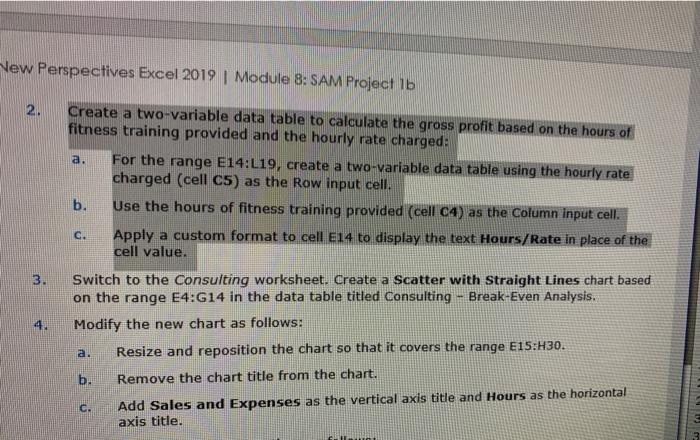
Vew Perspectives Excel 2019 | Module 8: SAM Project lb 2. Create a two-variable data table to calculate the gross profit based on the hours of fitness training provided and the hourly rate charged: a. For the range E14:L19, create a two-variable data table using the hourly rate charged (cell C5) as the Row input cell. b. Use the hours of fitness training provided (cell C4) as the Column input cell. Apply a custom format to cell E14 to display the text Hours/Rate in place of the cell value. CH 3. Switch to the Consulting worksheet. Create a Scatter with Straight Lines chart based on the range E4:G14 in the data table titled Consulting - Break-Even Analysis. Modify the new chart as follows: Resize and reposition the chart so that it covers the range E15:H30. 4. a. b. Remove the chart title from the chart. C. Add Sales and Expenses as the vertical axis title and Hours as the horizontal axis title. Vew Perspectives Excel 2019 | Module 8: SAM Project lb 2. Create a two-variable data table to calculate the gross profit based on the hours of fitness training provided and the hourly rate charged: a. For the range E14:L19, create a two-variable data table using the hourly rate charged (cell C5) as the Row input cell. b. Use the hours of fitness training provided (cell C4) as the Column input cell. Apply a custom format to cell E14 to display the text Hours/Rate in place of the cell value. CH 3. Switch to the Consulting worksheet. Create a Scatter with Straight Lines chart based on the range E4:G14 in the data table titled Consulting - Break-Even Analysis. Modify the new chart as follows: Resize and reposition the chart so that it covers the range E15:H30. 4. a. b. Remove the chart title from the chart. C. Add Sales and Expenses as the vertical axis title and Hours as the horizontal axis title

Step by Step Solution

There are 3 Steps involved in it

1 Expert Approved Answer
Step: 1 Unlock blur-text-image

Question Has Been Solved by an Expert!

Get step-by-step solutions from verified subject matter experts

Step: 2 Unlock
Step: 3 Unlock

Students Have Also Explored These Related General Management Questions!