







Question: HELP WITH THIS LC3 PROGRAM. HOW TO DO FOLLOWING BELOW IN LC3 CODE? Read in the + or -. If the character is a -,
HELP WITH THIS LC3 PROGRAM. HOW TO DO FOLLOWING BELOW IN LC3 CODE?
Read in the + or -. If the character is a -, remember to make the final result negative (i.e. take the 2s complement of R5 at the end). If the result is positive then ... dont.
Convert the string of characters input by the user into the binary number they represent (see examples). To do this, you can follow this algorithm:
Initialize R5 to 0 (DO NOT do this by LD'ing a 0 from memory! There is a much simpler & faster way!)
Convert each digit to binary as it is typed in, and add it to R5; if another digit is entered, multiply R5 by 10, and repeat. Stop when you detect the ENTER (x0A):
For example, if the user types 2, then R5 will contain #2 == b0000 0000 0000 0010
If the user then types a 3, making the string now read 23, then R5 will contain 2 x 10 + 3 == #23 == b0000 0000 0001 0111
If the user then types 4, making the string read 234, then R5 will contain 23 x 10 + 4 == #234 == b0000 0000 1110 1010 You must also perform input character validation with this assignment i.e. reject any non-numeric input character. That is, if the user enters +23g, your program should "choke" on the g, print an error message (see sample output), and start over at the beginning with the initial prompt. However, you do not have to detect overflow in this assignment we will only test your code with inputs in the range [-32768, +32767].
Expected/ Sample output Output
Prompt
Input a positive or negative decimal number (max 5 digits), followed by ENTER
Newline terminated
Error Message
ERROR INVALID INPUT
Newline terminated Example If the user enters +7246, your program should read the +, 7, 2, 4, 6 and end up with the value b0001 1100 0100 1110 in R5 (which corresponds to the number #7246, or x1C4E). If the users enters -14237, your program should read the -, 1, 4, 2, 3, 7 and end up with the value #-14237 == xC863 == b11001000 01100011 in R5.
Note: You must echo the digits as they are input (no "ghost writing").
You do not have to output the converted binary number. It should simply be sitting happily in R5, where you can check it in simpl.
What should happen when an error occurs?
Output "ERROR INVALID INPUT" and start over, prompting the user for input
Other Errors (output "ERROR INVALID INPUT" and start over):
Nothing entered before ENTER
only sign is entered before ENTER
first character entered is neither a sign nor a digit
REMEMBER: all outputs must be newline terminated
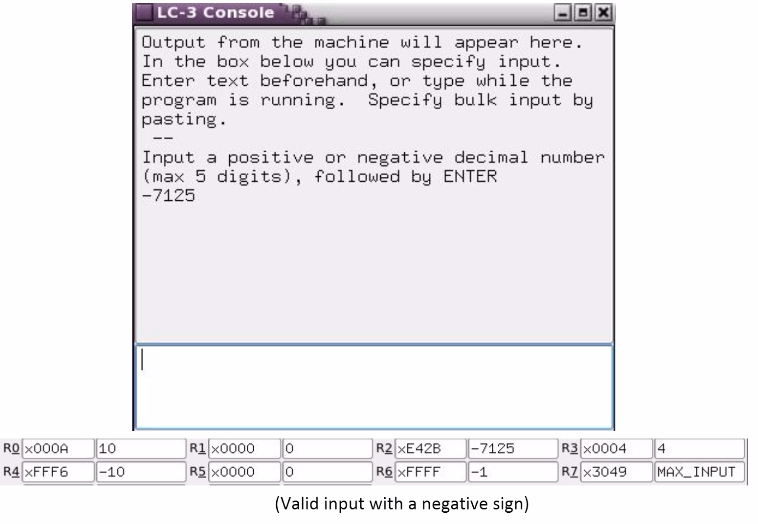
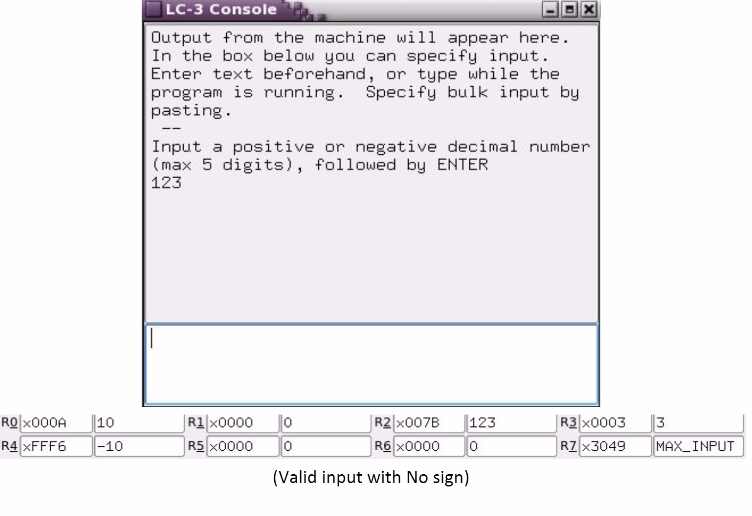
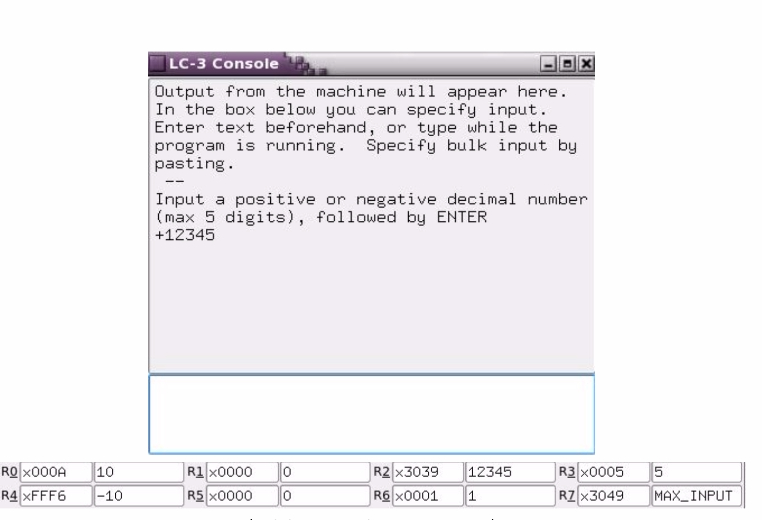
(With postive value)
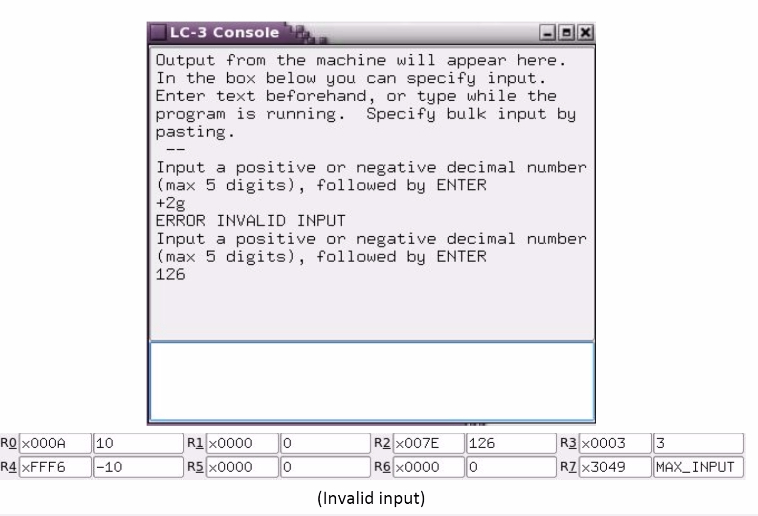
THIS IS THE GIVEN CODE TO WORK WITH -----------------------------------------------------------------------------------------------------------------------------------------------------------------------------------
| ORIG x3000 ; Program begins here | |
| ;------------- | |
| ;Instructions | |
| ;------------- | |
| ;------------------------------- | |
| ;INSERT CODE STARTING FROM HERE | |
| ;-------------------------------- | |
| ;Example of how to Output Intro Message | |
| ;LD R0, introMessage ;Output Intro Message | |
| ;PUTS | |
| ;Example of how to Output Error Message | |
| ;LD R0, errorMessage ;Output Error Message | |
| ;PUTS | |
| HALT | |
| ;--------------- | |
| ;Data | |
| ;--------------- | |
| introMessage .FILL x6000 | |
| errorMessage .FILL x6100 | |
| ;------------ | |
| ;Remote data | |
| ;------------ | |
| .ORIG x6000 | |
| ;--------------- | |
| ;messages | |
| ;--------------- | |
| intro .STRINGZ "Input a positive or negative decimal number (max 5 digits), followed by ENTER " | |
| ;--------------- | |
| ;error_messages | |
| ;--------------- | |
| .ORIG x6100 | |
| error_mes .STRINGZ "ERROR INVALID INPUT " | |
| ;--------------- | |
| ;END of PROGRAM | |
| ;--------------- | |
| .END | |
| ;------------------- | |
| ;PURPOSE of PROGRAM | |
| ;------------------- |
Step by Step Solution
There are 3 Steps involved in it

Get step-by-step solutions from verified subject matter experts
 Study Help