







Question: Help with this vector in c++ please! I am given a config file and a metadata file. (See screenshot, as my program right now just
Help with this vector in c++ please!
I am given a config file and a metadata file. (See screenshot, as my program right now just reads them line by line and prints them)
I need to separate the string into 2 parts, a string and a float so that I can multiply the cycle times by the number of cycles. For example. 0(Hard Drive)6; from the meta data file needs to multiply "Hard drive cycle time (msec): 15" to output: "0(Hard Drive) 6 - 90 ms"
I know how use getline to read the whole line, but I don't know how to read in separate pieces of the same line to be manipulated differently.
below is my code and current output.
#include
#include
#include
#include
using namespace std;
//Can we use #include
int main(int argc, const char * argv[]) {
ifstream file("config.txt"); //read config file
ifstream metaf("metadata.txt"); //read meta data
string myline;
vector
vector
if (!file)
{
cout
system("pause");
return -1;
}
while (getline(file, myline))
{
configArray.push_back(myline);
}
if (!metaf)
{
cout
system("Pause");
return -1;
}
while (getline(metaf, myline))
{
metaArray.push_back(myline);
}
cout
cout
}
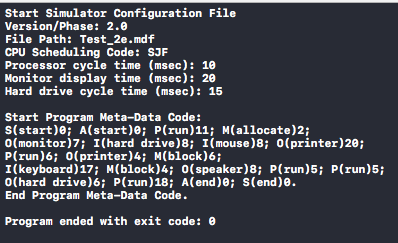
** I am also curious why my vector isn't printing properly. It has to be [0] or [1] in the config vector. [0] prints the first half, and [1] prints the second half. Shouldn't there be many more elements than just 0 and 1? **
Start Simulator Configuration File Version/Phase: 2.0 File Path: Test 2e.mdf CPU Scheduling Code: SJF Processor cycle time (msec): 10 Monitor display time (msec): 20 Hard drive cycle time (msec): 15 Start Program Meta-Data Code: S(start)e; A(start)0; P(run)11 M(allocate)2; 0(monitor)7; I(hard drive)8; I(mouse)8; 0(printer)20; P(run)6; 0(printer)4; M(block)6 I(keyboard)17; N(block)4; 0(speaker)8; P(run)5; P(run)5; 0(hard drive)6; P(run)18; A(end)e; S(end)0. End Program Meta-Data Code Program ended with exit code
Step by Step Solution
There are 3 Steps involved in it

Get step-by-step solutions from verified subject matter experts
 Study Help