







Question: Here are some steps you could follow: First, define the vertices of the cube using an array. Each vertex should have three coordinates: x,y, and
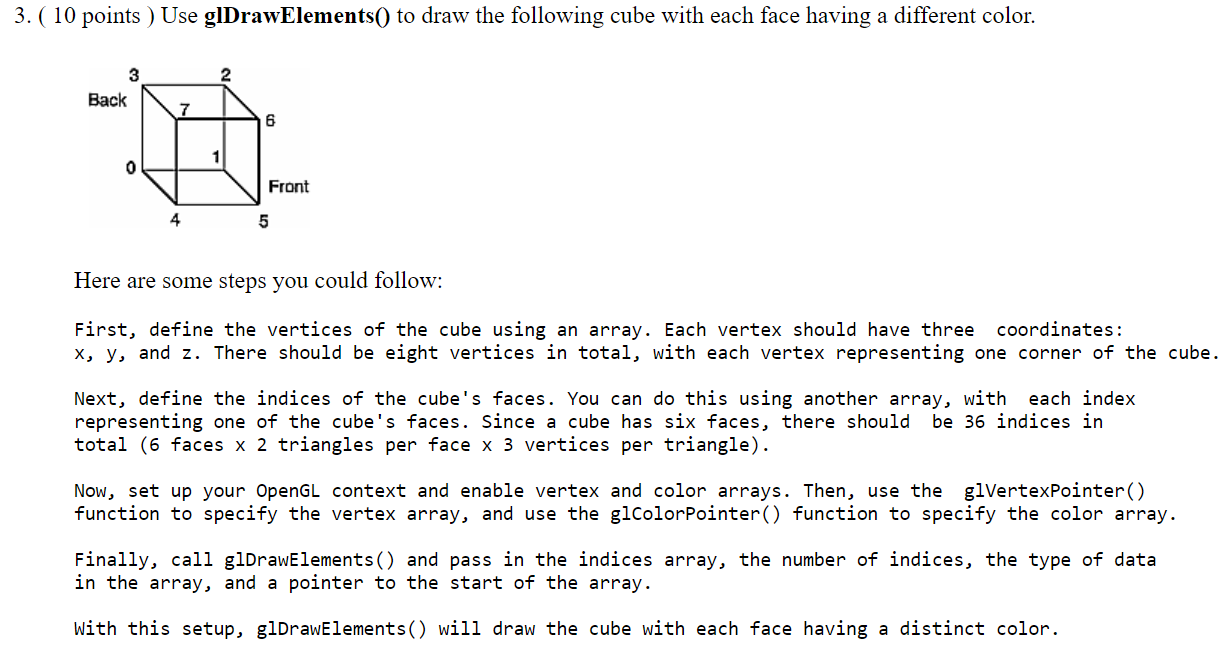
Here are some steps you could follow: First, define the vertices of the cube using an array. Each vertex should have three coordinates: x,y, and z. There should be eight vertices in total, with each vertex representing one corner of the cube Next, define the indices of the cube's faces. You can do this using another array, with each index representing one of the cube's faces. Since a cube has six faces, there should be 36 indices in total (6 faces 2 triangles per face 3 vertices per triangle). Now, set up your Opengl context and enable vertex and color arrays. Then, use the glVertexPointer() function to specify the vertex array, and use the glcolorpointer() function to specify the color array. Finally, call glDrawElements() and pass in the indices array, the number of indices, the type of data in the array, and a pointer to the start of the array. With this setup, glDrawElements() will draw the cube with each face having a distinct color
Step by Step Solution
There are 3 Steps involved in it

Get step-by-step solutions from verified subject matter experts
 Study Help