





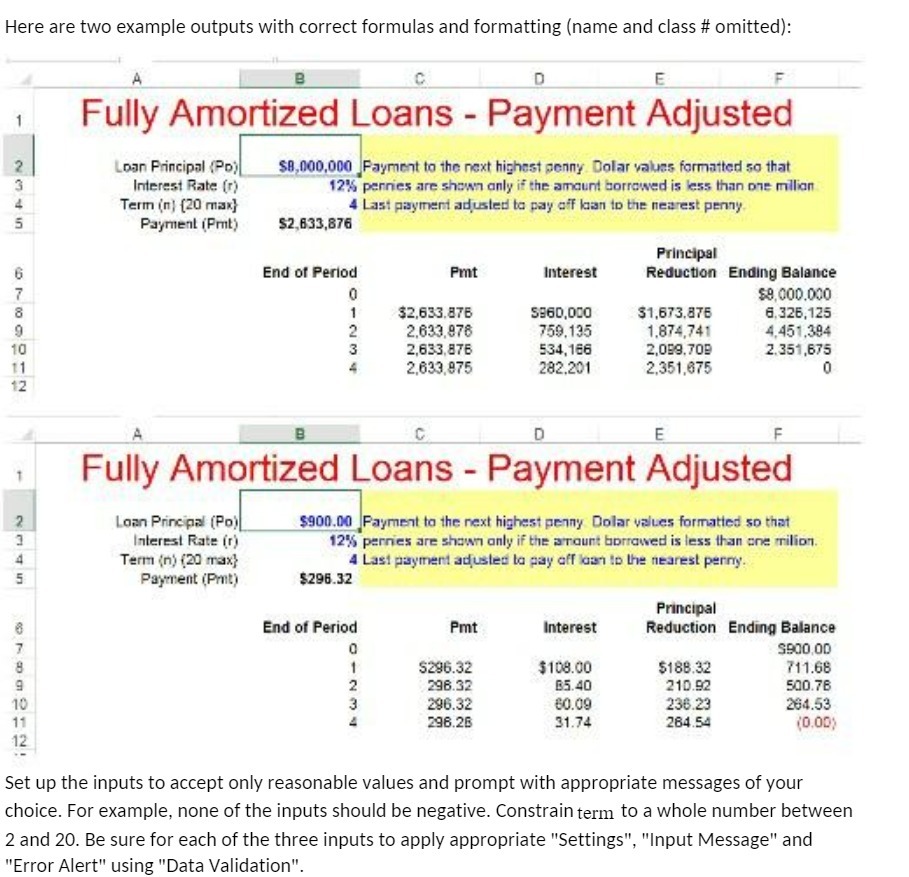
Question: Here are two example outputs with correct formulas and formatting (name and class # omitted): B C D E Fully Amortized Loans - Payment Adjusted
Here are two example outputs with correct
Here are two example outputs with correct formulas and formatting (name and class # omitted): B C D E Fully Amortized Loans - Payment Adjusted Loan Principal (PD) $8,000,000 Payment to the next highest penny Dolar values formatted so that Interest Rate (r) 12% pennies are shown only if the amount borrowed is less than one million Term (n) (20 max} 4 Last payment adjusted to pay off loan to the nearest penny Payment (Prut) $2,633,876 Principal End of Period Pmt Interest Reduction Ending Balance $9,000.000 $2,633.876 5860,000 $1,673,875 6,326,125 2.633,976 759.135 1.874,741 4,451.394 2,633,876 534,186 2,089.709 2.351,675 2.633,975 282.201 2.351,675 0 B C D E F Fully Amortized Loans - Payment Adjusted Loan Principal (Po) $900.00 Payment to the next highest penny Dollar values formatted so that Interest Rate (r) 12%% pernes are shown only if the amount borrowed is less than one milion. Term (n) (20 max} 4 Last payment adjusted to pay off loan to the nearest penny. Payment (Prut) $296.32 Principal End of Period Pmt Interest Reduction Ending Balance S900,00 $296.32 $108.00 $188.32 711.68 296.32 B5.40 210.92 500.76 296.32 60.09 236.23 264.53 296.26 31.74 284.54 (0.0D) Set up the inputs to accept only reasonable values and prompt with appropriate messages of your choice. For example, none of the inputs should be negative. Constrain term to a whole number between 2 and 20. Be sure for each of the three inputs to apply appropriate "Settings", "Input Message" and "Error Alert" using "Data Validation"

Step by Step Solution

There are 3 Steps involved in it

1 Expert Approved Answer
Step: 1 Unlock blur-text-image

Question Has Been Solved by an Expert!

Get step-by-step solutions from verified subject matter experts

Step: 2 Unlock
Step: 3 Unlock

Students Have Also Explored These Related Accounting Questions!