







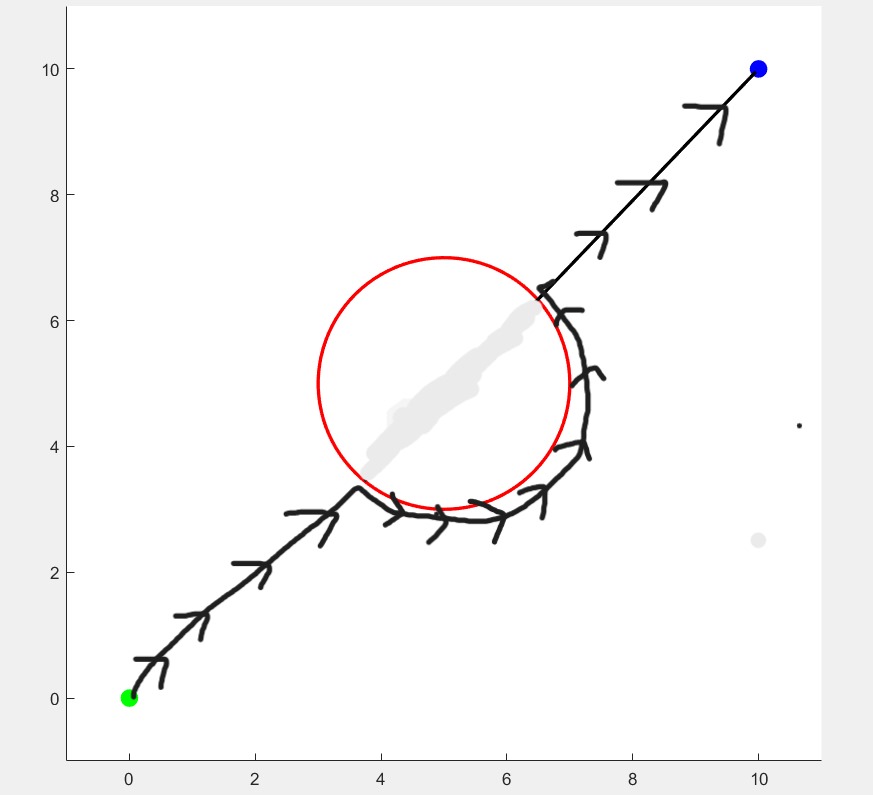
Question: here is a code for bug 2 algorithm in matlab. the output of this code is shown in the 2 nd image which is not
here is a code for bug algorithm in matlab. the output of this code is shown in the nd image which is not desired. the output graph should look like the st image. so rewrite the code make the changes so that the output looks like the st image:
BUG Algorithm Implementation in MATLAB
clear;
clc;
Define initial and goal positions
initpos ; Initial position
goalpos ; Goal position
Define obstacle as a boundary for simplicity, a circular obstacle
obstaclecenter ; Center of the circular obstacle
obstacleradius ; Radius of the circular obstacle
Create figure
figure;
hold on;
Plot obstacle
theta linspacepi;
xobstacle obstaclecenter obstacleradius costheta;
yobstacle obstaclecenter obstacleradius sintheta;
plotxobstacle, yobstacle, r 'LineWidth', ; Red boundary for obstacle
Plot initial and goal points
plotinitpos initposgo 'MarkerSize', 'MarkerFaceColor', g;
plotgoalpos goalposbo 'MarkerSize', 'MarkerFaceColor', b;
Set axis limits
axis equal;
xlim;
ylim;
Start moving towards goal
currentpos initpos;
plotpath ; To store the path of the robot
while normcurrentpos goalpos Continue until the goal is reached
Check if line of sight is clear no obstacle intersection
if ~isinobstaclecurrentpos, goalpos, obstaclecenter, obstacleradius
Move straight towards the goal
currentpos movetowardscurrentpos, goalpos;
else
Encounter obstacle, follow boundary
currentpos followobstaclecurrentpos, goalpos, obstaclecenter, obstacleradius;
end
Plot the robot's path
plotpath plotpath; currentpos; #ok
plotplotpath: plotpath:k 'LineWidth', ;
pause; Slow down the plotting for visualization
end
Function to check if a path is within an obstacle
function isobst isinobstaclepos pos center, radius
Check if the line between pos and pos intersects with the circular obstacle
For simplicity, use distance to the obstacle center
midpoint pos pos;
distancetocenter normmidpoint center;
if distancetocenter radius
isobst true;
else
isobst false;
end
end
Function to move the robot towards the goal
function newpos movetowardscurrentpos, goalpos
stepsize ; Define the step size
direction goalpos currentpos normgoalpos currentpos;
newpos currentpos stepsize direction;
end
Function to follow the obstacle boundary
function newpos followobstaclecurrentpos, goalpos, center, radius
For simplicity, move around the obstacle in a circular fashion
stepangle ; Step size around the obstacle
directionvector currentpos center;
currentangle atandirectionvector directionvector;
newangle currentangle stepangle; Move along the boundary
newpos center radius cosnewangle sinnewangle;
end
Step by Step Solution
There are 3 Steps involved in it
1 Expert Approved Answer
Step: 1 Unlock

Question Has Been Solved by an Expert!
Get step-by-step solutions from verified subject matter experts
Step: 2 Unlock
Step: 3 Unlock
 Study Help