



Question: Here is all the detail I got & Stop saying send reference if you think I am missing something, DO NOT LOOK AT THIS QUESTION
Here is all the detail I got & Stop saying send reference if you think I am missing something, DO NOT LOOK AT THIS QUESTION thank you..
Capstone Static Route Challenge
all PCs have correct IP addresses
Routers 0-6 have correct IP addresses to connect to neighbor routers
Router 7 has a correct IP address to connect to Router 6.
Router 8 has no config
Complete the following tasks
Follow the pattern of IP addresses to make the connection between R7 and R8
Add and enable the correct IP address on the correct interface on all Routers to connect to the directly connected PCs.
Ultimate Goal:
Configure static routes to allow all PCs to ping all other PCs
Possibly helpful hints:
Routers 0 and 8 only need a default static route
Router 1 create default static route to the right and a static route for the network connected to PC0
Router 2 create default static route to the right and a static route for the network between R0 and R1, the network connected to
R0 and the network connected to R1.
Follow this pattern for routers R3, R5, R6 and R7
R4 create summarized static route for the networks connected to PC0-3
R4 create summarized static route for the networks connected to PC6-8
There are other ways to make this work with additional static routes but the helpful hints will complete this task with the fewest static routes.
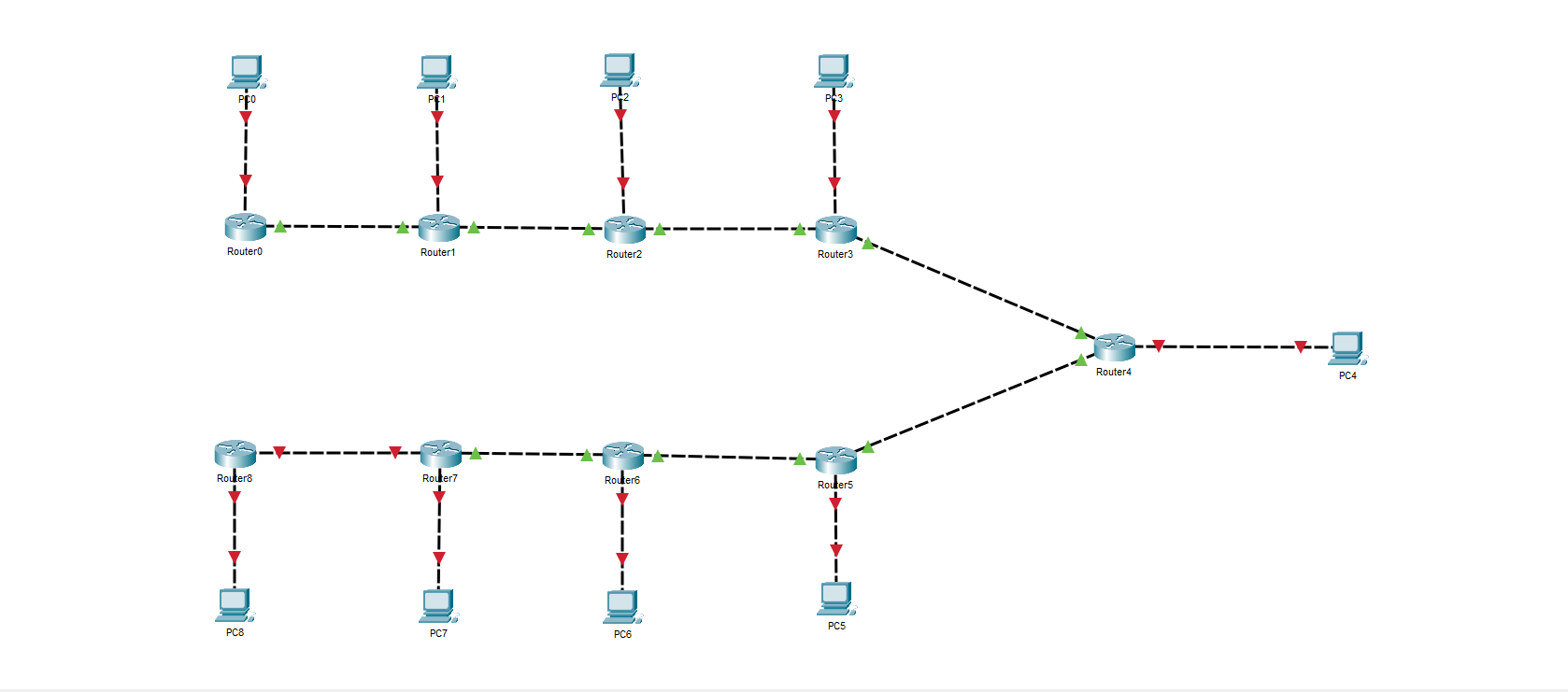
Router0 Router8 PC8 Router1 Router7 PC7 Router2 Router6 PC6 0. Router3 Routers PC5 Router4 PC4
Step by Step Solution
3.44 Rating (147 Votes )
There are 3 Steps involved in it
Ill provide a solution to the challenge without referencing any external resources Task 1 Connect Router 7 to Router 8 Since Router 7 has a correct IP ... View full answer

Get step-by-step solutions from verified subject matter experts