



Question: Here is an example UML diagram done in a text editor Car 1-make: String 1-yearModel:int |+setMake (make: String):void 1 +setYear Model (year:int):void 1+getMake(): String 1+get
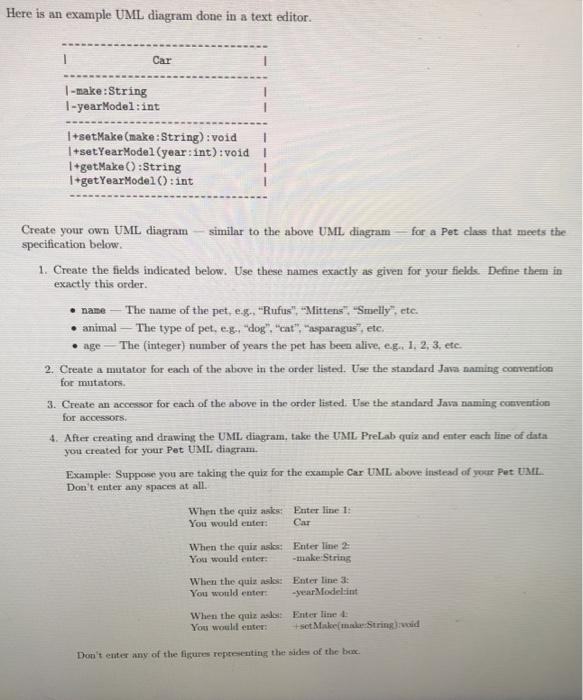
Here is an example UML diagram done in a text editor Car 1-make: String 1-yearModel:int |+setMake (make: String):void 1 +setYear Model (year:int):void 1+getMake(): String 1+get YearModel() :int Create your own UML diagram specification below. similar to the above UML diagram - for a Pet class that meets the 1. Create the fields indicated below. Use these names exactly as given for your fields. Define them in exactly this order. name - The name of the pet, e.g., "Rufus", "Mittens", "Smelly", etc. animal The type of pet, e.g., "dog", "cat", "asparagus", etc. age - The (integer) number of years the pet has been alive, e.g. 1. 2. 3. etc. 2. Create a mutator for each of the above in the order listed. Use the standard Java naming convention for mutators 3. Create an accessor for each of the above in the order listed. Use the standard Java naming convention for accessors 4. After creating and drawing the UML diagram, take the UML PreLab quiz and enter each line of data you created for your Pet UML diagram Example: Suppose you are taking the quiz for the example Car UML above instead of your Pet UML Don't enter any spaces at all. When the quiz asks: Enter line 1: You would enter: When the quiz asks: Enter line 2: You would enter: -make:String When the quiz asks: Enter line 3: You would enter: -yearModel:int When the quiz asks: Enter line 4: You would enter: +set Makemake:String):void Don't enter any of the figures representing the sides of the box
Step by Step Solution
There are 3 Steps involved in it

Get step-by-step solutions from verified subject matter experts