







Question: Here is my code thus far: #include #include graph1.h using namespace std; //Add Function Prototypes Here int getNoPoints(); void getPoints(int x[], int y[], int no_points);
![std; //Add Function Prototypes Here int getNoPoints(); void getPoints(int x[], int y[],](https://dsd5zvtm8ll6.cloudfront.net/si.experts.images/questions/2024/09/66f06b2e5c7b3_10966f06b2dd4658.jpg)
Here is my code thus far:
#include
using namespace std;
//Add Function Prototypes Here int getNoPoints(); void getPoints(int x[], int y[], int no_points); void drawPolyLine(int x[], int y[], int no_points);
int main() { //Variable Declaration/Initialization int no_points = 0; const int MAX_POINTS = 10; int x[MAX_POINTS]; int y[MAX_POINTS];
//Display Graphics Window displayGraphics();
//Prompt for the number of points no_points = getNoPoints();
//Prompt for the data for the points getPoints(x, y, no_points);
//Draw the polyline int no_points;
return 0; }
//Function Stubs Follows int getNoPoints() { //Declare local variables int no_points = 0; //Prompt for the number of points cout > no_points; //Return the number of points }
void getPoints(int x[], int y[], int no_points) { //Declare local variables
//Using a for-loop, prompt for the coordinates of each point and store in arrays x and y for (i = 0; i > x[i] >> y[i]; } }
void drawPolyLine(int x[], int y[], int no_points) { //Declare local variables int circle = 0;
//Use 1 for-loop for drawing the red circle on each point for (i = 0; i
//Use a second for-loop for drawing the lines - remember there is always one less line than there are points!
}
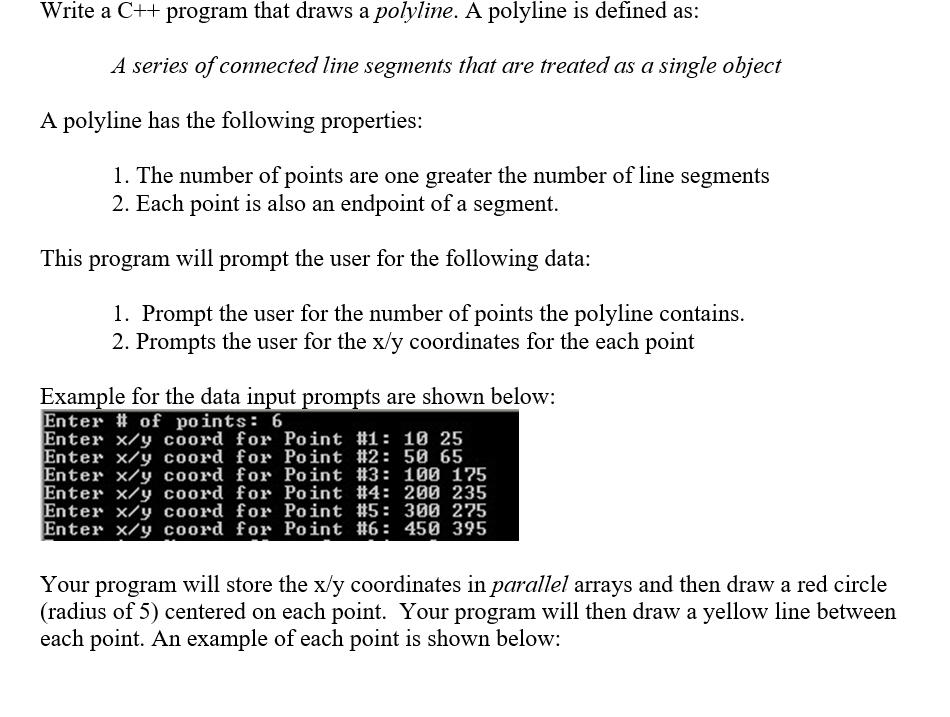
Write a C++ program that draws a polyline. A polyline is defined as: A series of connected line segments that are treated as a single object A polyline has the following properties: 1. The number of points are one greater the number of line segments 2. Each point is also an endpoint of a segment. This program will prompt the user for the following data: 1. Prompt the user for the number of points the polyline contains. 2. Prompts the user for the x/y coordinates for the each point Example for the data input prompts are shown below: Enter # of points: 6 Enter x/y coord for Point #1: 10 25 Enter x/y coord for Point #2: 50 65 Enter x/y coord for Point #3: 100 175 Enter x/y coord for Point #4: 200 235 Enter x/y coord for Point #5: 300 275 Enter x/y coord for Point #6: 450 395 Your program will store the x/y coordinates in parallel arrays and then draw a red circle (radius of 5) centered on each point. Your program will then draw a yellow line between each point. An example of each point is shown below: C++ Graphics QOX
Step by Step Solution
There are 3 Steps involved in it

Get step-by-step solutions from verified subject matter experts
 Study Help