







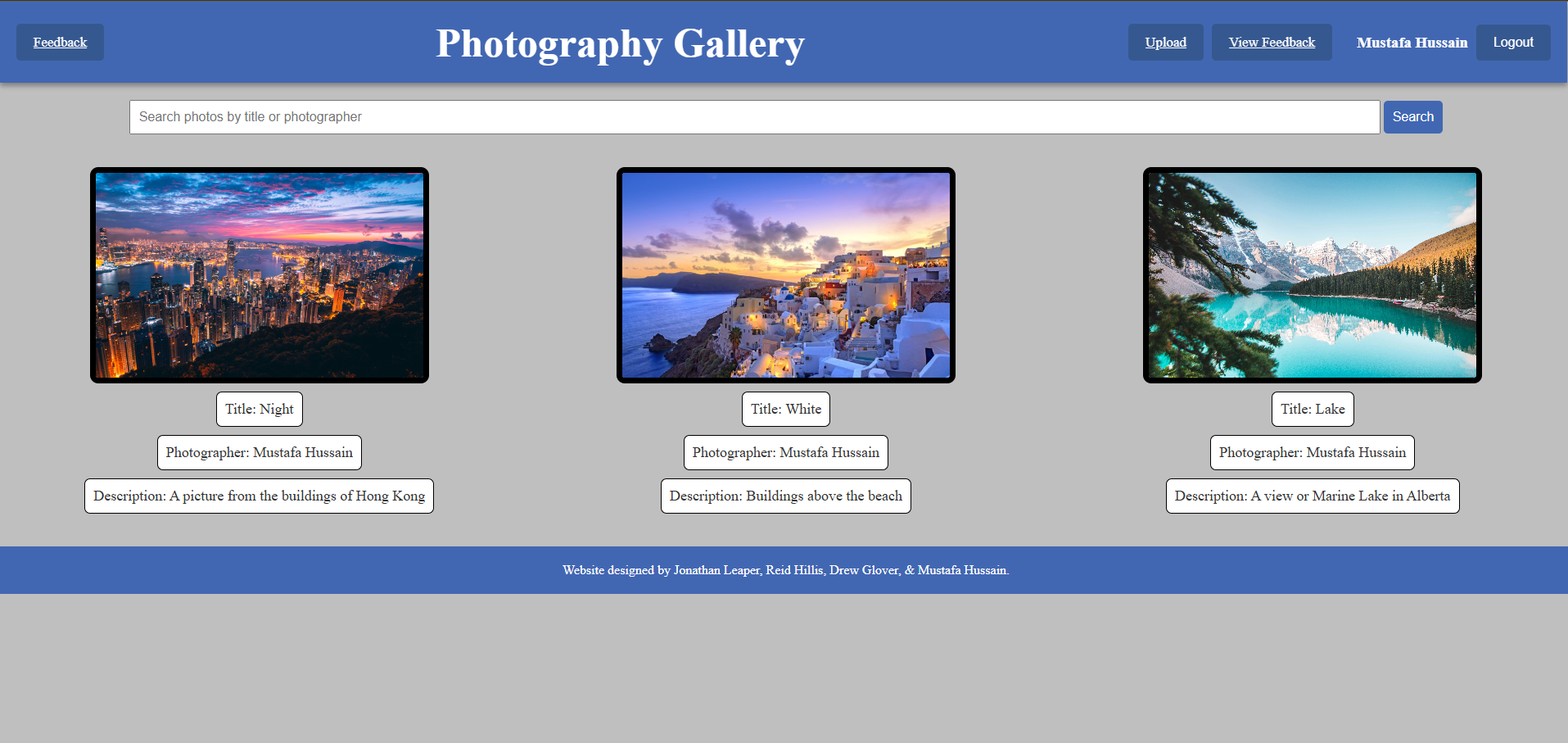
Question: here is my css file how can i make my website look better please tell me: . photo { width: 2 0 0 % ;
here is my css file how can i make my website look better please tell me:
photo
width: ;
height: px;
border: px solid black;
borderradius: px;
objectfit: cover;
cursor: pointer;
photo:hover
transform: scale;
boxshadow: px px grey;
upload
border: solid black px;
padding: px;
width: px;
height: px;
margin: px auto;
borderradius: ;
backgroundcolor: white;
#photoContainer
display: grid;
gridtemplatecolumns: repeatfr;
gap: px;
padding: px;
margin: auto;
justifyitems: center;
#photoContainer div button
margintop: px;
#photoContainer div
display: flex;
flexdirection: column;
alignitems: center;
#photoContainer div p
backgroundcolor: white;
padding: px;
margintop: px;
marginbottom: ;
whitespace: nowrap;
borderradius: px;
fontsize: px;
border: px solid black;
header
zindex: ;
top: ;
width: ;
display: flex;
position: fixed;
justifycontent: spacebetween;
alignitems: center;
backgroundcolor: #b;
color: white;
padding: px;
boxshadow: px px grey;
marginbottom: px;
header h
flexgrow: ;
fontsize: px;
fontweight: bold;
textalign: center;
margin: ;
header a
backgroundcolor: #;
fontsize: px;
marginright: px;
header a:hover
backgroundcolor: #c;
body
paddingtop: px;
textalign: center;
margin: ;
color: #;
backgroundcolor: #bfbfbf;
body h
fontsize: px;
marginbottom: px;
backgroundcolor: white;
borderradius: px;
padding: px px;
margin: px auto;
width: fitcontent;
body h
fontsize: px;
marginbottom: px;
backgroundcolor: white;
borderradius: px;
padding: px px;
margin: px auto;
width: fitcontent;
Style for links and buttons
a button
backgroundcolor: #b;
color: white;
border: px solid transparent;
borderradius: px;
padding: px px;
fontsize: px;
cursor: pointer;
transition: all s ease; Smooth transition for hover and active states
Hover state
a:hover, button:hover
backgroundcolor: #;
transform: translateYpx;
a:active, button:active
transform: translateYpx;
mainbuttons amainbuttons button
marginright: px;
modal
display: none;
position: fixed;
top: ;
left: ;
width: ;
height: ;
backgroundcolor: rgba;
justifycontent: center;
alignitems: center;
zindex: ;
modal img
maxwidth: ;
maxheight: ;
footer
margintop: px;
padding: px;
backgroundcolor: #b;
color: white;
textalign: center;
#contactSection
display: none;
transition: maxheight s easeout;
overflow: hidden;
border: px;
#contactSection.active
display: block;
form
padding: px;
backgroundcolor: white;
border: px solid #ddd;
borderradius: px;
maxwidth: px;
margin: px auto;
boxshadow: px px rgba;
form input, form textarea
width: ;
padding: px px;
margintop: px;
marginbottom: px;
border: px solid #ddd;
borderradius: px;
h
textalign: right;
paddingleft: px;
paddingright: px;
#logout
color: white;
backgroundcolor: #;
#logout:hover
backgroundcolor: #c;
mainbuttons
display: flex;
gap: px;
position: absolute;
right: px;
top: px;
Step by Step Solution
There are 3 Steps involved in it
1 Expert Approved Answer
Step: 1 Unlock

Question Has Been Solved by an Expert!
Get step-by-step solutions from verified subject matter experts
Step: 2 Unlock
Step: 3 Unlock
 Study Help