







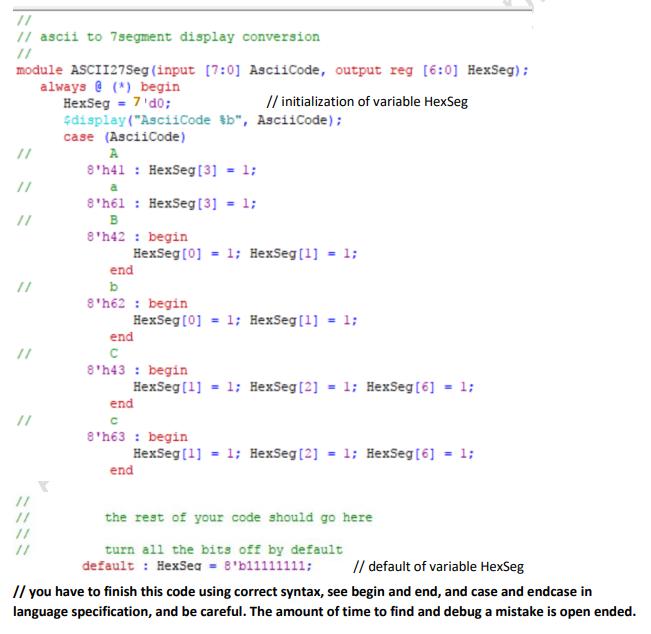
Question: Here is my verilog code not sure why it won't compile Module ASCII27Seg (input [7:0] AsciiCode, output red [6:0] HexSeg);
Here is my verilog code not sure why it won't compile
Module ASCII27Seg (input [7:0] AsciiCode, output red [6:0] HexSeg);
always @(')
begin
$display("AsciiCode=%b", AsciiCode);
case(AsciiCode)
8'h41, 8'h61 : HexSeg = 7'b000_1000; // A, a // output is A
8'h42, 8'h62 : HexSeg = 7'b000_1011; // B, b // output is B
8'h43, 8'h63 : HexSeg = 7'b100_0110; // C, c // output is C
8'h44, 8'h64 : HexSeg = 7'b010_0001; // D, d // output is D
8'h45, 8'h65 : HexSeg = 7'b000_0100; // E, e // output is E
8'h46, 8'h66 : HexSeg = 7'b000_1110; // F, f // output is F
8'h47, 8'h67 : HexSeg = 7'b001_0000; // G, g // output is G
8'h48, 8'h68 : HexSeg = 7'b000_1101; // H, h // output is H
8'h49, 8'h69 : HexSeg = 7'b111_1001; // I, i // output is I
8'h4A, 8'h6A : HexSeg = 7'b111_0000; // J, j // output is J
8'h4B, 8'h6B : HexSeg = 7'b000_1001; // K, k // output is K
8'h4C, 8'h6C : HexSeg = 7'b100_0111; // L, l // output is L
8'h4D, 8'h6D : HexSeg = 7'b011_0000; // M, m // output is M
8'h4E, 8'h6E : HexSeg = 7'b010_1011; // N, n // output is N
8'h4F, 8'h6F : HexSeg = 7'b010_0011; // O, o // output is O
8'h50, 8'h70 : HexSeg = 7'b000_1100; // P, p // output is P
8'h51, 8'h71 : HexSeg = 7'b001_1000; // Q, q // output is Q
8'h52, 8'h72 : HexSeg = 7'b010_1111; // R, r // output is R
8'h53, 8'h73 : HexSeg = 7'b001_0010; // S, s // output is S
8'h54, 8'h74 : HexSeg = 7'b000_0111; // T, t // output is T
8'h55, 8'h75 : HexSeg = 7'b100_0001; // U, u // output is U
8'h56, 8'h76 : HexSeg = 7'b110_0011; // V, v // output is V
8'h57, 8'h77 : HexSeg = 7'b000_0110; // W, w // output is W
8'h58, 8'h78 : HexSeg = 7'b100_0000; // X, x // output is X
8'h59, 8'h79 : HexSeg = 7'b001_1001; // Y, y // output is Y
8'h5A, 8'h7A : HexSeg = 7'b010_0100; // Z, z // output is Z
8'h30 : begin HexSeg [6] = 1; end
8'h31 : begin HexSeg [6] = 1; HexSeg[2] = 1; HexSeg[5] = 1; HexSeg[6] = 1; end
8'h32 : begin HexSeg [6] = 1; HexSeg[5] = 1; end
8'h33 : begin HexSeg [6] = 1; HexSeg[5] = 1; end
8'h34 : begin HexSeg [6] = 1; HexSeg[3] = 1; HexSeg[4] = 1; end
8'h35 : begin HexSeg [6] = 1; HexSeg[4] = 1; end
8'h36 : begin HexSeg [6] = 1; end
8'h37 : begin HexSeg [6] = 1; HesSeg[4] = 1; HexSeg[5] = 1; HexSeg[6] = 1; end
8'h38 : begin HexSeg [6] = 1; end
8'h39 : begin HexSeg [6] = 1; end
Default : HexSeg - 8'b11111111;
endcase
end
Parent Module
module ASCIICodes (input Kkey0, output [6:0] HexSeg4, HexSeg2, HexSeg1, HexSeg0);
reg [7:0] Message [4:0];
always @ (*) begin
Message [4] = "H";
Message [3] = "E";
Message [2] = "L";
Message [1] = "L";
Message [0] = "O";
case(Kkey0)
1 'b1 : begin
Message [4] = "H";
Message [3] = "E";
Message [2] = "L";
Message [1] = "L";
Message [0] = "O";
end
case(Kkey0)
1 'b0 : begin
Message [4] = "W";
Message [3] = "O";
Message [2] = "R";
Message [1] = "L";
Message [0] = "D";
end
case(Kkey0)
1 'b1 : begin
Message [4] = "D";
Message [3] = "A";
Message [2] = "W";
Message [1] = "";
Message [0] = "";
end
endcase
end
ASCII27Seg SevH4 (Message[4], HexSeg4);
ASCII27Seg SevH3 (Message[3], HexSeg3);
ASCII27Seg SevH2 (Message[2], HexSeg2);
ASCII27Seg SevH1 (Message[1], HexSeg1);
ASCII27Seg SevH0 (Message[0], HexSeg0);
endmodule
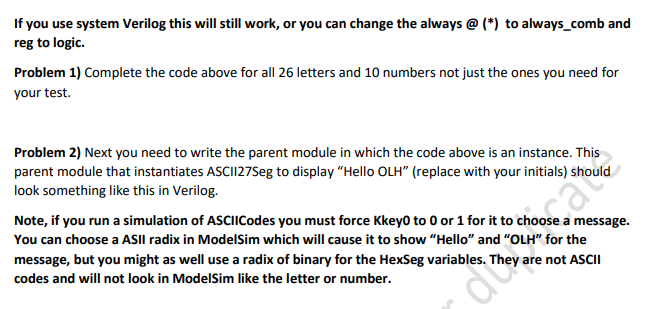
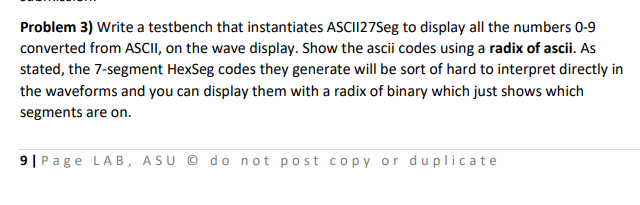
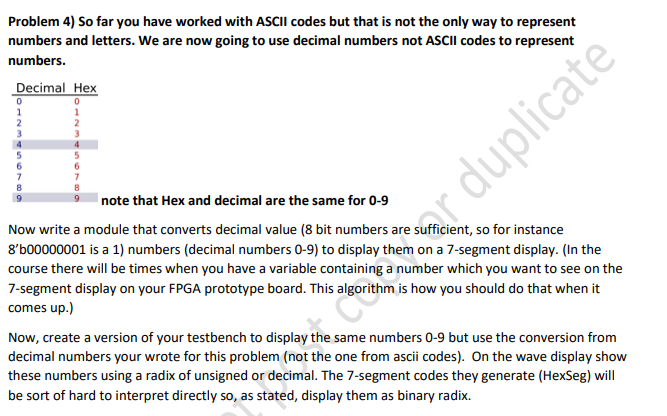
If you use system verilog this will still work, or you can change the always @ (*) to always_comb and reg to logic. Problem 1) Complete the code above for all 26 letters and 10 numbers not just the ones you need for your test. Problem 2) Next you need to write the parent module in which the code above is an instance. This parent module that instantiates ASCI127Seg to display "Hello OLH" (replace with your initials) should look something like this in Verilog. Note, if you run a simulation of ASCIICodes you must force Kkey0 to 0 or 1 for it to choose a message. You can choose a ASII radix in ModelSim which will cause it to show "Hello" and "OLH" for the message, but you might as well use a radix of binary for the HexSeg variables. They are not ASCII codes and will not look in ModelSim like the letter or number.
Step by Step Solution
There are 3 Steps involved in it
Fixing and Completing the Verilog Code Lets start with fixing the module ASCII27Seg Issues to Fix 1 Syntax error in always 2 Some segments of the case ... View full answer

Get step-by-step solutions from verified subject matter experts
 Study Help