







Question: here is program 2 instructions File IO Control structures Looping Operator precedence Error checking (bad data, file stream fail state, etc.) Use of proper data
here is program 2 instructions
File IO
Control structures
Looping
Operator precedence
Error checking (bad data, file stream fail state, etc.)
Use of proper data types
Exact output
Write a program that can be used to create a detailed billing report for a company that provides tax consultations for customers:
The information will be in the provided data file customers.txt. The data file consists of several rows of data, as follows (commas are not in the file):
Customer First Initial, Customer Last Name, Customer ID, Yearly Income, Consulting Time in Minutes, Consulting Agent ID
Request the name of the input file from the user. Do not hard-code the file name in the program.
Read the file using a looping construct that checks for the end of file (not the number of rows in the data file).
The agent ID maps to an agent last name and hourly rate. Evaluate the agent ID using a SWITCH statement to retrieve the agent last name and hourly rate. The mapping values are as follows. You will use these as constants/literals in your program:
Agent ID 1 = Bortles; Hourly Rate = 65.00
Agent ID 2 = Cower; Hourly Rate = 70.00
Agent ID 3 = Watt; Hourly Rate = 75.00
Any other agent ID is an error and needs to be handled accordingly. See Error Handling below.
Determine if the customer is a low income customer and set a flag accordingly (Y or N). This is to be output in the report (see below) and may be used for calculating the customers amount due (bill). A customer is low income if the yearly income is less than or equal to $25,000.
Calculate the customers amount due (bill) as follows:
If the customer is a low income customer:
If the consulting time is less than or equal to 30 minutes, the amount due (bill) is 0.00
If the consulting time is greater than 30 minutes, the amount due (bill) is 40% of the hourly rate (billing rate) times (the consulting time minus 30 minutes) divided by 60 minutes (i.e., billed by the hour). For example, if the consulting time is 32 minutes the calculation would be:
Hourly rate * 0.40 * (32 - 30) / 60
Otherwise (the customer is not a low income customer):
If the consulting time is less than or equal to 20 minutes, the amount due (bill) is 0.00
If the consulting time is greater than 20 minutes, the amount due is 70% of the hourly rate (billing rate) times (the consulting time minus 20 minutes) divided by 60 minutes.
Request an output file name from the user. Do not hard-code the file name in the program.
For each error-free row of input in the data file, output the following to the console (screen) in a neat, readable format. Output each input line on one output line. Use manipulators to output values in readable columns. Use dollar signs before monetary values. All monetary values must have 2 decimal points. Use headings to indicate values displayed (you DO NOT need to use the headings below, you may use your own):
Customer Name (initial and last name)
Customer ID
Yearly Income
Consulting time (in minutes)
Amount Due (customers bill)
Low Income (Y or N indicator)
Agent Name (consulting agent)
Agents Hourly Rate
Output must be in the following form, i.e., a report header and one heading for all lines for output:
Billing Report
Customer Name Customer ID Yearly Income Consulting Time Amount Due Low Income Agent Name Rate
For each error-free row of input in the data file, output the following to an output file, name of your choice, entered as requested, (in addition to the console) in a neat, readable format. Output each input line on one output line. Use manipulators to output values in readable columns. Use dollar signs before monetary values. All monetary values must have 2 decimal points. Use headings to indicate values (you DO NOT need to use the headings below, you may use your own):
Customer Name (initial and last name)
Customer ID
Yearly Income
Consulting time (in minutes)
Amount Due (customers bill)
Low Income (Y or N indicator)
Agent Name (consulting agent)
Agents Hourly Rate
Output must be in the following form, i.e., a report header and one heading for all lines for output:
Billing Report
Customer Name Customer ID Yearly Income Consulting Time Amount Due Low Income Agent Name Rate
You MAY use abbreviations for headers to fit across the screen.
Error Handling: There will be errors in the data file (see below for possible errors). If an error in the data is encountered, write the nature of the error and the customer name (initial and last name) and customer id containing the error to a second output file, name of your choice (not the console). Do Not Process the Data; continue with the next input line. Only log the first error found in each line/row of data.
You MAY hardcode (use a literal/constant) the name of the output error file.
Possible errors:
Valid agent IDs are 1, 2 and 3. Any other agent ID is an error.
The yearly income and consulting minutes must be greater than zero. Check both the yearly income and consulting minutes in your program.
Open all necessary data files and check the state of all file opens. If any file does not open properly, display an appropriate message and exit the program.
CLOSE ALL files before exiting the program.
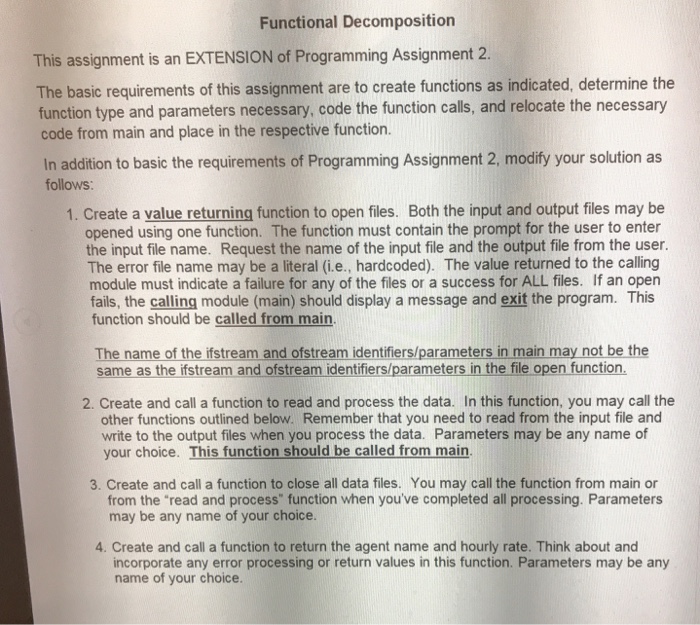
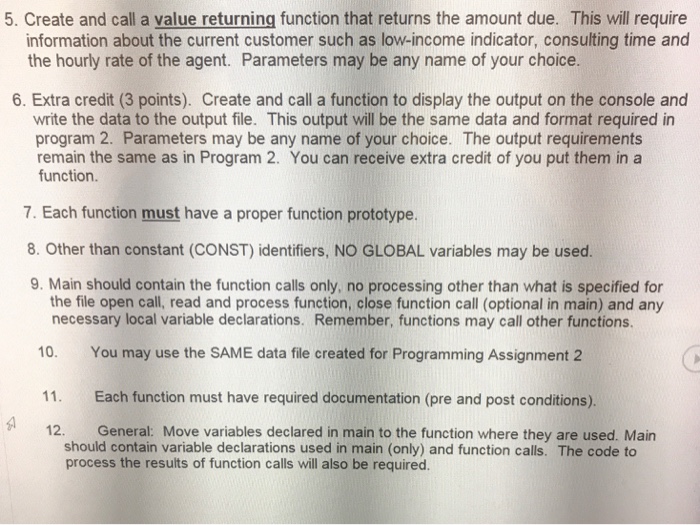
Functional Decomposition This assignment is an EXTENSION of Programming Assignment 2 The basic requirements of this assignment are to create functions as indicated, determine the code from main and place in the respective function. function type and parameters necessary, code the function calls, and relocate the necessary In addition to basic the requirements of Programming Assignment 2, modify your solution as follows: 1. Create a value returning function to open files. Both the input and output files may be opened using one function. The function must contain the prompt for the user to enter the input file name. Request the name of the input file and the output file from the user. The error file name may be a literal (i.e., hardcoded). The value returned to the calling module must indicate a failure for any of the files or a success for ALL files. If an open fails, the calling module (main) should display a message and exit the program. This function should be called from main. The name of the ifstream and ofstream identifiers/parameters in main may not be the same as the ifstream and ofstream identifiers/parameters in the file open function 2. Create and call a function to read and process the data. In this function, you may call the other functions outlined below. Remember that you need to read from the input file and write to the output files when you process the data. Parameters may be any name of your choice. This function should be called from main 3. Create and call a function to close all data files. You may call the function from main or from the read and process function when you've completed all processing. Parameters may be any name of your choice. 4. Create and call a function to return the agent name and hourly rate. Think about and incorporate any error processing or return values in this function. Parameters may be any name of your choice
Step by Step Solution
There are 3 Steps involved in it

Get step-by-step solutions from verified subject matter experts
 Study Help