







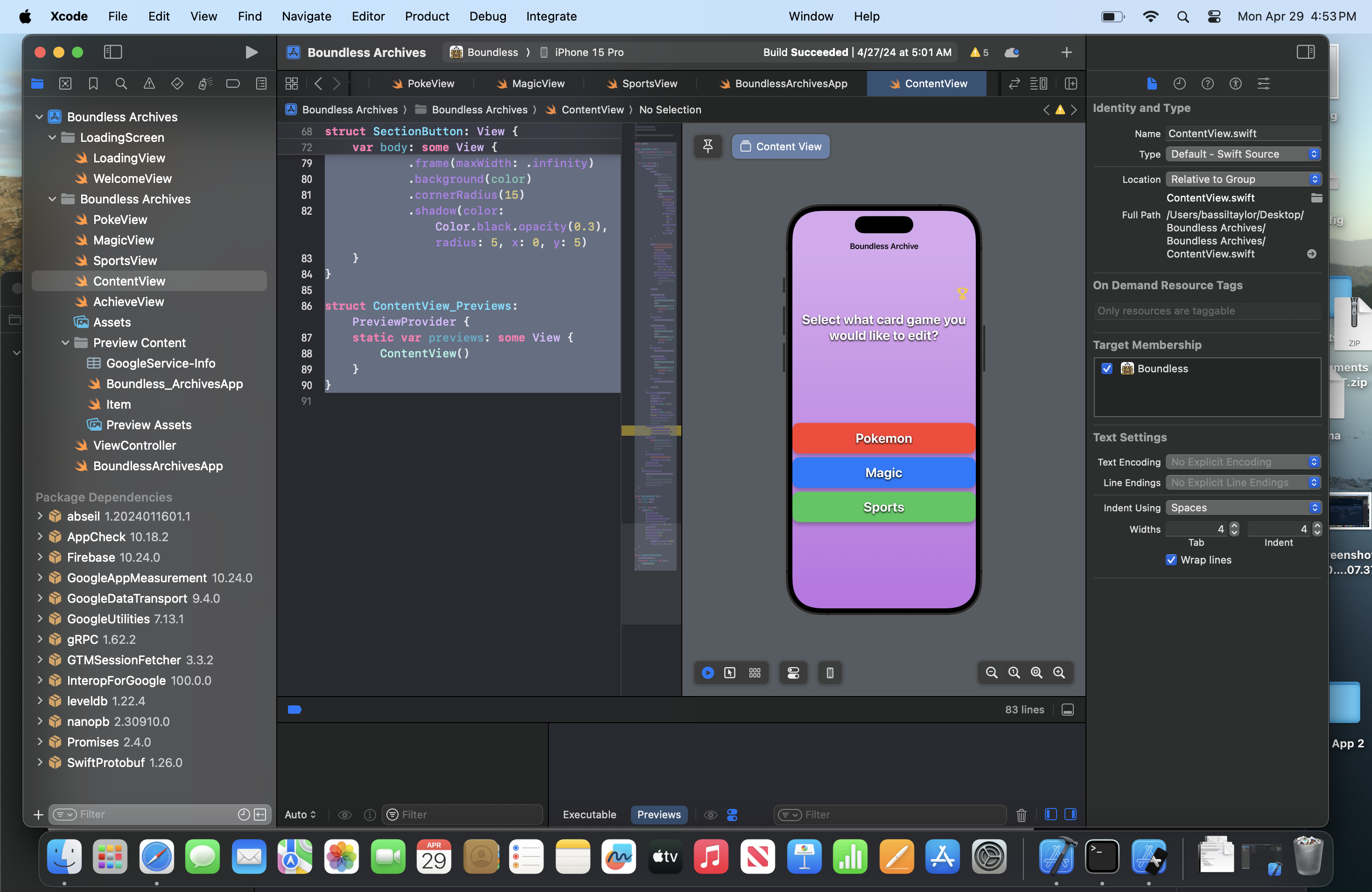
Question: Here is the code for my contentView for my Trading card app. Is their any design ideas that can make it look for appealing? The
Here is the code for my contentView for my Trading card app. Is their any design ideas that can make it look for appealing? The picture is what it looks like during the preview. import SwiftUI
struct ContentView: View
@State private var isDark false State variable to toggle between light and dark purple
var body: some View
NavigationView
VStack
HStack
Spacer Add spacer to move trophy icon to the right
NavigationLinkdestination: AchievementBoard
ImagesystemName: "trophy"
resizable
aspectRatiocontentMode: fit
framewidth: height:
foregroundColoryellow
padding
TextSelect what card game you would like to edit?"
fonttitle
fontWeightbold
foregroundColorwhite
shadowcolor: black, radius: x: y:
paddingbottom,
multilineTextAlignmentcenter Centeralign the text
Spacer
NavigationLinkdestination: PokemonCollectionView
SectionButtontitle: "Pokemon", color: red
buttonStylePlainButtonStyle
NavigationLinkdestination: MagicCollectionView
SectionButtontitle: "Magic", color: blue
buttonStylePlainButtonStyle
NavigationLinkdestination: SportsCollectionView
SectionButtontitle: "Sports", color: green
buttonStylePlainButtonStyle
Spacer
backgroundLinearGradientgradient: Gradientcolors: Colorpurple.opacityisDark : Color.purple.opacityisDark : startPoint: top, endPoint: bottom Animated gradient background
animationAnimationeaseInOutduration: repeatForever Continuous animation
onAppear
self.isDark.toggle Toggle the state variable to trigger animation
navigationBarTitleBoundless Archive", displayMode: inline
fonttitle
fontWeightbold
navigationViewStyleStackNavigationViewStyle Use StackNavigationViewStyle to prevent navigation bar from appearing on iPad
struct SectionButton: View
var title: String
var color: Color
var body: some View
Texttitle
fonttitle
fontWeightbold
foregroundColorwhite
shadowcolor: black, radius: x: y:
padding
framemaxWidth: infinity
backgroundcolor
cornerRadius
shadowcolor: Color.black.opacity radius: x: y:
struct ContentViewPreviews: PreviewProvider
static var previews: some View
ContentView
Step by Step Solution
There are 3 Steps involved in it
1 Expert Approved Answer
Step: 1 Unlock

Question Has Been Solved by an Expert!
Get step-by-step solutions from verified subject matter experts
Step: 2 Unlock
Step: 3 Unlock
 Study Help