







Question: Here is the code I have as project 4 : import pandas as pd class EMSystem: def _ _ init _ _ ( self )
Here is the code I have as project :
import pandas as pd
class EMSystem:
def initself:
self.employeelist
self.currentlog
self.start
def startself:
self.printWelcomeMessage
while True:
self.printAllOptions
inp intinput
if inp :
self.setEmployeeList
elif inp :
self.printEmployeeList
elif inp :
time inputEnter the current time HH:MM:
self.makeNewLogtime
elif inp :
break
else:
printInvalid input. Please try again."
def printWelcomeMessageself:
printWelcome to the Employee Monitoring System!"
def printAllOptionsself:
printWhat do you want to do today? input the number
print Set the employee list"
print Show the employee list"
print Make a new timestamp"
print Close the EM System"
def setEmployeeListself:
filename inputEnter the file name employeelistcsv or employeelisttxt:
try:
if filename.endswithcsv:
self.employeelist pdreadcsvfilenamevalues.tolist
elif filename.endswithtxt:
with openfilename, r as f:
self.employeelist linestripsplitt for line in f
else:
printInvalid file format. Please use csv or txt
except FileNotFoundError:
printfFile filename not found."
except Exception as e:
printfAn error occurred: stre
def printEmployeeListself:
if not self.employeelist:
printEmployee list is empty."
else:
printEmployee List:"
for employee in self.employeelist:
printfID: employee Name: employee Total Hours: employee
def makeNewLogself time:
if not self.employeelist:
printEmployee list is empty. Please set the employee list first."
return
self.currentlog employeeidin time for employeeid in self.employeelist
while True:
employeeid inputEnter employee ID to log inout blank to finish:
if not employeeid:
break
self.addEmployeeToLogemployeeid "out" if self.currentlogin else in time
self.createTimestampLog
def addEmployeeToLogself employeeid status, time:
for iid hours in enumerateselfemployeelist:
if id employeeid:
self.currentlogiemployeeid status, time
self.employeelisti if status "out" else
break
def createTimestampLogself:
print
Timestamp Log:"
for employeeid status, time in self.currentlog:
employee nexte for e in self.employeelist if e employeeid
printfID: employee Name: employee Status: status Time: time Total Hours: employee
with opentimestamplogtxtw as f:
for employeeid status, time in self.currentlog:
employee nexte for e in self.employeelist if e employeeid
fwritefID: employee Name: employee Status: status Time: time Total Hours: employee
AksenchureCompany EMSystem
Now here is the revised code:
import tkinter as tk
from tkinter import ttk
import pandas as pd
class EMSystem:
def initself:
self.window tkTk
self.window.titleEmployee Monitoring System"
self.employeelist
self.currentlog
self.creategui
self.window.mainloop
def createguiself:
label tkLabelselfwindow, text"Employee ID:
label.gridrow column
self.employeeentry tkEntryselfwindow
self.employeeentry.gridrow column
setemployeebutton tkButtonselfwindow, text"Set Employee List", commandself.setemployeelist
setemployeebutton.gridrow columnspan
def setemployeelistself:
filename self.employeeentry.get
try:
self.employeelist pdreadcsvfilenamevalues.tolist
printEmployee list loaded successfully."
except FileNotFoundError:
printFile not found. Please check the filename."
except Exception as e:
printAn error occurred:", stre
if namemain:
system EMSystem
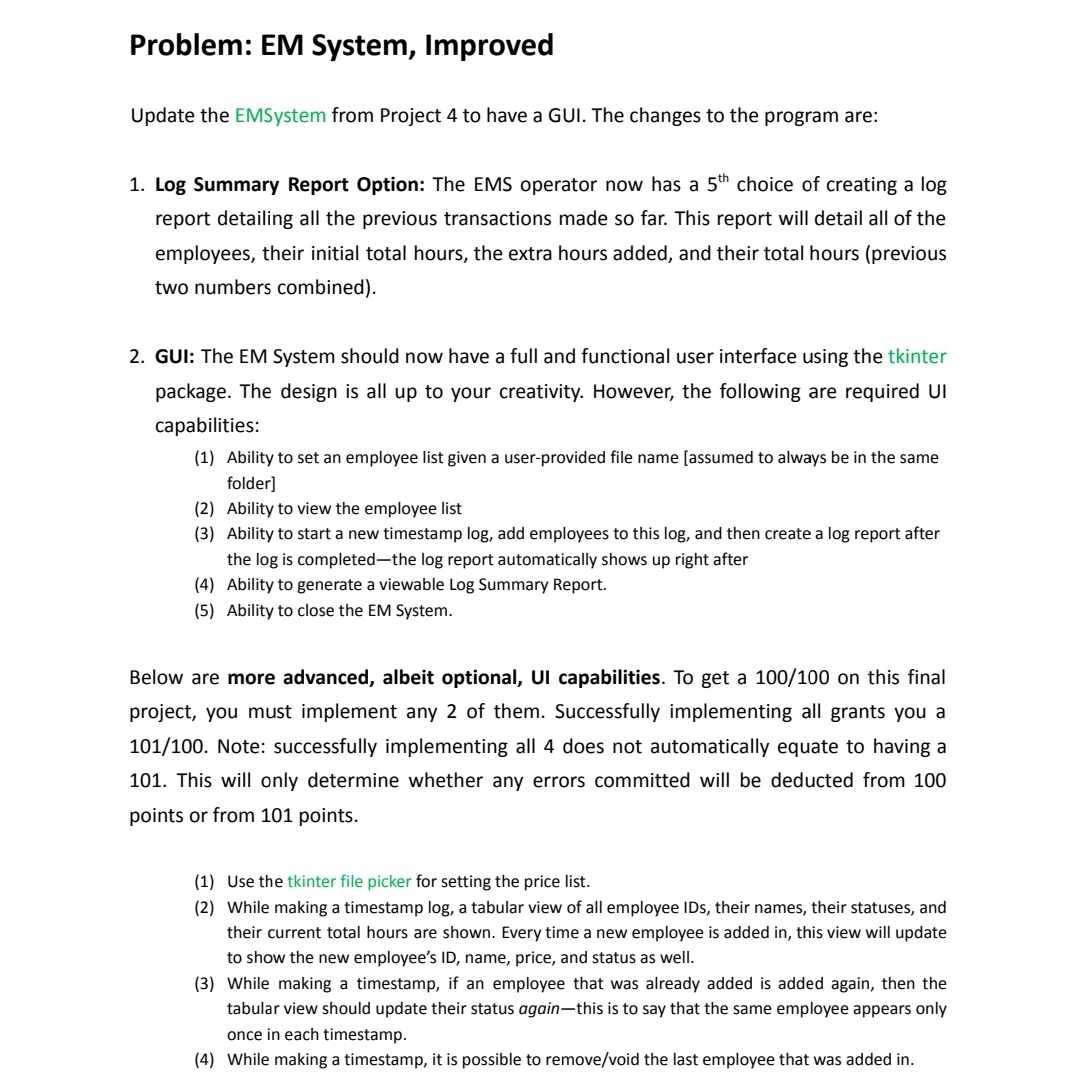
However, to satisfy the spec given in the image, the GUI created should display the options as buttons in a single window which the current revised code does not satisfy. Please revise it again to satisfy the spec.
Problem: EM System, Improved
Update the EMSystem from Project to have a GUI. The
Step by Step Solution
There are 3 Steps involved in it
1 Expert Approved Answer
Step: 1 Unlock

Question Has Been Solved by an Expert!
Get step-by-step solutions from verified subject matter experts
Step: 2 Unlock
Step: 3 Unlock
 Study Help