







Question: here is the code: import java.util.Scanner; // Needed for the Scanner class /** * This program allows the user to order a pizza. */ public
![*/ public class PizzaOrder { public static void main(String[] args) { //](https://dsd5zvtm8ll6.cloudfront.net/si.experts.images/questions/2024/09/66f10644234a0_81166f10643a5601.jpg)
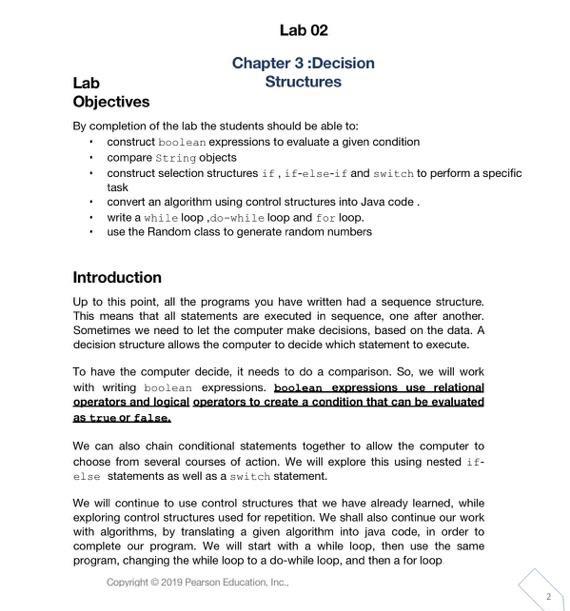
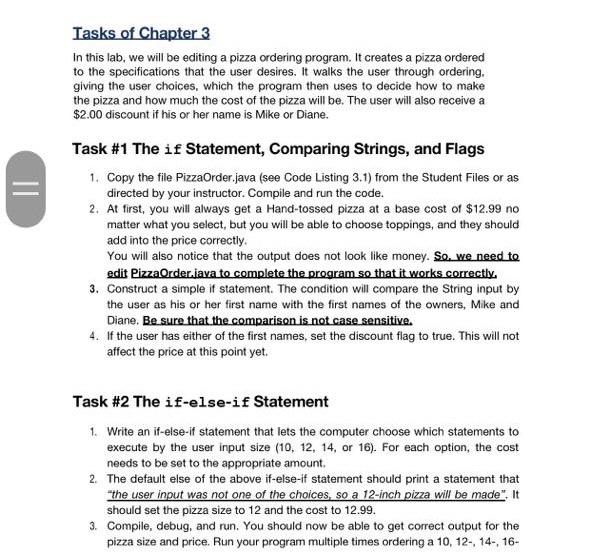
Lab 02 Chapter 3 :Decision Lab Structures Objectives By completion of the lab the students should be able to: construct boolean expressions to evaluate a given condition compare String objects construct selection structures if, if-else-if and switch to perform a specific task convert an algorithm using control structures into Java code. write a while loop.do-while loop and for loop. use the Random class to generate random numbers Introduction Up to this point, all the programs you have written had a sequence structure. This means that all statements are executed in sequence, one after another. Sometimes we need to let the computer make decisions, based on the data. A decision structure allows the computer to decide which statement to execute. To have the computer decide, it needs to do a comparison. So, we will work with writing boolean expressions, boolean expressions use relational operators and logical operators to create a condition that can be evaluated as true or false. We can also chain conditional statements together to allow the computer to choose from several courses of action. We will explore this using nested if- else statements as well as a switch statement. We will continue to use control structures that we have already learned, while exploring control structures used for repetition. We shall also continue our work with algorithms, by translating a given algorithm into java code, in order to complete our program. We will start with a while loop, then use the same program, changing the while loop to a do-while loop, and then a for loop Copyright 2019 Pearson Education, Inc., Tasks of Chapter 3 In this lab, we will be editing a pizza ordering program. It creates a pizza ordered to the specifications that the user desires. It walks the user through ordering, giving the user choices, which the program then uses to decide how to make the pizza and how much the cost of the pizza will be. The user will also receive a $2.00 discount if his or her name is Mike or Diane. II Task #1 The if Statement, Comparing Strings, and Flags 1. Copy the file PizzaOrder.java (see Code Listing 3.1) from the Student Files or as directed by your instructor. Compile and run the code. 2. At first, you will always get a Hand-tossed pizza at a base cost of $12.99 no matter what you select, but you will be able to choose toppings, and they should add into the price correctly. You will also notice that the output does not look like money. So, we need to edit PizzaOrder.java to complete the program so that it works correctly 3. Construct a simple if statement. The condition will compare the String input by the user as his or her first name with the first names of the owners, Mike and Diane. Be sure that the comparison is not case sensitive. 4. If the user has either of the first names, set the discount flag to true. This will not affect the price at this point yet. Task #2 The if-else-if Statement 1. Write an if-else-if statement that lets the computer choose which statements to execute by the user input size (10, 12, 14, or 16). For each option, the cost needs to be set to the appropriate amount 2. The default else of the above if-else-if statement should print a statement that "the user input was not one of the choices, so a 12-inch pizza will be made". It should set the pizza size to 12 and the cost to 12.99. 3. Compile, debug, and run. You should now be able to get correct output for the pizza size and price. Run your program multiple times ordering a 10, 12., 14., 16- Task #3 The switch Statement 1. Write a switch statement that compares the user's choice with the appropriate characters (make sure that both capital letters and small letters will work). 2. Each case will assign the appropriate string indicating crust type to the crust variable. 3. The default case will print a statement that the user input was not one of the choices, so a Hand-tossed crust will be made. 4. Compile, debug, and run. You should now be able to get crust types other than Hand-tossed. Run your program multiple times to make sure all cases of the switch statement operate correctly. Task #4 Using a Flag as a Condition 1. Write an if statement that uses a flag as the condition. Remember that a flag is a boolean variable, so it is either true or false. It does not have to be compared to anything. 2. The body of the if statement should contain two statements: a. A statement that prints a message indicating that the user is eligible for a $2.00 discount b. A statement that reduces the variable cost by 2. 3. Compile, debug, and run. Test your program using the owners' names (both capitalized and not) as well as a different name. The discount should be displayed correctly at this time Task #5 Formatting Output 1. Edit the appropriate lines in the main method so that any monetary output has 2decimal places. 2. Compile, debug, and run. Your output should be completely correct at this time, and numeric output should look like money
Step by Step Solution
There are 3 Steps involved in it

Get step-by-step solutions from verified subject matter experts
 Study Help