







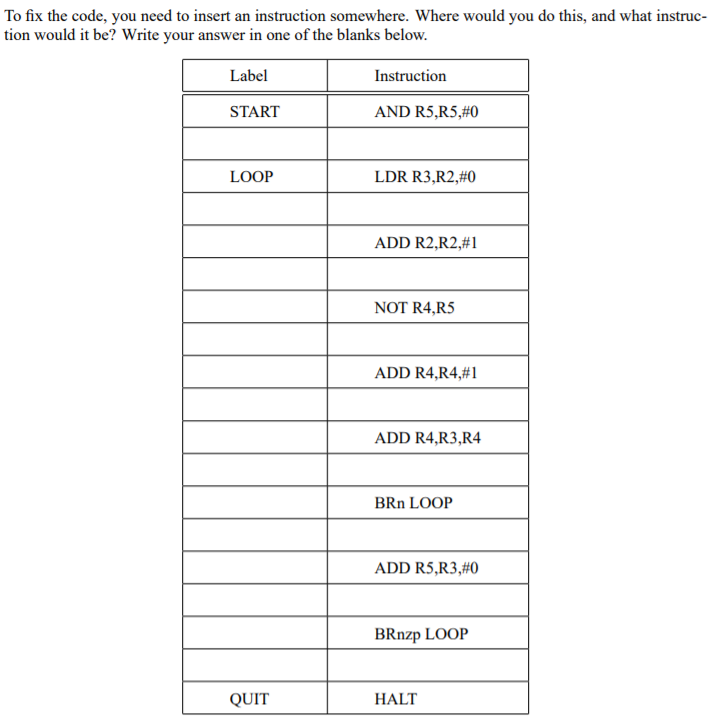
Question: Here is the code: .ORIG x3000 SETUP LEA R2, DATA ; set R2 START AND R5,R5,#0 LOOP LDR R3,R2,#0 ADD R2,R2,#1 NOT R4,R5 ADD R4,R4,#1
Here is the code:
.ORIG x3000
SETUP LEA R2, DATA ; set R2
START AND R5,R5,#0
LOOP LDR R3,R2,#0
ADD R2,R2,#1
NOT R4,R5
ADD R4,R4,#1
ADD R4,R3,R4
BRn LOOP
ADD R5,R3,#0
BRnzp LOOP ;loop
QUIT HALT
DATA .FILL #6
.FILL #8
.FILL #11
.FILL #2
.FILL #0
.FILL #5
.FILL #-4
.END
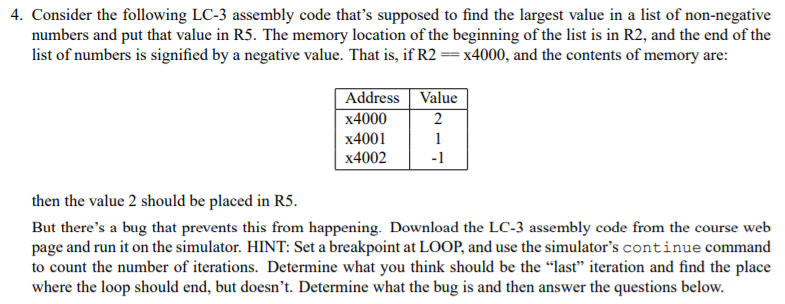
4. Consider the following LC-3 assembly code that's supposed to find the largest value in a list of non-negative numbers and put that value in R5. The memory location of the beginning of the list is in R2, and the end of the list of numbers is signified by a negative value. That is, if R2x4000, and the contents of memory are: Address Value x4000 x4001 x4002 -1 then the value 2 should be placed in RS. But there's a bug that prevents this from happening. Download the LC-3 assembly code from the course web page and run it on the simulator. HINT: Set a breakpoint at LOOP, and use the simulator's continue command to count the number of iterations. Determine what you think should be the las" iteration and find the place where the loop should end, but doesn't. Determine what the bug is and then answer the questions below
Step by Step Solution
There are 3 Steps involved in it

Get step-by-step solutions from verified subject matter experts
 Study Help