







Question: Here is the code provided import java.awt.Color; abstract class Shape { private Color fillColor; private Color borderColor; private Boolean isFilled; private Point Location; // the
Here is the code provided
import java.awt.Color; abstract class Shape { private Color fillColor; private Color borderColor; private Boolean isFilled; private Point Location; // the three constructors initialize the instance fields public Shape(Color fillColor, borderColor, int x, int y) { } // set borderColor to Black since not provided public Shape(Color fillColor, int x, int y) { } // set fillColor to white and border color to black public Shape(int x, int y) { } // will fill the shape with some random image. You can select any image for larger shapes public void setFillImage(BufferedImage b) { } public void setFillColor(Color c) { } public Color getFillColor() { } public void setBorderColor(Color c) { } public Color getBorderColor() { } public void setLocation(Point pt) { } public Point getLocation() { } // Note: subclasses of Shape do not inherent private members so we need methods the subclasses // can use to get the x and y values from the private Point instance field public int getX() { } public void setX(int x) { } public int getY() { } public void setY(int y) { } // if fillColor is white returns true, else returns false public boolean isFilled() { } // moves location by dx and dy private void moveLocation(int dx, int dy) { } abstract double getArea(); abstract double getPerimeter(); }
Thanks
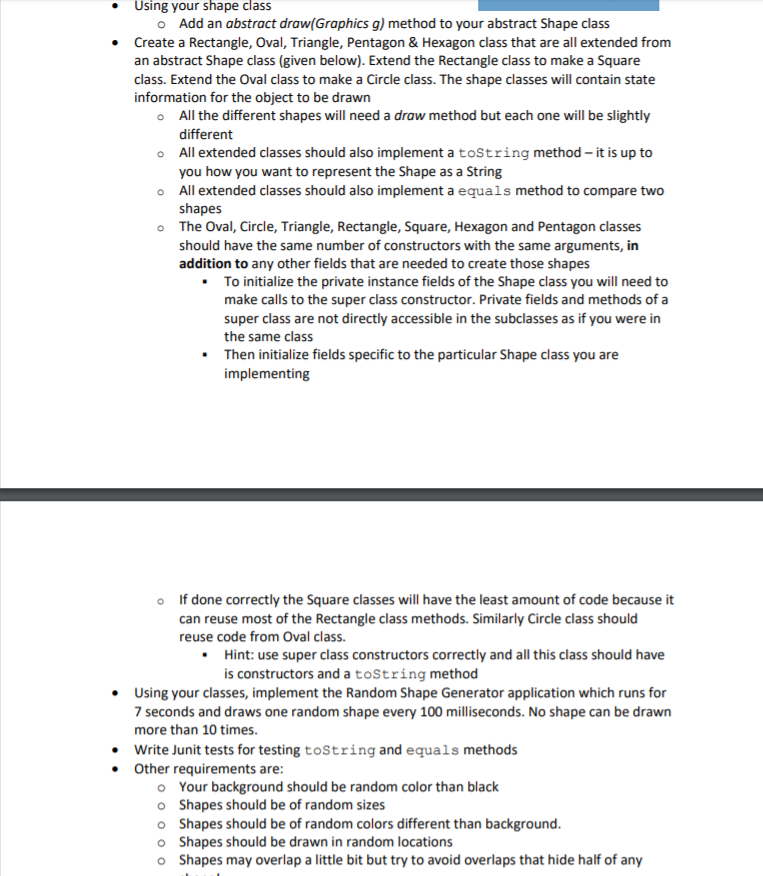
Using your shape class . o Add an abstract draw(Graphics g) method to your abstract Shape class Create a Rectangle, Oval, Triangle, Pentagon & Hexagon class that are all extended from an abstract Shape class (given below). Extend the Rectangle class to make a Square class. Extend the Oval class to make a Circle class. The shape classes will contain state information for the object to be drawn All the different shapes will need a draw method but each one will be slightly different All extended classes should also implement a toString method-it is up to you how you want to represent the Shape as a String All extended classes should also implement a equals method to compare two shapes The Oval, Circle, Triangle, Rectangle, Square, Hexagon and Pentagon classes should have the same number of constructors with the same arguments, in addition to any other fields that are needed to create those shapes o o o o To initialize the private instance fields of the Shape class you will need to make calls to the super class constructor. Private fields and methods of a the same class implementing are not directly accessible in the subclasses as if you were in Then initialize fields specific to the particular Shape class you are If done correctly the Square classes will have the least amount of code because it can reuse most of the Rectangle class methods. Similarly Circle class should reuse code from Oval class. o Hint: use super class constructors correctly and all this class should have is constructors and a toString method Using your classes, implement the Random Shape Generator application which runs for 7 seconds and draws one random shape every 100 milliseconds. No shape can be drawn more than 10 times. Write Junit tests for testing toString and equals methods Other requirements are: o o o o o Your background should be random color than black Shapes should be of random sizes Shapes should be of random colors different than background Shapes should be drawn in random locations Shapes may overlap a little bit but try to avoid overlaps that hide half of any Using your shape class . o Add an abstract draw(Graphics g) method to your abstract Shape class Create a Rectangle, Oval, Triangle, Pentagon & Hexagon class that are all extended from an abstract Shape class (given below). Extend the Rectangle class to make a Square class. Extend the Oval class to make a Circle class. The shape classes will contain state information for the object to be drawn All the different shapes will need a draw method but each one will be slightly different All extended classes should also implement a toString method-it is up to you how you want to represent the Shape as a String All extended classes should also implement a equals method to compare two shapes The Oval, Circle, Triangle, Rectangle, Square, Hexagon and Pentagon classes should have the same number of constructors with the same arguments, in addition to any other fields that are needed to create those shapes o o o o To initialize the private instance fields of the Shape class you will need to make calls to the super class constructor. Private fields and methods of a the same class implementing are not directly accessible in the subclasses as if you were in Then initialize fields specific to the particular Shape class you are If done correctly the Square classes will have the least amount of code because it can reuse most of the Rectangle class methods. Similarly Circle class should reuse code from Oval class. o Hint: use super class constructors correctly and all this class should have is constructors and a toString method Using your classes, implement the Random Shape Generator application which runs for 7 seconds and draws one random shape every 100 milliseconds. No shape can be drawn more than 10 times. Write Junit tests for testing toString and equals methods Other requirements are: o o o o o Your background should be random color than black Shapes should be of random sizes Shapes should be of random colors different than background Shapes should be drawn in random locations Shapes may overlap a little bit but try to avoid overlaps that hide half of any
Step by Step Solution
There are 3 Steps involved in it

Get step-by-step solutions from verified subject matter experts
 Study Help