







Question: Here is the code provided in the zip folder using System; using System.Collections.Generic; using System.Linq; using System.Text; using System.Threading.Tasks; using System.Windows; using System.Windows.Controls; using System.Windows.Data;
Here is the code provided in the zip folder
using System; using System.Collections.Generic; using System.Linq; using System.Text; using System.Threading.Tasks; using System.Windows; using System.Windows.Controls; using System.Windows.Data; using System.Windows.Documents; using System.Windows.Input; using System.Windows.Media; using System.Windows.Media.Imaging; using System.Windows.Navigation; using System.Windows.Shapes;
namespace CreateClassesObjs { ///
/// Interaction logic for MainWindow.xaml ///
public partial class MainWindow : Window {
Course choice;
public MainWindow() { InitializeComponent(); }
private void Window_Loaded(object sender, RoutedEventArgs e) { Course course1 = new Course(); Course course2 = new Course(); Course course3 = new Course(); Course course4 = new Course(); Course course5 = new Course(); Course course6 = new Course(); Course course7 = new Course();
course1.setName("IT 145"); course2.setName("IT 200"); course3.setName("IT 201"); course4.setName("IT 270"); course5.setName("IT 315"); course6.setName("IT 328"); course7.setName("IT 330");
this.comboBox.Items.Add(course1); this.comboBox.Items.Add(course2); this.comboBox.Items.Add(course3); this.comboBox.Items.Add(course4); this.comboBox.Items.Add(course5); this.comboBox.Items.Add(course6); this.comboBox.Items.Add(course7); }
private void button_Click(object sender, RoutedEventArgs e) { choice = (Course)(this.comboBox.SelectedItem); this.listBox.Items.Add(choice); }
} }
I need this to be able to work. Please provide the solution ith all of the changes you make in comments
Thank you
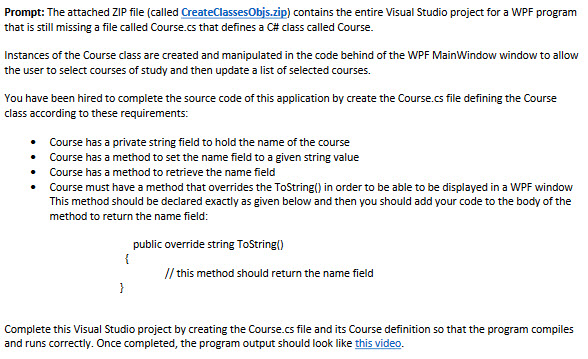
Prompt: The attached ZIP file (called CreateClassesObjs.zip) contains the entire Visual Studio project for a WPF program that is still missing a file called Course.cs that defines a Ca class called Course. instances of the Course class are created and manipulated in the code behind of the WPF MainWindow window to allow the user to select courses of study and then update a list of selected courses. You have been hired to complete the source code of this application by create the Course.cs file defining the Course class according to these requirements: Course has a private string field to hold the name of the course Course has a method to set the name field to a given string value Course has a method to retrieve the name field Course must have a method that overrides the ToString in order to be able to be displayed in a WPF window This method should be declared exactly as given below and then you should add your code to the body of the method to return the name field: public override string ToString() this method should return the name field Complete this Visual Studio project by creating the Course.cs file and its Course definition so that the program compiles and runs correctly. Once completed, the program output should look like this video
Step by Step Solution
There are 3 Steps involved in it

Get step-by-step solutions from verified subject matter experts
 Study Help