







Question: Here is the code to complete: import java.util.Scanner; //Fixme(1) add a statement to import the Random class public class RandomTest { public static void main(String[]
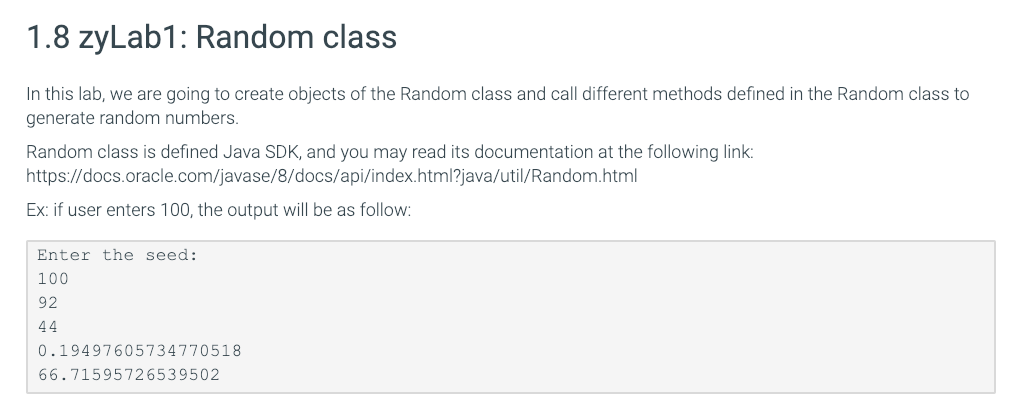
Here is the code to complete:
import java.util.Scanner; //Fixme(1) add a statement to import the Random class
public class RandomTest { public static void main(String[] args) { Scanner scnr = new Scanner(System.in);
System.out.println("Enter the seed: "); int seed = scnr.nextInt(); //Fixme(2) create a Random object with the user entered seed //Fixme(3) Generate and print out a random integer in the range of 0 to 100. //Fixme(4) Generate and print out a random integer in the range of -50 to 50. //Fixme(5) Generate and print out a random decimal number in the range of 0 to 1.0. //Fixme(6) Generate and print out a random decimal number in the range of 0 to 100.0. } }
1.8 zyLab1: Random class In this lab, we are going to create objects of the Random class and call different methods defined in the Random class to generate ranom numbers. Random class is defined Java SDK, and you may read its documentation at the following link https://docs.oracle.com/javase/8/docs/api/index.html?java/util/Random.html Ex: if user enters 100, the output will be as follow Enter the seed: 100 92 0.19497605734770518 66.71595726539502
Step by Step Solution
There are 3 Steps involved in it

Get step-by-step solutions from verified subject matter experts
 Study Help