







Question: here is the example from chapter 3 (jupyter notebook), please modifiy the code below and explain what the code is doing? from sklearn.datasets import fetch_mldata
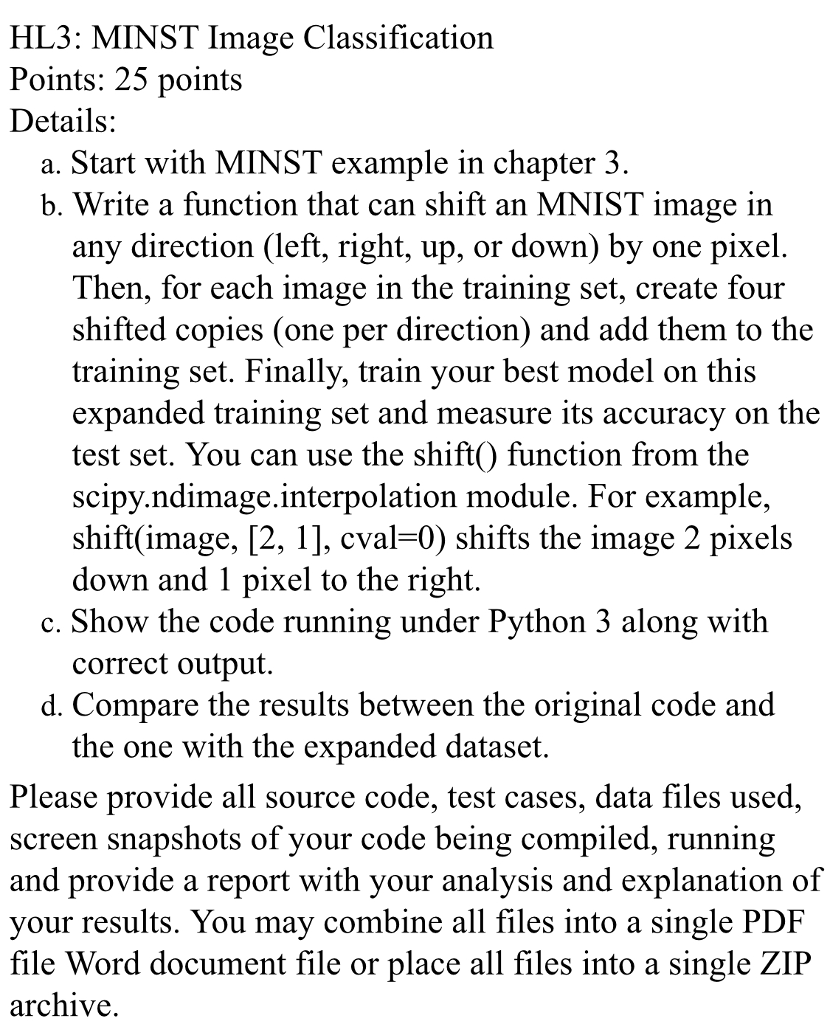
here is the example from chapter 3 (jupyter notebook), please modifiy the code below and explain what the code is doing?
from sklearn.datasets import fetch_mldata
mnist = fetch_mldata('MNIST original')
mnist
X, y = mnist["data"], mnist["target"]
X.shape
y.shape
28*28
%matplotlib inline
import matplotlib
import matplotlib.pyplot as plt
some_digit = X[36000]
some_digit_image = some_digit.reshape(28, 28)
plt.imshow(some_digit_image, cmap = matplotlib.cm.binary,
interpolation="nearest")
plt.axis("off")
save_fig("some_digit_plot")
plt.show()
def plot_digit(data):
image = data.reshape(28, 28)
plt.imshow(image, cmap = matplotlib.cm.binary,
interpolation="nearest")
plt.axis("off")
# EXTRA
def plot_digits(instances, images_per_row=10, **options):
size = 28
images_per_row = min(len(instances), images_per_row)
images = [instance.reshape(size,size) for instance in instances]
n_rows = (len(instances) - 1) // images_per_row + 1
row_images = []
n_empty = n_rows * images_per_row - len(instances)
images.append(np.zeros((size, size * n_empty)))
for row in range(n_rows):
rimages = images[row * images_per_row : (row + 1) * images_per_row]
row_images.append(np.concatenate(rimages, axis=1))
image = np.concatenate(row_images, axis=0)
plt.imshow(image, cmap = matplotlib.cm.binary, **options)
plt.axis("off")
plt.figure(figsize=(9,9))
example_images = np.r_[X[:12000:600], X[13000:30600:600], X[30600:60000:590]]
plot_digits(example_images, images_per_row=10)
save_fig("more_digits_plot")
plt.show()
y[36000]
X_train, X_test, y_train, y_test = X[:60000], X[60000:], y[:60000], y[60000:]
import numpy as np
shuffle_index = np.random.permutation(60000)
X_train, y_train = X_train[shuffle_index], y_train[shuffle_index]
HL3: MINST Image Classification Points: 25 points Details: a. Start with MINST example in chapter 3 b. Write a function that can shift an MNIST image in any direction (left, right, up, or down) by one pixel Then, for each image in the training set, create four shifted copies (one per direction) and add them to the training set. Finally, train your best model on this expanded training set and measure its accuracy on the test set. You can use the shift() function from the scipy.ndimage.interpolation module. For example, shift(image, [2, 1], cval-0) shifts the image 2 pixels down and 1 pixel to the right c. Show the code running under Python 3 along with correct output. d. Compare the results between the original code and the one with the expanded dataset Please provide all source code, test cases, data files used, screen snapshots of vour code being compiled, running and provide a report with your analysis and explanation of your results. You may combine all files into a single PDF file Word document file or place all files into a single ZIP archiVe. HL3: MINST Image Classification Points: 25 points Details: a. Start with MINST example in chapter 3 b. Write a function that can shift an MNIST image in any direction (left, right, up, or down) by one pixel Then, for each image in the training set, create four shifted copies (one per direction) and add them to the training set. Finally, train your best model on this expanded training set and measure its accuracy on the test set. You can use the shift() function from the scipy.ndimage.interpolation module. For example, shift(image, [2, 1], cval-0) shifts the image 2 pixels down and 1 pixel to the right c. Show the code running under Python 3 along with correct output. d. Compare the results between the original code and the one with the expanded dataset Please provide all source code, test cases, data files used, screen snapshots of vour code being compiled, running and provide a report with your analysis and explanation of your results. You may combine all files into a single PDF file Word document file or place all files into a single ZIP archiVe
Step by Step Solution
There are 3 Steps involved in it

Get step-by-step solutions from verified subject matter experts
 Study Help