



Question: Here is the full problem, but I just need assistance with lines marked as (1) and (2). Operation This is a java application that simulates
Here is the full problem, but I just need assistance with lines marked as (1) and (2).
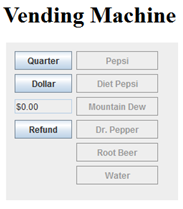
Operation
This is a java application that simulates a vending machine that dispenses soft drinks.
The Quarter button deposits $0.25.
The Dollar button deposits $1.00.
The label indicates the current credit.
The Refund button refunds the customers credit.
The slot buttons display the name of the product currently loaded in one of the vending machines six slots. The example above shows that the vending machine is loaded with Pepsi, Diet Pepsi, Mountain Dew, Dr. Pepper, Root Beer, and Water.
When the program starts, the six slot buttons are disabled. The program enables these buttons when the user has a credit of at least $1.00 (the cost of one item).
If the user clicks one of the slot buttons, the program displays a dialog box that tells the user to enjoy the beverage. For example, Enjoy your Diet Pepsi.
If the user clicks Refund, the program displays a dialog box that asks the user to take his or her change. For example, Please take your change of $1.25.
Specifications
You may design any classes you wish to use for this application. For example, you may want to create a class that defines a vending machine or a beverage.
Each slot in the vending machine can hold up to 10 bottles. The application should keep track of how many bottles are available in each slot and display a dialog box with the message Out of Stock if the user selects a beverage thats out of stock.
Disable the beverages button if the beverage is out of stock
(1) Create a report button on this page that can be clicked that will show the current sales of sodas (Soda name, Qty & Revenue). The report should be implemented by using a second jframe (Java) or Acivity(Android) and have a button to return the user to the first form.
(2) All data should be stored permanently such that if the application is stop/closed and re-opened the Soda Machine will still have the correct inventory. Here is the code that I am already working with:
package murach.business;
import java.awt.EventQueue; import java.awt.FlowLayout; import java.awt.TrayIcon.MessageType; import java.awt.event.ActionEvent; import java.awt.event.ActionListener; import javax.swing.*; import static javax.swing.JFrame.EXIT_ON_CLOSE; import murach.business.Reports;
public class VendingMachine extends JFrame { // Constructor public VendingMachine() { initComponents(); } // Constructor // Init method private void initComponents() { this.setSize(WIDTH, HEIGHT); this.setLayout(new FlowLayout()); this.setDefaultCloseOperation(EXIT_ON_CLOSE); this.setTitle("Vending Machine"); buildAddPanel(); buildRefundPanel(); buildSlotsPanel(); buildReportsPanel(); this.add(slotsPanel); this.add(addPanel); this.add(refundPanel); this.add(reportPanel); } // Panel builders private void buildAddPanel() { addPanel = new JPanel(); addQuarterBtn = new JButton("Quarter"); addDollarBtn = new JButton("Dollar"); currentCents = 0; currentCreditLbl = new JLabel(); updateCurrentCredit(); addQuarterBtn.setActionCommand("25"); addDollarBtn.setActionCommand("100"); addQuarterBtn.addActionListener(new ButtonAddListener()); addDollarBtn.addActionListener(new ButtonAddListener()); addPanel.add(addQuarterBtn); addPanel.add(addDollarBtn); addPanel.add(currentCreditLbl); } private void buildRefundPanel() { refundPanel = new JPanel(); refundBtn = new JButton("Refund"); refundBtn.addActionListener(new ButtonRefundListener()); refundPanel.add(refundBtn); } private void buildSlotsPanel() { slotsPanel = new JPanel(); slotNames = new String[MAX_SLOTS]; slotButtons = new JButton[MAX_SLOTS]; currentSlotAmounts = new int[MAX_SLOTS]; slotPrices = new int[MAX_SLOTS]; slotNames[0] = "Pepsi"; slotNames[1] = "Diet Pepsi"; slotNames[2] = "Mountain Dew"; slotNames[3] = "Dr. Pepper"; slotNames[4] = "Root Beer"; slotNames[5] = "Water"; for (int i = 0; i 9 ? ("" + cents) : ("0" + cents)); } private void addToCurrentCents(int amount) { this.currentCents += amount; } private void decrementSlotAmount(int slotIndex) { if (currentSlotAmounts[slotIndex] > 0) { currentSlotAmounts[slotIndex]--; } } private void updateCurrentCredit() { currentCreditLbl.setText(getCurrentCredit()); } private void updateSlotAvails() { for (int i = 0; i = slotPrices[i] && currentSlotAmounts[i] > 0); } } // Variables declaration private final int WIDTH = 600; private final int HEIGHT = 200; private final int MAX_SLOTS = 6; private final int MAX_SLOT_AMT = 10; private final int DEFAULT_PRICE = 100; private JPanel addPanel; private JPanel refundPanel; private JPanel slotsPanel; private JPanel reportPanel;
private JButton addQuarterBtn; private JButton addDollarBtn; private JButton generateReportBtn; private JButton closeBtn; private int currentCents; private JLabel currentCreditLbl;
private JButton refundBtn; private String[] slotNames; private JButton[] slotButtons; private int[] currentSlotAmounts; private int[] slotPrices; // Variables declaration // Main public static void main(String args[]) { EventQueue.invokeLater(new Runnable() { public void run() { new VendingMachine().setVisible(true); } }); } }
/* * To change this license header, choose License Headers in Project Properties. * To change this template file, choose Tools | Templates * and open the template in the editor. */ package murach.business;
import java.awt.FlowLayout; import java.awt.event.ActionEvent; import java.awt.event.ActionListener; import java.util.List; import javax.swing.JButton; import javax.swing.JFrame; import static javax.swing.JFrame.EXIT_ON_CLOSE; import javax.swing.JLabel; import javax.swing.JPanel; import murach.business.ImportData;
/** * * @author dakco */ public class Reports extends JFrame { // Constructor public Reports() { initComponents(); } private void initComponents() { this.setSize(WIDTH, HEIGHT); this.setLayout(new FlowLayout()); this.setDefaultCloseOperation(EXIT_ON_CLOSE); this.setTitle("Final Report"); buildReportsPanel(); this.add(reportPanel); } private void buildReportsPanel() { reportPanel = new JPanel(); exitbtn = new JButton("Exit"); exitbtn.addActionListener(new Reports.Close()); reportLabel1 = new JLabel(); reportLabel1.setText("Report Generated: "); reportLabel2 = new JLabel(); reportLabel2.setSize(100, 100); reportLabel2.setText(displayAllTransactions()); reportPanel.add(reportLabel1); reportPanel.add(reportLabel2); reportPanel.add(exitbtn); } public static String displayAllTransactions() {
List
private JButton exitbtn; private JLabel reportLabel1; private JLabel reportLabel2; private final int WIDTH = 1000; private final int HEIGHT = 200; }
package murach.business;
import java.util.*; import java.io.*; import java.nio.file.*; import murach.business.Transaction;
public class ImportData { private static final String FIELD_SEP = "\t"; private static final Path transactionsPath = Paths.get("trasactions.txt"); private static final File transactionsFile = transactionsPath.toFile(); private static List
public static List
transaction = new ArrayList(); // load the array list with Customer objects created from // the data in the file if (Files.exists(transactionsPath)){ try (BufferedReader in = new BufferedReader( new FileReader(transactionsFile))){ String line = in.readLine(); while (line != null) { String[] columns = line.split(FIELD_SEP); String sodaName = columns[0]; String quantity = columns[1]; Transaction c = new Transaction(); c.setsodaName(sodaName); c.setquantity(Integer.parseInt(quantity)); transaction.add(c); line = in.readLine(); } } catch (IOException e){ System.out.println(e); return null; } }
return transaction; } }
package murach.business;
public class Transaction { private String sodaName; private int quantity;
public Transaction() { sodaName = ""; quantity = 0; } public Transaction(String sodaName, int quantity, String emailAddress){ this.sodaName = sodaName; this.quantity = quantity; } public void setsodaName(String sodaName) { this.sodaName = sodaName; }
public String getsodaName() { return sodaName; }
public void setquantity(int quantity) { this.quantity = quantity; }
public int getquantity() { return quantity; } public String gettxtQuantity(){ return Integer.toString(quantity); }
}
Vending Machine Quarter Pepsi Diet Pepsi Mountain Dew Dr. Pepper Root Beer Water Dollar $0.00 Refund Vending Machine Quarter Pepsi Diet Pepsi Mountain Dew Dr. Pepper Root Beer Water Dollar $0.00 Refund
Step by Step Solution
There are 3 Steps involved in it

Get step-by-step solutions from verified subject matter experts