







Question: Here is the instructions I mplement each buttons functionality (use getElementById): 1)Enter Name -> User should enter his/her name. 2)Enter Age -> User should enter
Here is the instructions
Implement each buttons functionality (use getElementById):
1)Enter Name -> User should enter his/her name.
2)Enter Age -> User should enter his/her age.
3) Display Message -> Hello my name is __, I'm __ years old. It is nice to meet you!
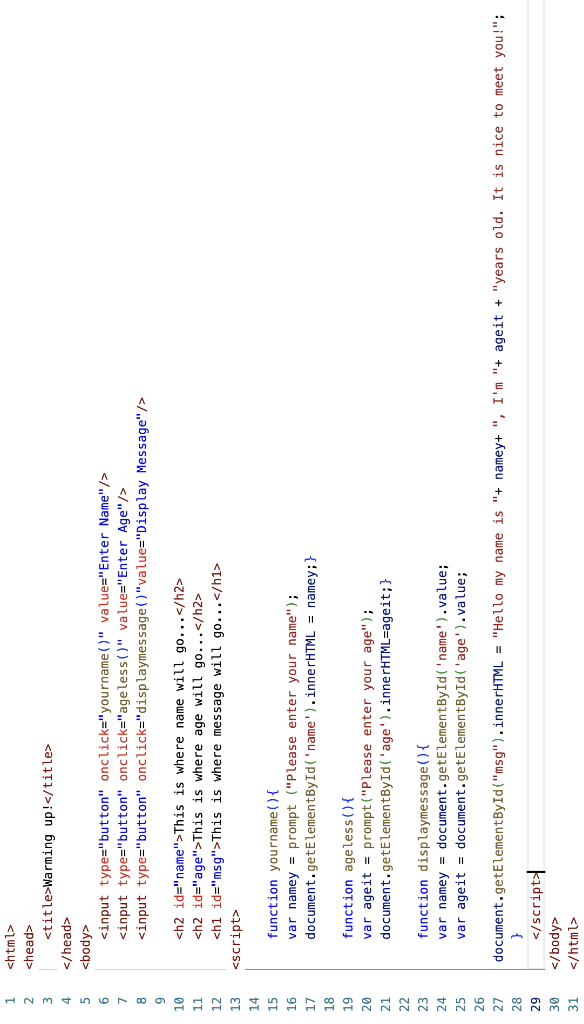
BELOW IS THE CODE THAT I HAVE DONE SO FAR. I CANNOT GET NUMBER 3) IT IS COMING BACK UNDEFINED. PLEASE HELP
This is where name will go...
This is where age will go...
This is where message will go...
function yourname(){
var namey = prompt ("Please enter your name");
document.getElementById('name').innerHTML = namey;}
function ageless(){
var ageit = prompt("Please enter your age");
document.getElementById('age').innerHTML=ageit;}
function displaymessage(){
var namey = document.getElementById('name').value;
var ageit = document.getElementById('age').value;
document.getElementById("msg").innerHTML = "Hello my name is "+ namey+ ", I'm "+ ageit + "years old. It is nice to meet you!";
}
123456789101112131415161718192021222324252627301
Step by Step Solution
There are 3 Steps involved in it

Get step-by-step solutions from verified subject matter experts
 Study Help