







Question: Here is the Java Code I have so far: import javafx.application.Application; import javafx.collections.FXCollections; import javafx.collections.ObservableList; import javafx.event.ActionEvent; import javafx.event.EventHandler; import javafx.geometry.Insets; import javafx.scene.Scene; import javafx.scene.control.
Here is the Java Code I have so far:
import javafx.application.Application;
import javafx.collections.FXCollections;
import javafx.collections.ObservableList;
import javafx.event.ActionEvent;
import javafx.event.EventHandler;
import javafx.geometry.Insets;
import javafx.scene.Scene;
import javafx.scene.control.;
import javafx.scene.layout.BorderPane;
import javafx.scene.layout.VBox;
import javafx.stage.Stage;
import java.sql;
public class BabyNames extends Application
Statement stmt;
public void startStage primaryStage throws SQLException, ClassNotFoundException
initializeDB;
BorderPane bp new BorderPane;
RadioButton boy new RadioButtonBoy;
RadioButton girl new RadioButtonGirl;
RadioButton either new RadioButtonBoth;
ToggleGroup genderGroup new ToggleGroup;
boy.setToggleGroupgenderGroup;
girl.setToggleGroupgenderGroup;
either.setToggleGroupgenderGroup;
VBox gender new VBox;
gender.setPaddingnew Insets;
gender.setStylefxborderwidth: px; fxbordercolor: green";
gender.getChildrenaddAllboy girl, either;
bpsetTopgender;
TextArea taResults new TextArea;
ScrollPane sp new ScrollPanetaResults;
Label results new LabelResults;
BorderPane resultPane new BorderPane;
resultPane.setTopresults;
resultPane.setBottomsp;
bpsetBottomresultPane;
BorderPane masterPane new BorderPane;
masterPane.setCenterbp;
ComboBox letter new ComboBox ;
letter.setPrefWidth;
Button search new ButtonSearch;
BorderPane fl new BorderPane;
flsetCenterletter;
flsetTopnew LabelStarts with...";
flsetBottomsearch;
String alphabetABCDEFGH"I","JKLMNOPQ
RSTUVWXYZ;
ObservableList items FXCollections.observableArrayListalphabet;
letter.getItemsaddAllitems;
BorderPane yearList new BorderPane;
ComboBox yearDropDown new ComboBox ;
yearDropDown.setPrefWidth;
String yr ;
ObservableList yritems FXCollections.observableArrayListyr;
yearDropDown.getItemsaddAllyr;
yearList.setCenteryearDropDown;
yearList.setTopnew LabelYear or interest";
yearList.setBottomsearch;
VBox vb new VBox;
vbgetChildrenaddAllfl yearList;
bpsetCentervb;
Scene scene new ScenemasterPane;
primaryStage.setTitleBaby Name Widget";
primaryStage.setScenescene;
primaryStage.show;
event handling
EventHandler eventHandler e
taResults.clear;
char c letter.getValuecharAt; letter selected in drop down box.
int y Integer.parseIntyearDropDowngetValue;
String queryString null;
if boyisSelected
System.out.printlnboy selected" c;
char g M;
# queryString is set to string that is mysql statement to
find all boys in y with names that start with c
else if girlisSelected
System.out.printlnGirl selected";
# queryString is set to string that is mysql statement to
find all girls in y with names that start with c
else
# queryString is set to string that is mysql statement to
find all boys and girls in y with names that start with c
System.out.printlnEither;
try #
int rcount ;
display the list of names in taResults
System.out.printlnrow count" rcount; this is just to check that displayed number of rows returned
catch SQLException ex
exprintStackTrace;
;
search.setOnActioneventHandler; associate event handling on the search button.
end start
private void makeQuery
public void initializeDB throws SQLException, ClassNotFoundException
Class.forNamecommysqlcjjdbcDriver";
System.out.printlnDriver loaded";
Connection connection DriverManager.getConnection
jdbc:mysql:localhostbabynames "root", "root";
stmt connection.createStatement;
public static void mainString args
launchargs;
A The script, Babynames.sql has been provided in the HW project. Run the script in workbench or other method of your choice to create the database babynames.
There is a similar page for years through You will need to read in the data and update your database for each of the years. In BabyNamesPopulateDB the for loop goes thru the years, and the while loop takes care of reading in the names for a particular year, based on the loop invariant year.
After you have read in your data, go to workbench and make sure it looks like it was read correctly.
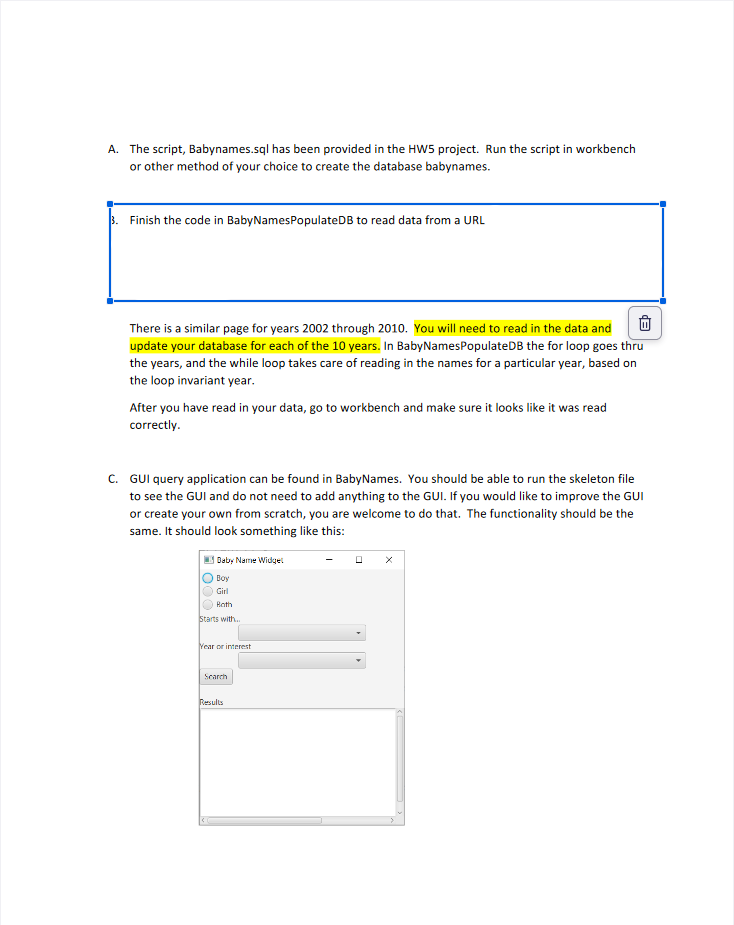
C GUI query application can be found in BabyNames. You should be able to run the skeleton file to see the GUI and do not need to add anything to the GUI. If you would like to improve the GUI or create your own from scratch, you are welcome to do that. The functionality should be the same. It should look something like this: D Your next task is to write the generic query string in ## and then to complete the display of
Step by Step Solution
There are 3 Steps involved in it
1 Expert Approved Answer
Step: 1 Unlock

Question Has Been Solved by an Expert!
Get step-by-step solutions from verified subject matter experts
Step: 2 Unlock
Step: 3 Unlock
 Study Help