







Question: Here is the output of the current code: Here is the expected output, which means that I need to change the buttons to look like
Here is the output of the current code: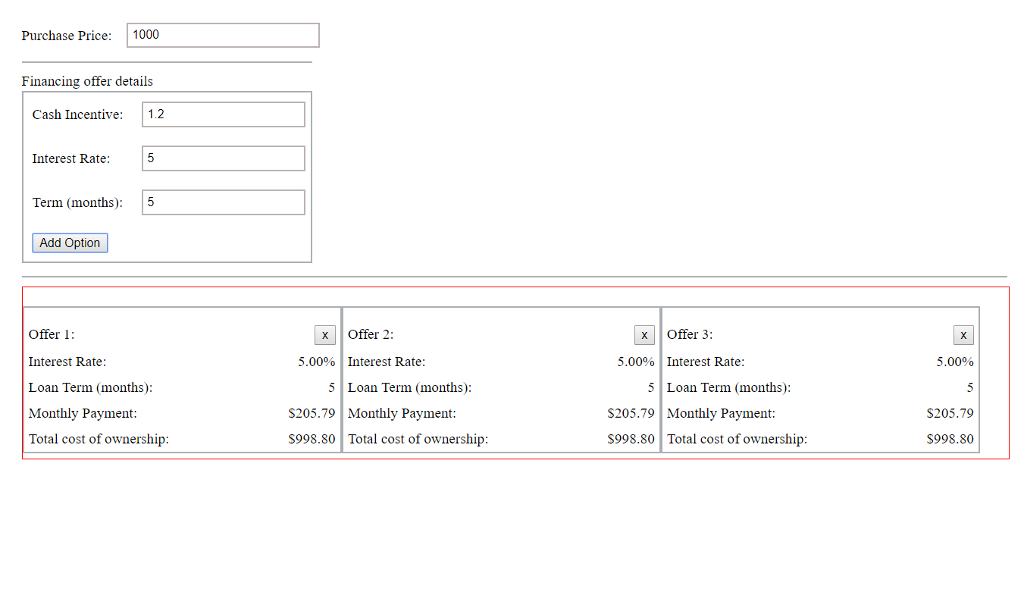
Here is the expected output, which means that I need to change the buttons to look like the ones in this:
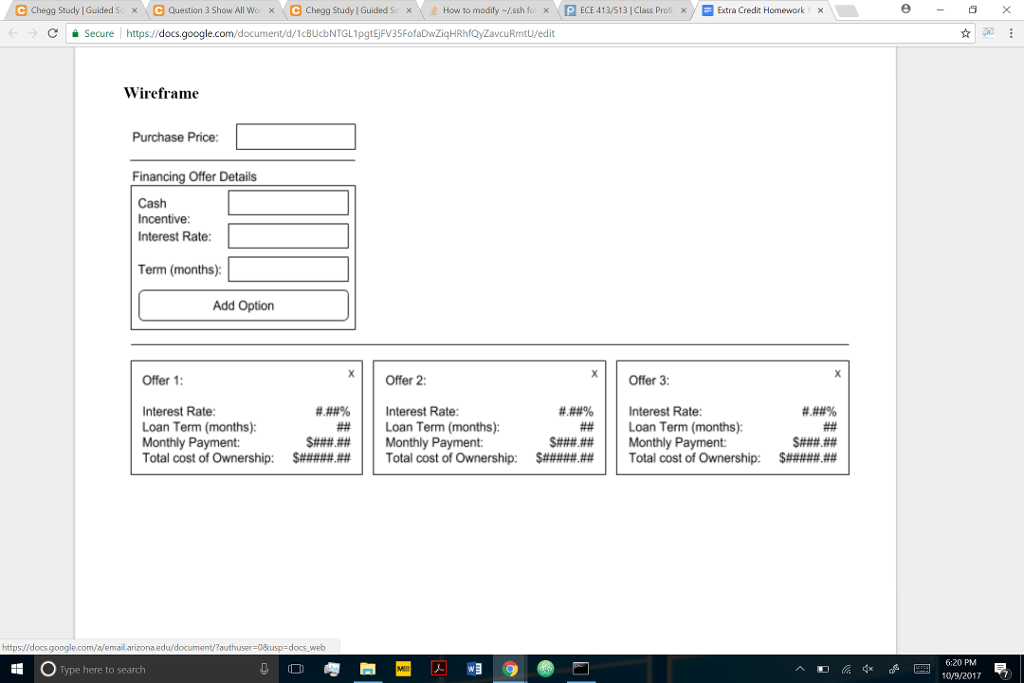
Also, need to change the code so that all user inputs should be validated. Some specifics include: 1) Interest rate should be greater than 0.0% and less than 10.0%, 2) Term in months should be greater than or equal to 24 and less than or equal to 72, 3) Purchase price should be greater than 0 and less than $100000.
html code
| Financing offer details | |||||||||
| | |||||||||
javascript code
function closeOption(offerId){ //Getting Offer div which was close to remove var element = document.getElementById(offerId); element.remove(); var i; for(i=offerId;i"; html += "
| Offer "+(offerId+1)+": | "; //Added id for td to change onclick value of next offers html +=""; html +=" |
| Interest Rate: | "; html += ""+ interestRate +"% | "; html += "
| Loan Term (months): | "; html += ""+ loanTerms +" | "; html += "
| Monthly Payment: | "; html += "$"+ monthlyPayment +" | "; html += "
| Total cost of ownership: | "; html += "$"+ finalPurchPrice +" | "; html += "
"; html += ""; document.getElementById("offerDetails").insertAdjacentHTML('beforeend',html); }else{ alert("You have max of 3 offers"); } }
css code
body { padding :20px; }
div.container { width: 100%; }
.container div{ padding-top:15px; }
.seperator{ border-bottom: 1.5px solid #aaafb3; margin-bottom:10px; } .innerTable { border: 2px solid #aaafb3; border-collapse: separate; border-spacing: 0; margin-top: 2px; } td,th {border:none}
openbutton { background-color: white; border: 1px solid #aaafb3; color: black; padding: 15px 32px; text-align: center; text-decoration: none; display: inline-block; font-size: 16px; margin: 4px 2px; cursor: pointer; border-radius: 8px; } .closebutton { background-color: white; color: black; text-align: center; text-decoration: none; display: inline-block; font-size: 16px; margin: 4px 2px; cursor: pointer; border-radius: 8px; }
.column{ float: left; width: 32.1%; height: auto; margin-top: 5px; }
.item1, .item2, .item3{ display: block; border:1.5px solid #aaafb3; } .item2, .item3{ margin-left:18.5px; } .pprice{ width: 98%; padding-bottom:5px; border:1.5px solid #bbb2b2; padding:5px; } .innerTable td input{ width: 95%; padding-bottom:5px; border:1.5px solid #bbb2b2; padding:5px; } .offerDetails{ border: 1px solid red; height: 173px; width: 100%; padding: 0; }
Step by Step Solution
There are 3 Steps involved in it

Get step-by-step solutions from verified subject matter experts
 Study Help