







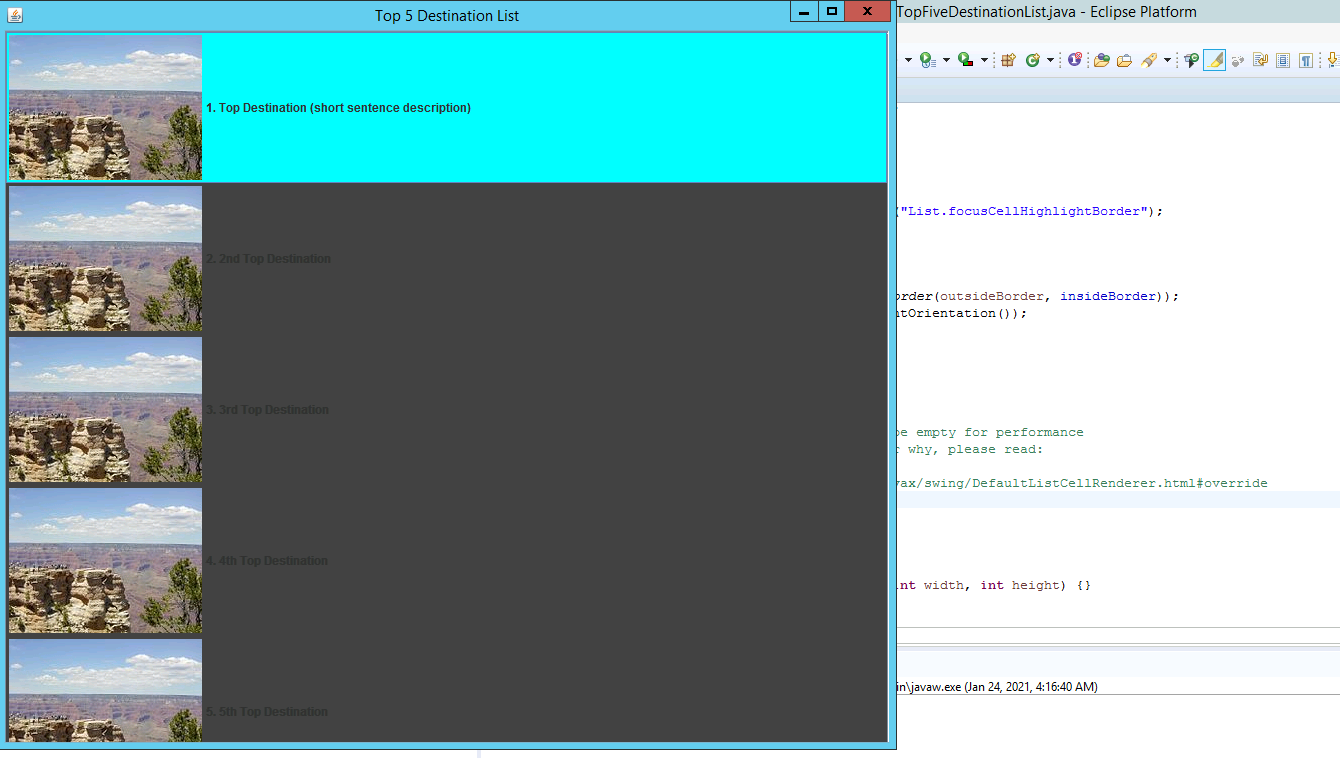
Question: Here is the question: How can I put the developer(title) name in top of the image, please? import java.awt.*; import javax.swing.*; import javax.swing.border.*; import javax.swing.JFrame;
Here is the question:
How can I put the developer(title) name in top of the image, please?
import java.awt.*; import javax.swing.*; import javax.swing.border.*; import javax.swing.JFrame;
/** * @author 1934246_snhu * */ public class TopFiveDestinationList { public static void main(String[] args) { SwingUtilities.invokeLater(new Runnable() { public void run() { TopDestinationListFrame topDestinationListFrame = new TopDestinationListFrame(); topDestinationListFrame.setTitle("Top 5 Destination List"); topDestinationListFrame.setVisible(true); } }); } }
class TopDestinationListFrame extends JFrame { private static final ListCellRenderer renderer = null; private DefaultListModel listModel;
public TopDestinationListFrame() { super("Top Five Destination List");
setDefaultCloseOperation(WindowConstants.EXIT_ON_CLOSE); setSize(900, 750); Container cp = getContentPane(); ImageIcon img = new ImageIcon(getClass().getResource("/resources/TestImage.jpg")); cp.add(new JLabel(img));
listModel = new DefaultListModel();
//Make updates to your top 5 list below. Import the new image files to resources directory. addDestinationNameAndPicture("1. Top Destination (short sentence description)", new ImageIcon(getClass().getResource("/resources/TestImage.jpg"))); addDestinationNameAndPicture("2. 2nd Top Destination", new ImageIcon(getClass().getResource("/resources/TestImage.jpg"))); addDestinationNameAndPicture("3. 3rd Top Destination", new ImageIcon(getClass().getResource("/resources/TestImage.jpg"))); addDestinationNameAndPicture("4. 4th Top Destination", new ImageIcon(getClass().getResource("/resources/TestImage.jpg"))); addDestinationNameAndPicture("5. 5th Top Destination", new ImageIcon(getClass().getResource("/resources/TestImage.jpg"))); JList list = new JList(listModel); JScrollPane scrollPane = new JScrollPane(list); list.setBackground(Color.DARK_GRAY); list.setSelectionBackground(Color.CYAN); list.setCellRenderer(renderer);
TextAndIconListCellRenderer renderer = new TextAndIconListCellRenderer(2);
list.setCellRenderer(renderer); JLabel nameLabel = new JLabel("Developer: John Smith");
getContentPane().add(scrollPane, BorderLayout.CENTER); getContentPane().add(scrollPane, BorderLayout.NORTH); }
private void addDestinationNameAndPicture(String text, Icon icon) { TextAndIcon tai = new TextAndIcon(text, icon); listModel.addElement(tai); } }
class TextAndIcon { private String text; private Icon icon;
public TextAndIcon(String text, Icon icon) { this.text = text; this.icon = icon; }
public String getText() { return text; }
public Icon getIcon() { return icon; }
public void setText(String text) { this.text = text; }
public void setIcon(Icon icon) { this.icon = icon; } }
class TextAndIconListCellRenderer extends JLabel implements ListCellRenderer { private static final Border NO_FOCUS_BORDER = new EmptyBorder(1, 1, 1, 1);
private Border insideBorder;
public TextAndIconListCellRenderer() { this(0, 0, 0, 0); }
public TextAndIconListCellRenderer(int padding) { this(padding, padding, padding, padding); }
public TextAndIconListCellRenderer(int topPadding, int rightPadding, int bottomPadding, int leftPadding) { insideBorder = BorderFactory.createEmptyBorder(topPadding, leftPadding, bottomPadding, rightPadding); setOpaque(true); }
public Component getListCellRendererComponent(JList list, Object value, int index, boolean isSelected, boolean hasFocus) { // The object from the combo box model MUST be a TextAndIcon. TextAndIcon tai = (TextAndIcon) value;
// Sets text and icon on 'this' JLabel. setText(tai.getText()); setIcon(tai.getIcon());
if (isSelected) { setBackground(list.getSelectionBackground()); setForeground(list.getSelectionForeground()); } else { setBackground(list.getBackground()); setForeground(list.getForeground()); }
Border outsideBorder;
if (hasFocus) { outsideBorder = UIManager.getBorder("List.focusCellHighlightBorder"); } else { outsideBorder = NO_FOCUS_BORDER; }
setBorder(BorderFactory.createCompoundBorder(outsideBorder, insideBorder)); setComponentOrientation(list.getComponentOrientation()); setEnabled(list.isEnabled()); setFont(list.getFont());
return this; }
// The following methods are overridden to be empty for performance // reasons. If you want to understand better why, please read: // // http://java.sun.com/javase/6/docs/api/javax/swing/DefaultListCellRenderer.html#override
public void validate() {} public void invalidate() {} public void repaint() {} public void revalidate() {} public void repaint(long tm, int x, int y, int width, int height) {} public void repaint(Rectangle r) {} }
Top 5 Destination List TopFive DestinationList.java - Eclipse Platform - ? 1. Top Destination (short sentence description) "List.focusCellHighlightBorder"); 2nd Top Destination brder (outsideBorder, insideBorder)); tOrientation () ); 3. 3rd Top Destination be empty for performance why, please read: fax/swing/DefaultListCellRenderer.html#override 4th Top Destination nt width, int height) {} in javaw.exe (Jan 24, 2021, 4:16:40 AM) 5. 5th Top Destination
Step by Step Solution
There are 3 Steps involved in it

Get step-by-step solutions from verified subject matter experts
 Study Help