Question: Here is the starter code: #include #include #include #include using namespace std; class Item { public: void SetName(string nm) { name = nm; }; void
Here is the starter code:
#include #include #include #include using namespace std;
class Item { public: void SetName(string nm) { name = nm; }; void SetQuantity(int qnty) { quantity = qnty; }; virtual void Print() { cout
class Produce : public Item { // Derived from Item class public: void SetExpiration(string expir) { expiration = expir; }; void Print() { cout
// Print all items in the inventory void PrintInventory(vector- inventory);
// Dialogue to create a new item, then add that item to the inventory vector- AddItemToInventory(vector
- inventory);
// Dialogue to update the quantity of an item, then update that item in the inventory vector- UpdateItemQtyInInventory(vector
- inventory);
// Dialogue to remove a specific item, then remove that specific item from the inventory vector- RemoveItemFromInventory(vector
- inventory);
int main() { vector- inventory; string usrInptOptn = "default"; while (true) { // Get user choice cout
// Process user choice if (usrInptOptn.size() == 0) { continue; } else if (usrInptOptn.at(0) == 'p') { PrintInventory(inventory); } else if (usrInptOptn.at(0) == 'a') { inventory = AddItemToInventory(inventory); } else if (usrInptOptn.at(0) == 'u') { inventory = UpdateItemQtyInInventory(inventory); } else if (usrInptOptn.at(0) == 'r') { inventory = RemoveItemFromInventory(inventory); } else if (usrInptOptn.at(0) == 'q') { cout
return 0; }
void PrintInventory(vector- inventory) { unsigned int i = 0; if (inventory.size() == 0) { cout Print(); } } return; }
vector- AddItemToInventory(vector
- inventory) { Produce* prdc; string usrInptName = ""; string usrInptQntyStr = ""; istringstream inSS; int usrInptQnty = 0; string usrInptExpr = ""; cout > usrInptQnty; inSS.clear(); cout SetName(usrInptName); prdc->SetQuantity(usrInptQnty); prdc->SetExpiration(usrInptExpr); inventory.push_back(prdc); return inventory; }
vector- UpdateItemQtyInInventory(vector
- inventory) { string usrIndexChoiceStr = ""; unsigned int usrIndexChoice = 0; istringstream inSS; string usrInptQntyStr = ""; int usrInptQnty = 0; if (inventory.size() == 0) { cout > usrIndexChoice; inSS.clear(); } while ( !(usrIndexChoice > usrInptQnty; inSS.clear(); inventory.at(usrIndexChoice)->SetQuantity(usrInptQnty); } return inventory; }
vector- RemoveItemFromInventory(vector
- inventory) { istringstream inSS; string usrIndexChoiceStr = ""; unsigned int usrIndexChoice = 0; string usrInptQntyStr = ""; if (inventory.size() == 0) { cout > usrIndexChoice; inSS.clear(); } while ( !(usrIndexChoice
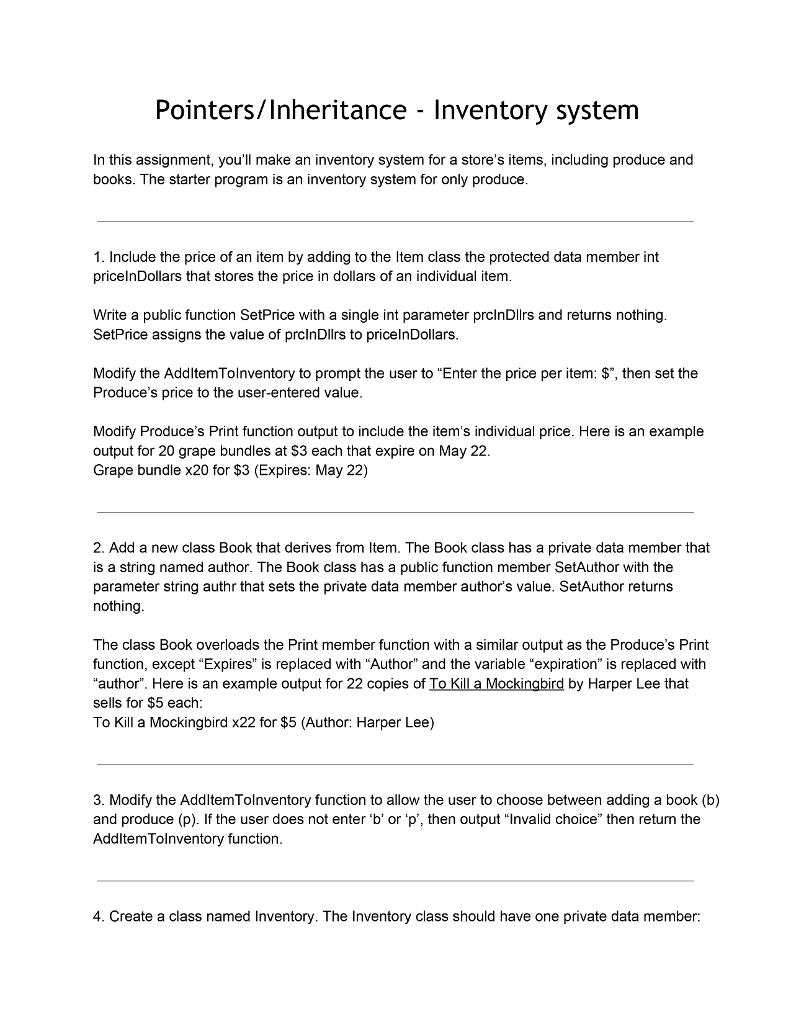
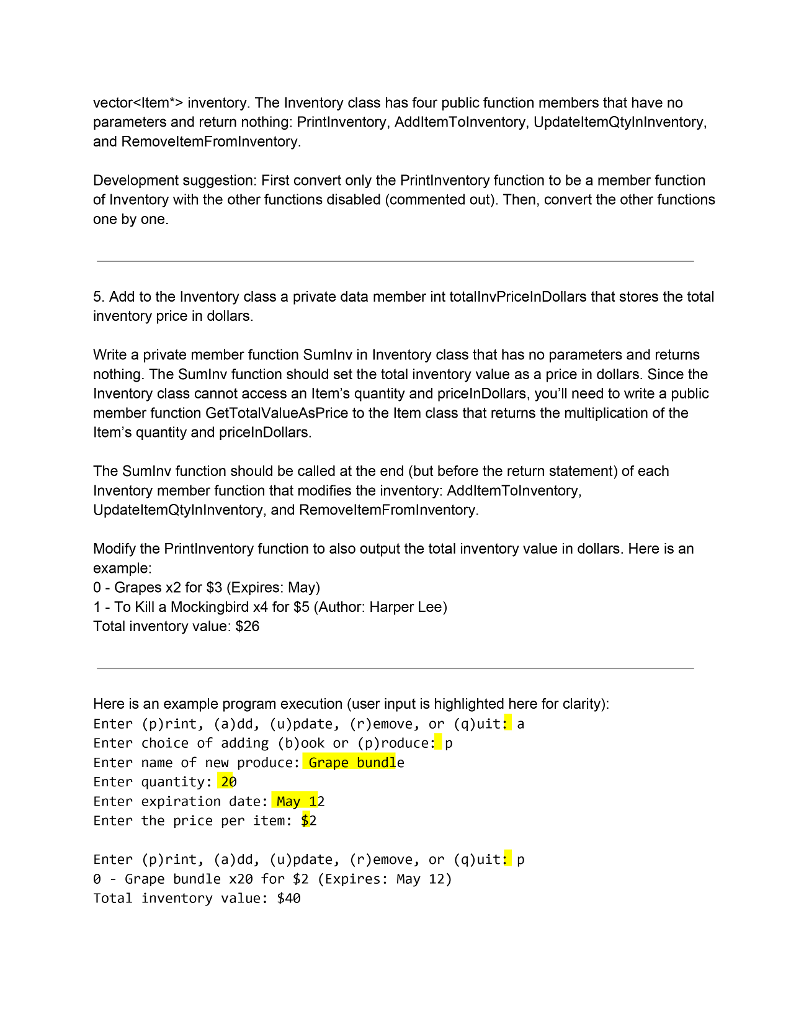
Pointers/Inheritance Inventory system In this assignment, you'll make an inventory system for a store's items, including produce and books. The starter program is an inventory system for only produce 1. Include the price of an item by adding to the ltem class the protected data member int pricelnDollars that stores the price in dollars of an individual item Write a public function SetPrice with a single int parameter prclnDllrs and returns nothing. SetPrice assigns the value of prclnDllrs to pricelnDollars. Modify the AddltemTolnventory to prompt the user to "Enter the price per item: then set the Produce's price to the user-entered value. Modify Produce's Print function output to include the item's individual price. Here is an example output for 20 grape bundles at $3 each that expire on May 22 Grape bundle x20 for $3 (Expires: May 22) 2. Add a new class Book that derives from Item. The Book class has a private data member that is a string named author. The Book class has a public function member SetAuthor with the parameter string authr that sets the private data member author's value. SetAuthor returns nothing The class Book overloads the Print member function with a similar output as the Produce's Print function, except "Expires" is replaced with "Author" and the variable "expiration" is replaced with "author". Here is an example output for 22 copies of To Kill a Mockingbird by Harper Lee that sells for $5 each To Kill a Mockingbird x22 for $5 (Author: Harper Lee) 3. Modify the AddltemTolnventory function to allow the user to choose between adding a book (b) and produce (p). If the user does not enter 'b' or 'p', then output "Invalid choice" then retum the AdditemTolnventory function. 4. Create a class named Inventory. The Inventory class should have one private data member









 Study Help