







Question: Here is the starter code: /* Returns 1 if the argument is a decimal digit (such as '5'), 0 otherwise */ int is_digit(char character) {
Here is the starter code:
/* Returns 1 if the argument is a decimal digit (such as '5'), 0 otherwise */ int is_digit(char character) { /* WRITE THIS FUNCTION */ return -1; }
/* Converts uppercase letters to lowercase letters. * If the argument is an uppercase letter, the function returns the * corresponding lowercase letter (e.g., 'D' yields 'd'). Otherwise, the * function returns the argument, unchanged. */ char to_lowercase(char character) { /* WRITE THIS FUNCTION */ return '\0'; }
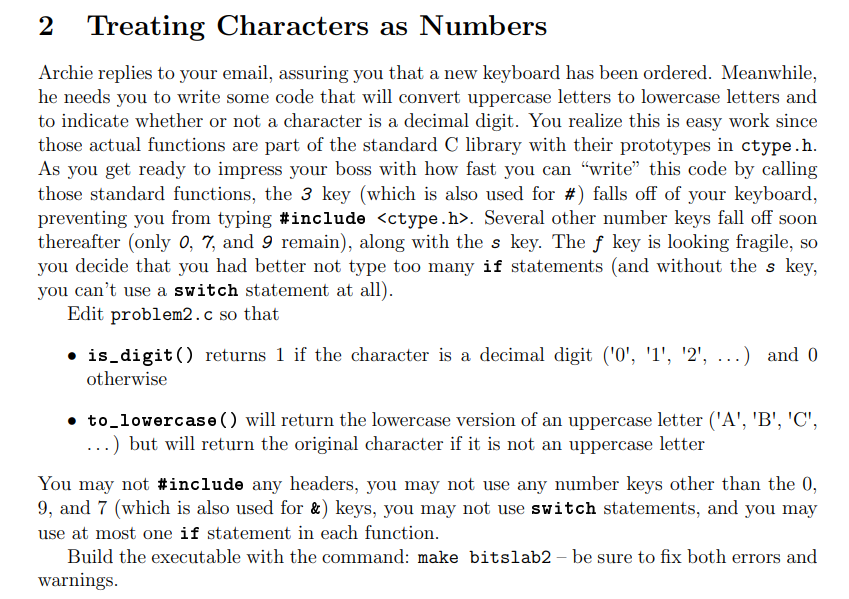
2 Treating Characters as Numbers Archie replies to your email, assuring you that a new keyboard has been ordered. Meanwhile, he needs you to write some code that will convert uppercase letters to lowercase letters and to indicate whether or not a character is a decimal digit. You realize this is easy work since those actual functions are part of the standard C library with their prototypes in ctype.h. As you get ready to impress your boss with how fast you can write this code by calling those standard functions, the 3 key (which is also used for #) falls off of your keyboard, preventing you from typing #include
Step by Step Solution
There are 3 Steps involved in it

Get step-by-step solutions from verified subject matter experts
 Study Help