







Question: Here is the starter program: #include using namespace std; int main() { // Draw leaves cout // Draw trunk cout return 0; } Loops Drawing
 Here is the starter program:
#include
int main() {
// Draw leaves cout
// Draw trunk cout
return 0; }
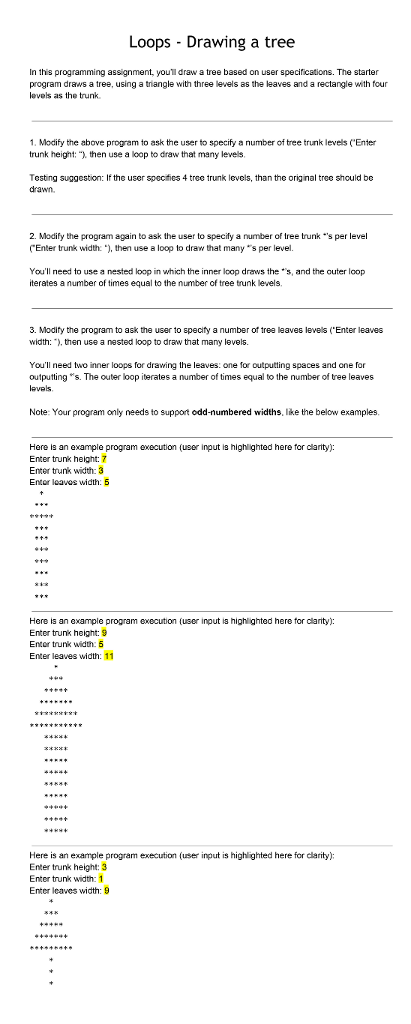
Loops Drawing a tree In this programming assignment, youT draw a tree based on user specifications. The starter program draws a tree, using a triangle with three levels as the leaves and a rectangle with four levels as e trunk. 1. Modify the above program to ask the user to specify a number of tree trunk levels "Enter trunk height: then use a loop to draw that many levels. Testing suggestion: If the user specifies 4 tree trunk levels, than the original tree should be drawn, 2. Modify the programagain to ask the user to specify a number of tree trunk "s per level (Enter trunk width: then use a loop to draw that many's per level. You need to use a nested loop in which the in ner loop draws the 's, and the outer loop iterates a number of times equal to the number of tree trunk levels. 3. Modify the program to ask the user to specify a number of tree leaves levels Enter leaves width: then use a nested loop to draw that many levels. You need two inner loops for drawing the leaves: one for outputting spaces and one fo outputting's. The outer loop iterates a number of times equal to the number oftree leaves Note: Your program only needs to support odd-numbered widths, like the below examples. Here is an example program execution (user input is highlghted here forclarity). nter trunk height: 7 nter trunk width: 3 Enter leaves width: 5 Here is an example program execution (user input is highlighted here for clarity): Enter trunk height: 9 ntor trunk width: Enter leaves width 11 Here is an example program execution (user input is highlighted here for clarity): Enter trunk height 3 Enter trunk width: Enter leaves width: 9
Step by Step Solution
There are 3 Steps involved in it

Get step-by-step solutions from verified subject matter experts
 Study Help