







Question: Here is the Student class: public class Student{ private int studentID; private String firstName; private String preferredName; private String lastName; public Student(int studentID, String firstName,


Here is the Student class:
public class Student{ private int studentID; private String firstName; private String preferredName; private String lastName; public Student(int studentID, String firstName, String lastName){ this.studentID=studentID; this.firstName=firstName; this.preferredName=firstName; this.lastName=lastName; } public int getStudentID() { return studentID; }
public String getName() { return preferredName + " "+ lastName; }
public void setLastName(String lastName) { this.lastName = lastName; }
public void setPreferredName(String preferredName) { this.preferredName = preferredName; } public String toString() { return getName() + " (" + studentID+ ")"; }
}
Here is the Building class:
class Building { String buildingName; int numberFloors; String campusLocation; Building(String name, int floors, String campus) { buildingName = name; numberFloors= floors; campusLocation = campus; } public String getBuildingName() { return buildingName; } public String getCampus() { return campusLocation; } public int hasMoreFloors(Building ob) { return numberFloors - ob.numberFloors; } public String toString() { return buildingName + " building (" + numberFloors + " floors), " + campusLocation + " campus"; } }
Here is the Room Class:
class Room { Building building; int roomNumber; int roomCapacity; Room(Building building, int room, int capacity) { this.building = building; roomNumber = room; roomCapacity = capacity; } public Building getBuilding() { return building; } public int getRoomCapacity() { return roomCapacity; } public void setRoomCapacity(int capacity) { roomCapacity = capacity; } public String toString() { return building.getBuildingName() + " building, Room " + roomNumber +" (seats " + roomCapacity +")"; } }
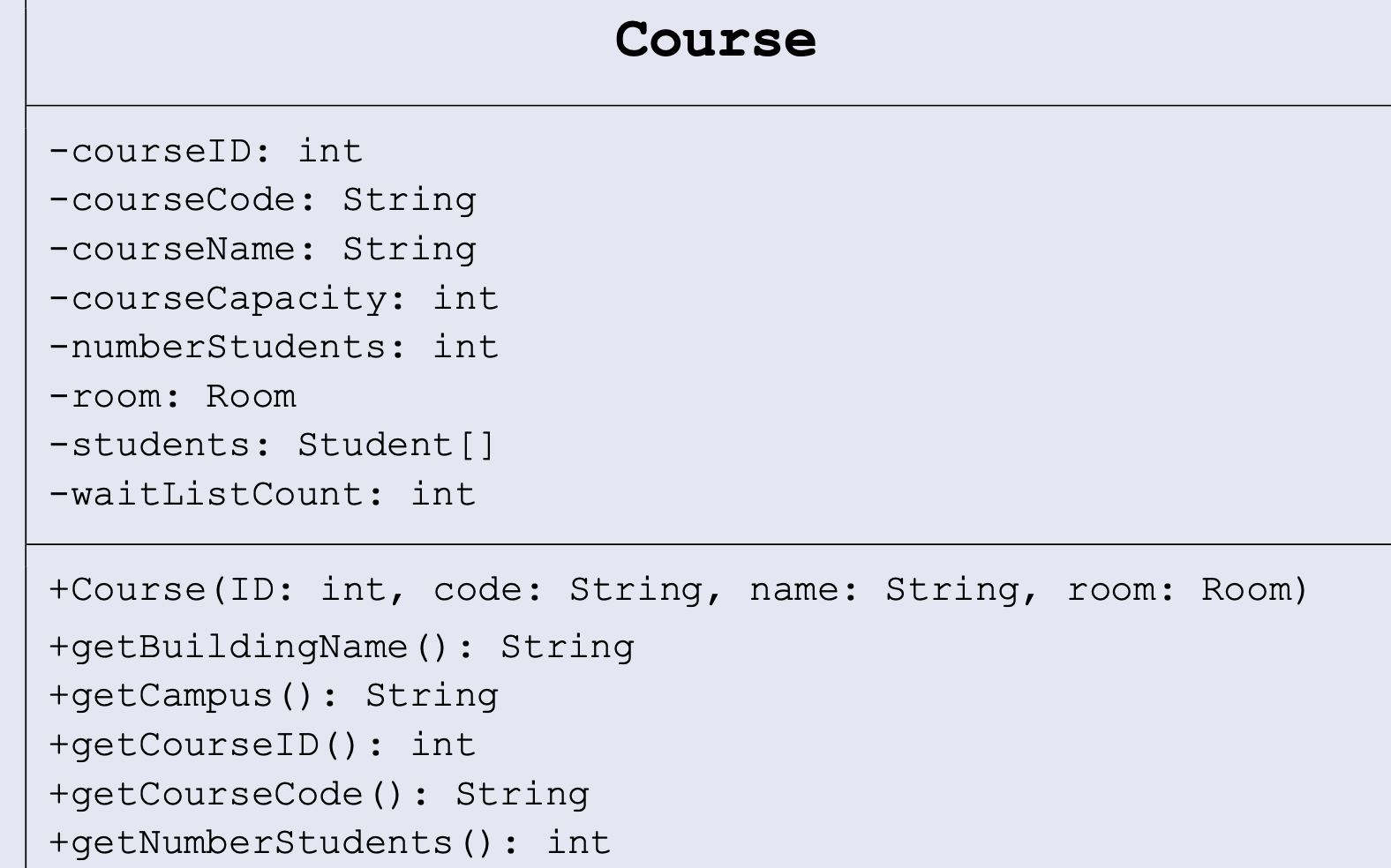
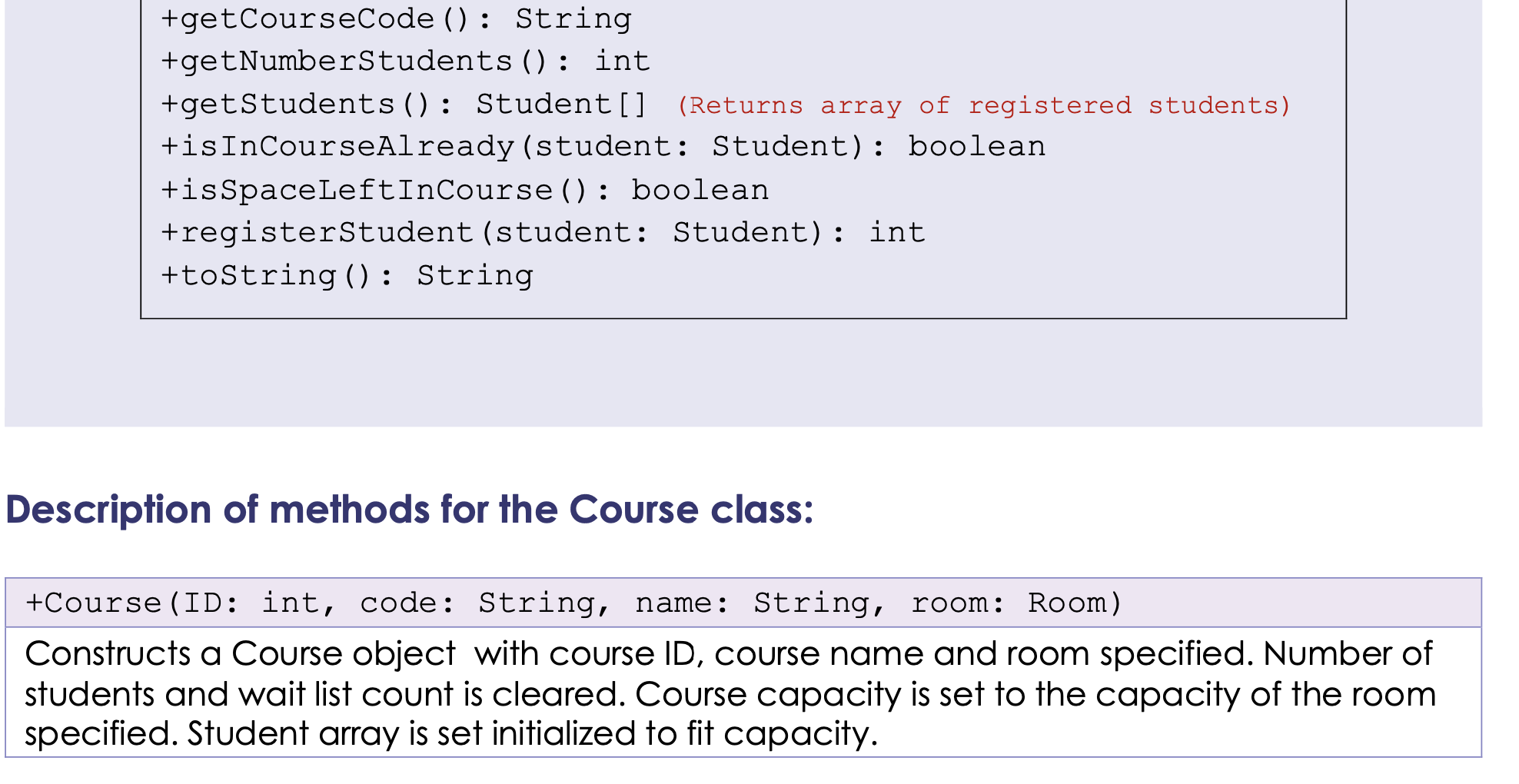
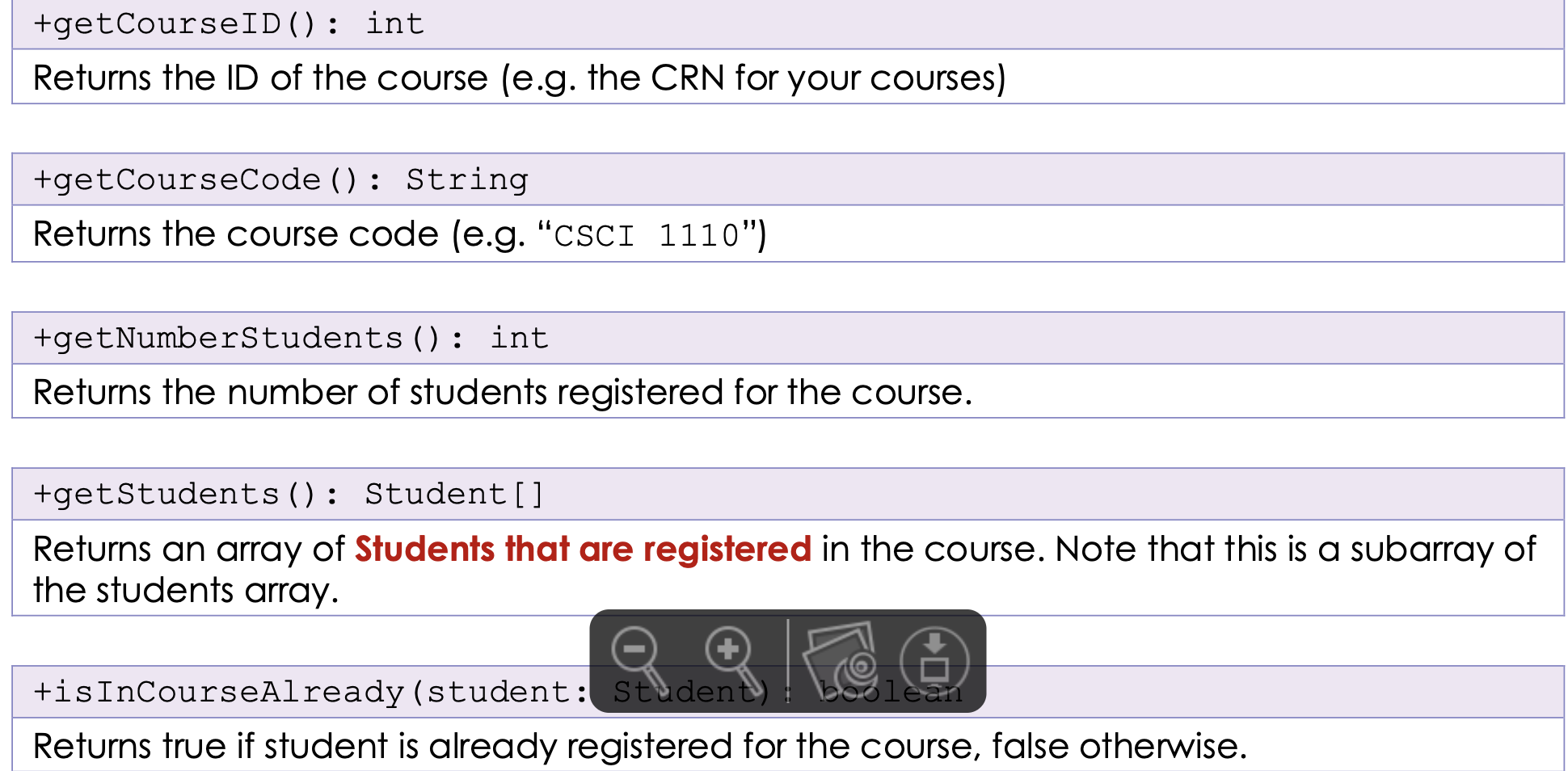
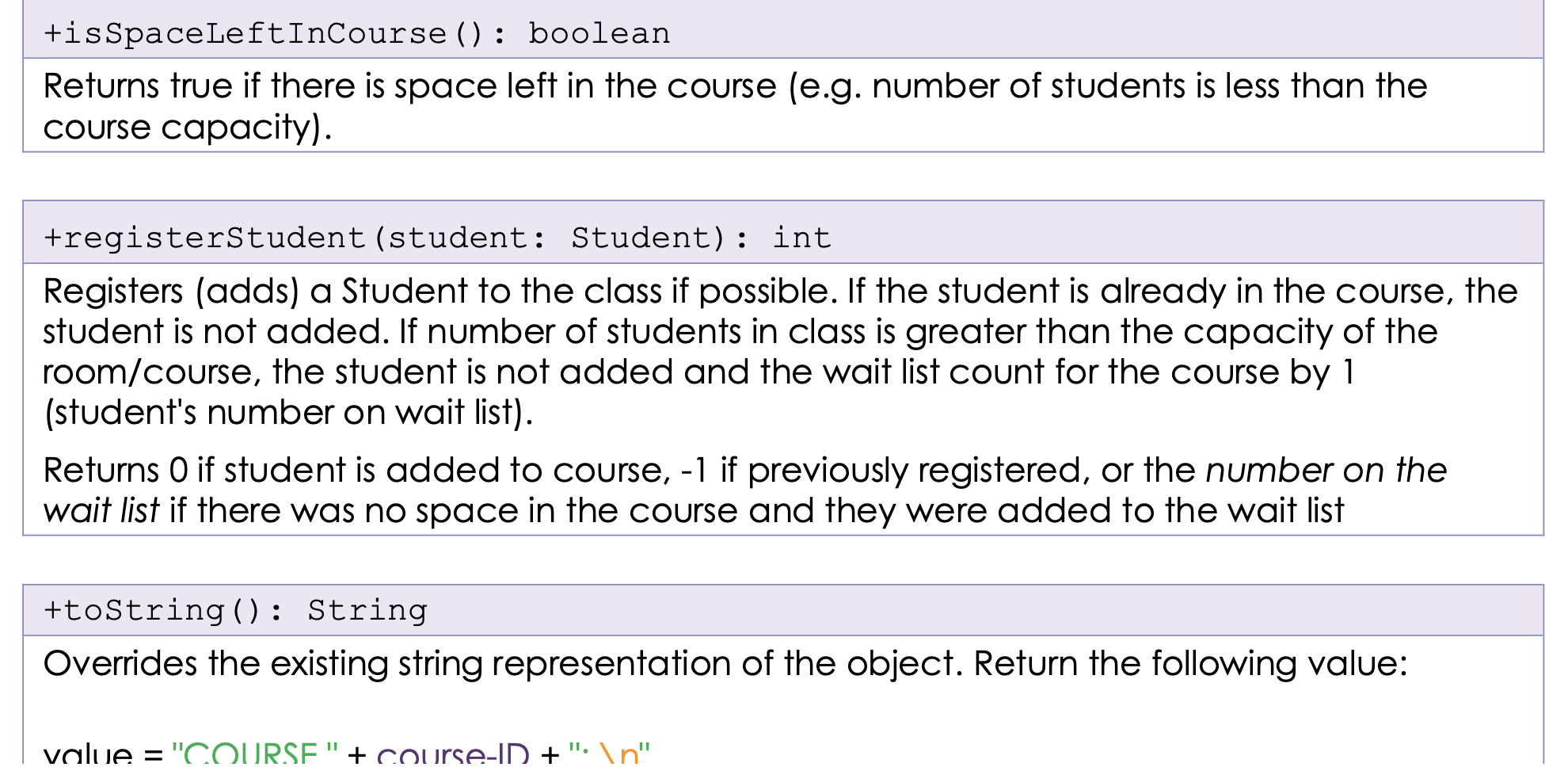
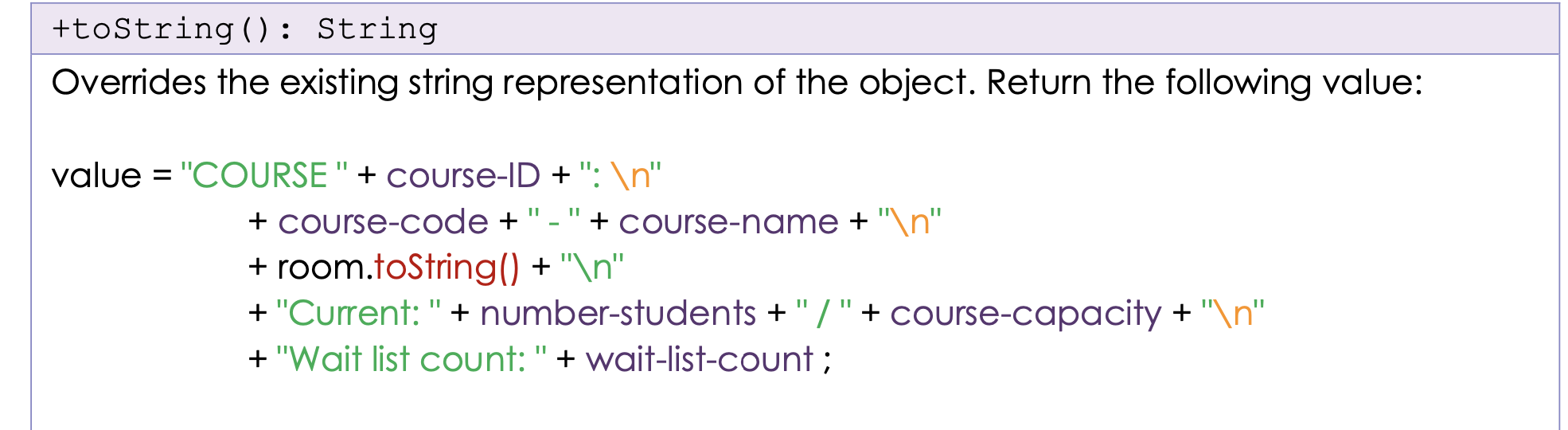
Now that we have that sorted, we are ready to connect all the dots. You will complete the Course class in this problem. All the information you should need can be found within the descriptions and UML diagram below. The Course class The Course class makes use of all of the other classes that you have made so far. In order to start this problem, you must have completed the first two problems successfully. You may then copy those files over here. Course -courseID: int -courseCode: String -courseName: String -courseCapacity: int -numberStudents: int -room: Room -students: Student[] -waitListCount: int +Course (ID: int, code: String, name: String, room: Room) +getBuildingName () : String +getCampus (): String +getCourseID(): int +getCourseCode () : String +getNumberStudents ( ) : int +getCourseCode () : String +getNumberStudents (): int +getStudents (): Student[] (Returns array of registered students) +isInCourseAlready (student: Student): boolean +isSpaceLeftInCourse (): boolean +registerStudent (student: Student): int +toString(): String Description of methods for the Course class: +Course (ID: int, code: String, name: String, room: Room) Constructs a Course object with course ID, course name and room specified. Number of students and wait list count is cleared. Course capacity is set to the capacity of the room specified. Student array is set initialized to fit capacity. +getBuildingName (): String Returns the name of the building (based on the room) in which the course is located. +getCampus (): String Returns the name of the campus (based on the room) in which the course is located. +getCourseID(): int Returns the ID of the course (e.g. the CRN for your courses) +getCourseCode (): String Returns the course code (e.g. "CSCI 1110") +getNumberStudents (): int Returns the number of students registered for the course. +getStudents (): Student[] Returns an array of Students that are registered in the course. Note that this is a subarray of the students array. an +isInCourseAlready (student: Student) Returns true if student is already registered for the course, false otherwise. +isSpaceLeftInCourse () : boolean Returns true if there is space left in the course (e.g. number of students is less than the course capacity). +registerStudent (student: Student): int Registers (adds) a Student to the class if possible. If the student is already in the course, the student is not added. If number of students in class is greater than the capacity of the room/course, the student is not added and the wait list count for the course by 1 (student's number on wait list). Returns O if student is added to course, -1 if previously registered, or the number on the wait list if there was no space in the course and they were added to the wait list +toString(): String Overrides the existing string representation of the object. Return the following value: value = "COURSE" + course-ID + ": " +toString(): String Overrides the existing string representation of the object. Return the following value: value = "COURSE" + course-ID + ": " + course-code +"-" + course-name + " " + room.toString() + " " + "Current: " + number-students +"/"+course-capacity + " " + "Wait list count:" + wait-list-count
Step by Step Solution
There are 3 Steps involved in it

Get step-by-step solutions from verified subject matter experts
 Study Help