







Question: Here is the TestDriver class: import java.util.Scanner; public class TestDriver { public static void main(String[] args) { Scanner input = new Scanner(System.in); IndexGenerator ig =
Here is the TestDriver class:
| import java.util.Scanner; | |
| public class TestDriver { | |
| public static void main(String[] args) | |
| { | |
| Scanner input = new Scanner(System.in); | |
| IndexGenerator ig = new IndexGenerator(); | |
| input.useDelimiter("[^a-zA-Z]+"); | |
| int page=0; | |
| for (int i=0; i | |
| { | |
| ig.registerWord(input.next().toLowerCase()); | |
| page++; | |
| ig.setPage(page); | |
| } | |
| ig.printIndex(System.out); | |
| } | |
| } Please provide code and your outputs. Thank you
|
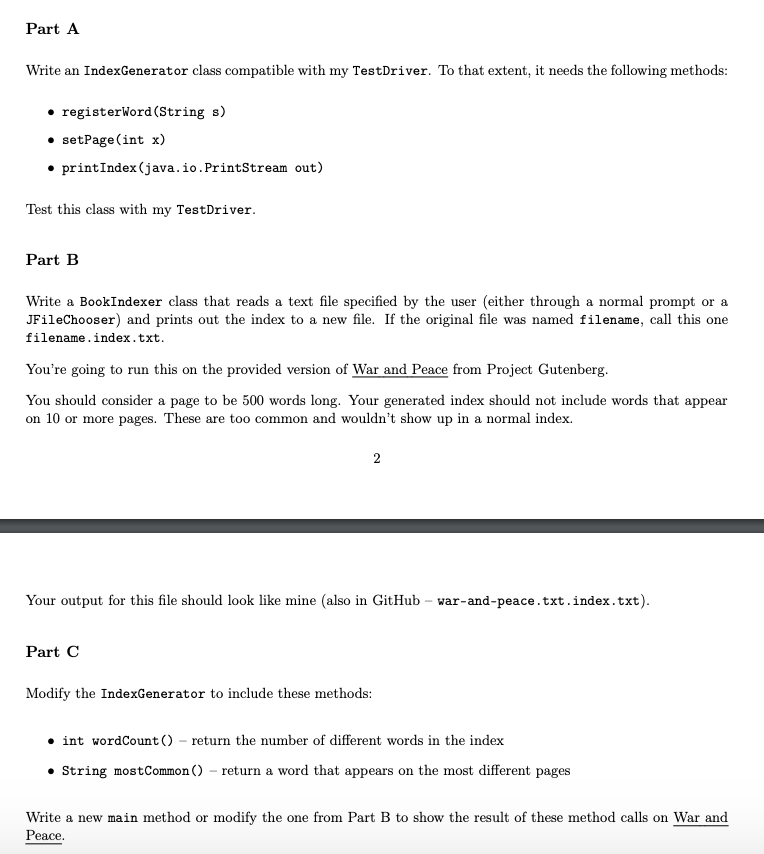
Part A Write an IndexGenerator class compatible with my TestDriver. To that extent, it needs the following methods registerWord (String s) * setPage(int x) printIndex (java.io.PrintStream out) Test this class with my TestDriver Part B Write a BookIndexer class that reads a text file specified by the user (either through a normal prompt or a JFileChooser) and prints out the index to a new file. If the original file was named filename, call this one filename.index.txt You're going to run this on the provided version of War and Peace from Project Gutenberg You should consider a page to be 500 words long. Your generated index should not include words that appear on 10 or more pages. These are too common and wouldn't show up in a normal index. Your output for this file should look like mine (also in GitHub - war-and-peace.txt.index.txt) Part C Modify the IndexGenerator to include these methods o int wordCount ) - return the number of different words in the index . String mostCommon () - return a word that appears on the most different pages Write a new main method or modify the one from Part B to show the result of these method calls on War and Peace
Step by Step Solution
There are 3 Steps involved in it

Get step-by-step solutions from verified subject matter experts
 Study Help