







Question: Here is what I got for 1.2: Please use this for the rest of the questions of 1.3, 1.4, and 1.5. Create a task table
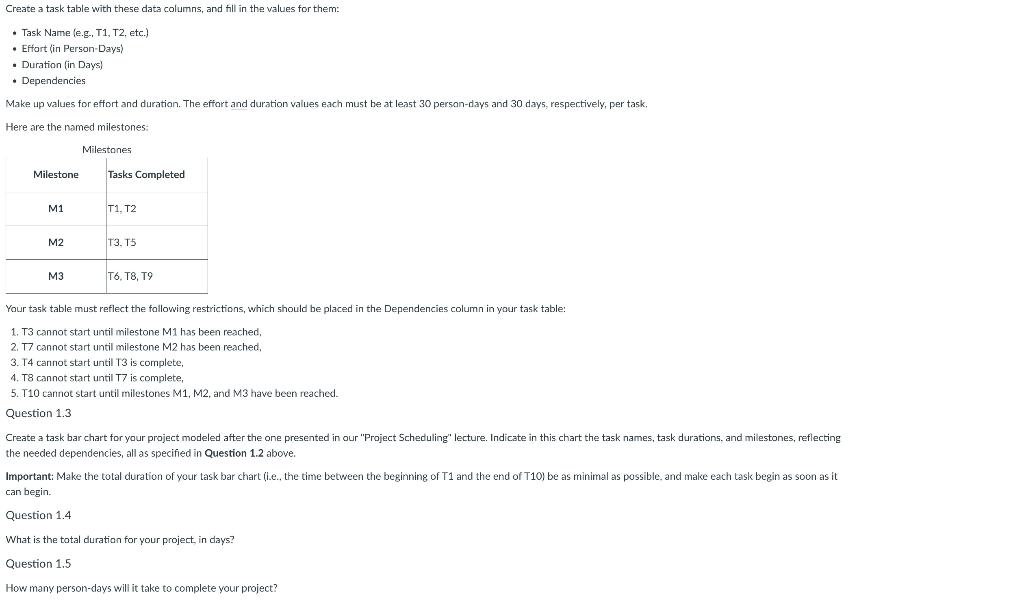
Here is what I got for 1.2:
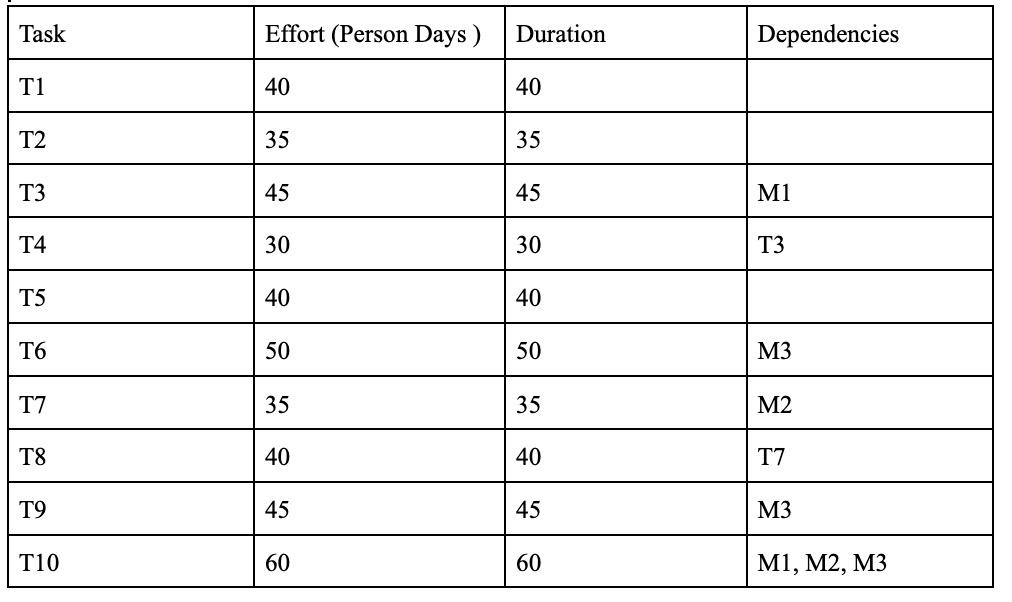
Please use this for the rest of the questions of 1.3, 1.4, and 1.5.
Create a task table with these data columns, and fill in the values for them: - Task Name (e.g., T1, T2, etc.) - Effart (in Person-Days) - Duration (in Days) - Dependencies Make up values for effort and duration. The effort and duration values each must be at least 30 person-days and 30 days, respectively, per task, Here are the named milestones: Your task table must reflect the fallowing restrictions, which should be placed in the Dependencies column in your task table: 1. T3 cannot start until milestone M1 has been reached, 2. T7 cannot start until milestone M2 has been reached, 3. T4 cannot start until T is complete, 4. T8 cannot start until T7 is complete, 5. T10 cannot start until milestones M1, M2, and M3 have been reached. Question 1.3 Create a task bar chart for your project modeled after the one presented in our "Project Scheduling" lecture. Indicate in this chart the task names, task durations, and milestones, reflecting the needed dependencies, all as specified in Question 1.2 above. Important: Make the total duration of your task bar chart (i.e., the time between the beginning of T1 and the end of T10) be as minimal as possible. and make each task begin as soon as it can begin. Question 1.4 What is the total duration for your project, in days? Question 1.5 How many person-days will it take to complete your project? \begin{tabular}{|l|l|l|l|} \hline Task & Effort (Person Days ) & Duration & Dependencies \\ \hline T1 & 40 & 40 & \\ \hline T2 & 35 & 35 & \\ \hline T3 & 45 & 45 & M1 \\ \hline T4 & 30 & 30 & T3 \\ \hline T5 & 40 & 40 & \\ \hline T6 & 50 & 50 & M3 \\ \hline T7 & 35 & 35 & M2 \\ \hline T8 & 40 & 40 & T7 \\ \hline T9 & 45 & 45 & M3 \\ \hline T10 & 60 & 60 & M1, M3 \\ \hline \end{tabular}
Step by Step Solution
There are 3 Steps involved in it

Get step-by-step solutions from verified subject matter experts
 Study Help