







Question: HERE S HOW TO DO IT: Label your notebook with markdown cells to show where the analysis for each of the datasets begins. Boston MBTA
HERES HOW TO DO IT:
Label your notebook with markdown cells to show where the analysis for each of the datasets begins.
Boston MBTA Data
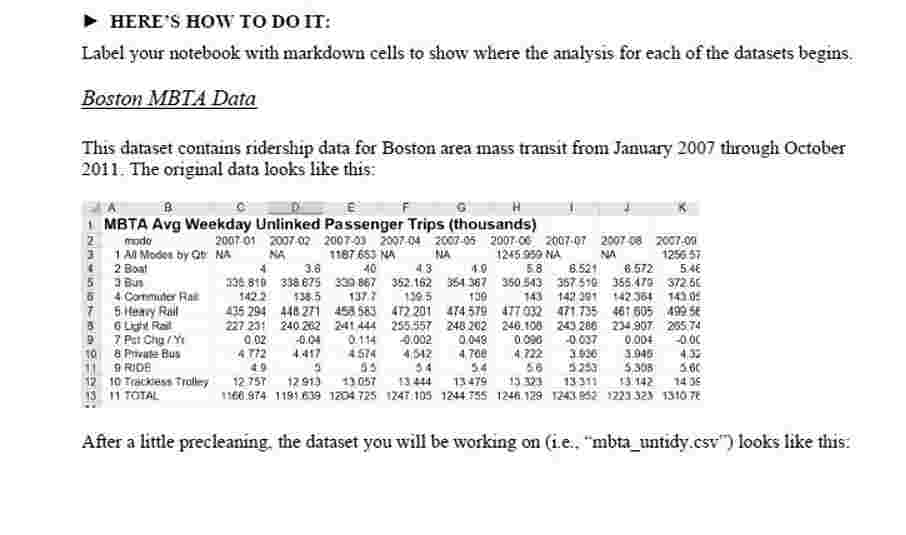
This dataset contains ridership data for Boston area mass transit from January through October The original data looks like this:
After a little precleaning, the dataset you will be working on iembtauntidy.csv looks like this:
You will use pandas do the following:
Read the data into a dataframe.
The order column is unnecessary. Drop it from your dataframe.
Use the melt function to convert the year and month columns to a single column called yearmon in the dataframe.
Split the values in the yearmon column into year and month values, then add those values to the dataframe as appropriately named columns.
Drop the yearmon column after you are confident your results are what you were expecting.
Your resulting dataframe should look like this: HERE'S HOW TO DO IT:
Label your notebook with markdown cells to show where the analysis for each of the datasets begins.
Boston MBTA Data
This dataset contains ridership data for Boston area mass transit from January through October The original data looks like this:
After a little precleaning, the dataset you will be working on ie "mbtauntidy.csv looks like this:
You will use pandas do the following:
Read the data into a dataframe.
The 'order' column is unnecessary. Drop it from your dataframe.
Use the melt function to convert the "year and month" columns to a single column called "yearmon" in the dataframe.
Split the values in the "year mon" column into year and month values, then add those values to the dataframe as appropriately named columns.
Drop the "yearmon" column after you are confident your results are what you were expecting.
Your resulting dataframe should look like this:
Step by Step Solution
There are 3 Steps involved in it
1 Expert Approved Answer
Step: 1 Unlock

Question Has Been Solved by an Expert!
Get step-by-step solutions from verified subject matter experts
Step: 2 Unlock
Step: 3 Unlock
 Study Help