







Question: Here we have a gui that is integrated with a Shipping management database ( both java gui and mysql code given in files), when you
Here we have a gui that is integrated with a Shipping management database ( both java gui and mysql code given in files), when you run the gui in java you can choose from four entites from the database to do the following queries (INSERT, DELETE, DISPLAY). The proplem is we can't seem to get the DISPLAY method working, we're not sure whats the cause. If someone could check the java code and help us find the problem and fix it so the gui works flawlessly.
i think the proble is in this method //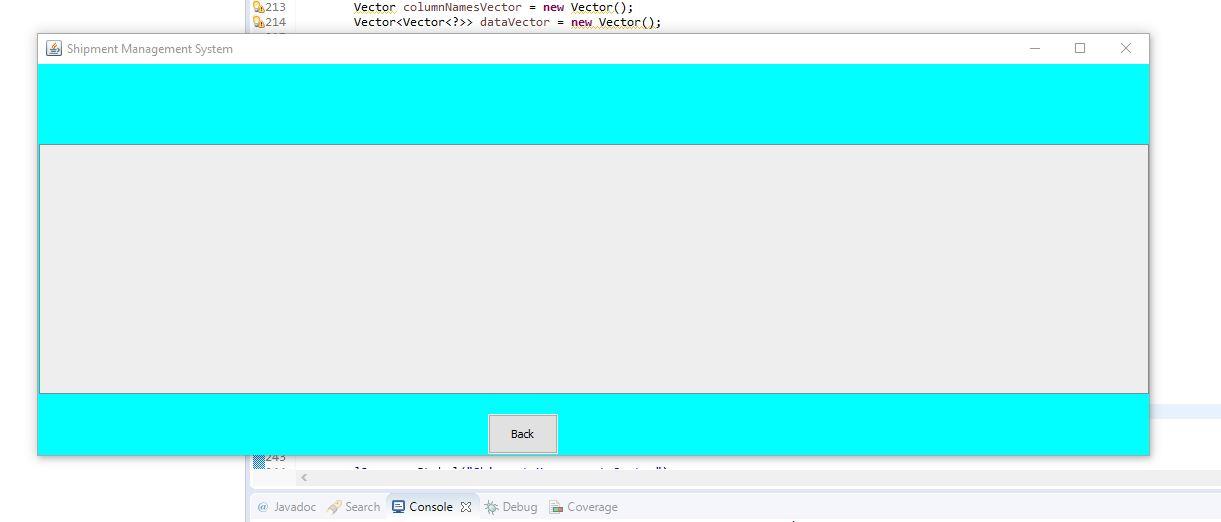 public JTable ResultRet(ResultSet rs) throws SQLException
//Creates JTable of the resultset public JTable ResultRet(ResultSet rs) throws SQLException { ArrayList
// Get column names for (int i = 1; i
// Get row data while (rs.next()) { ArrayList
for (int i = 1; i
data.add( row ); } Vector columnNamesVector = new Vector(); Vector
for (int i = 0; i
for (int i = 0; i
//create a new GUI form with tables public void newFrame(boolean frameFlag) { TableFrame = new JFrame("Shipment Management System");
Container tContainer = TableFrame.getContentPane();
tContainer.setBackground(Color.cyan); tContainer.setLayout(null); font = new Font("Lemon",Font.BOLD,32);
l3 = new JLabel("Shimpent Management System"); l3.setFont(font); table = new JTable(); table.getTableHeader().setFont(new Font("Segeo UI",Font.BOLD,12)); table.getTableHeader().setOpaque(false); table.getTableHeader().setBackground(new Color(32,136,203)); table.getTableHeader().setForeground(new Color(255,255,255)); table.setRowHeight(25); table.setAutoCreateColumnsFromModel(true); table.setAutoResizeMode(JTable.AUTO_RESIZE_ALL_COLUMNS);
JScrollPane scrollPane = new JScrollPane(table); scrollPane.setBounds(1,80,1110,250); try{ for(UIManager.LookAndFeelInfo info : UIManager.getInstalledLookAndFeels()) { if("Windows".equals(info.getName())) { UIManager.setLookAndFeel(info.getClassName()); break; } } } catch(Exception ex) { ex.getMessage(); } tContainer.add(l3); tContainer.add(scrollPane);
back = new JButton("Back"); back.setBounds(450,350,70,40); tContainer.add(back);
back.addActionListener(new ActionListener() { @Override public void actionPerformed(ActionEvent e) { TableFrame.setVisible(false); LoginForm(); } });
TableFrame.setVisible(frameFlag); TableFrame.setBounds(150,100,1127,430); }
2213 94214 Vector columnNamesVector = new Vector(); Vector
Step by Step Solution
There are 3 Steps involved in it

Get step-by-step solutions from verified subject matter experts
 Study Help