







Question: Heres the code for embedding DML in a PL/SQL program. Enter the above PL/SQL block into the Query Builder. Complete the remaining part as directed
Heres the code for embedding DML in a PL/SQL program.
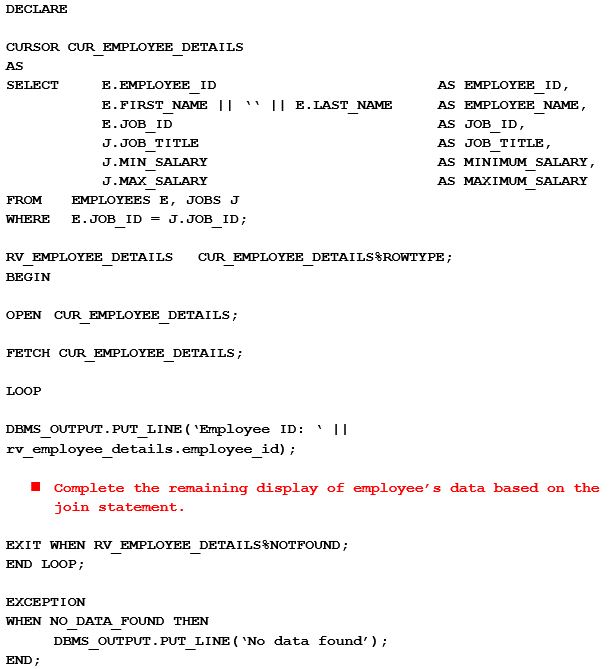
Enter the above PL/SQL block into the Query Builder.
Complete the remaining part as directed in the comment inside the BEGIN section of the anonymous block.
Compile and run the program by clicking on the green triangle. If you receive errors, correct them until the program runs correctly.
Part 2 Questions
What are the other ways you can run through all the data to display the entire result set?
Provide the syntax for the alternative approach to retrieve the same result.
DECLARE CURSOR CUR EMPLOYEE DETAILS AS SELECT E. EMPLOYEE ID E.FIRST NAME 11 ?.JOB ID J. JOB TITLE J.MIN SALARY J.MAX SALARY AS EMPLOYEE ID, AS EMPLOYEE NAME AS JOB ID, AS JOB TITLE, AS MINIMUM SALARY AS MAXIMUM SALARY 11 ELAST NAME FROM EMPLOYEES E, JOBS J WHERE E.JOB1D=J.JOB1D; RV EMPLOYEE DETAILS CUR EMPLOYEE DETAILS %ROWTYPE; BEGIN OPEN CUR EMPLOYEE DETAILS FETCH CUR EMPLOYEE DETAILS LOOP DEMS OUTPUT. PUT LINE ('Employee ID :?11 rv employee details.employee id) Complete the remaining display of employee' s data based on the join statement EXIT WHEN RV EMPLOYEE DETAILS%NOTFOUND; END LOOP EXCEPTION WHEN NO DATA FOUND THEN DBMS OUTPUT. PUT LINE 'No data found END DECLARE CURSOR CUR EMPLOYEE DETAILS AS SELECT E. EMPLOYEE ID E.FIRST NAME 11 ?.JOB ID J. JOB TITLE J.MIN SALARY J.MAX SALARY AS EMPLOYEE ID, AS EMPLOYEE NAME AS JOB ID, AS JOB TITLE, AS MINIMUM SALARY AS MAXIMUM SALARY 11 ELAST NAME FROM EMPLOYEES E, JOBS J WHERE E.JOB1D=J.JOB1D; RV EMPLOYEE DETAILS CUR EMPLOYEE DETAILS %ROWTYPE; BEGIN OPEN CUR EMPLOYEE DETAILS FETCH CUR EMPLOYEE DETAILS LOOP DEMS OUTPUT. PUT LINE ('Employee ID :?11 rv employee details.employee id) Complete the remaining display of employee' s data based on the join statement EXIT WHEN RV EMPLOYEE DETAILS%NOTFOUND; END LOOP EXCEPTION WHEN NO DATA FOUND THEN DBMS OUTPUT. PUT LINE 'No data found END
Step by Step Solution
There are 3 Steps involved in it

Get step-by-step solutions from verified subject matter experts
 Study Help