







Question: Heres the example code that needs revised. volumeofsphere (2) - Notepad File Edit Format View Help from tkinter import class CalculateSphereVolume def init_(self): self.main_ window
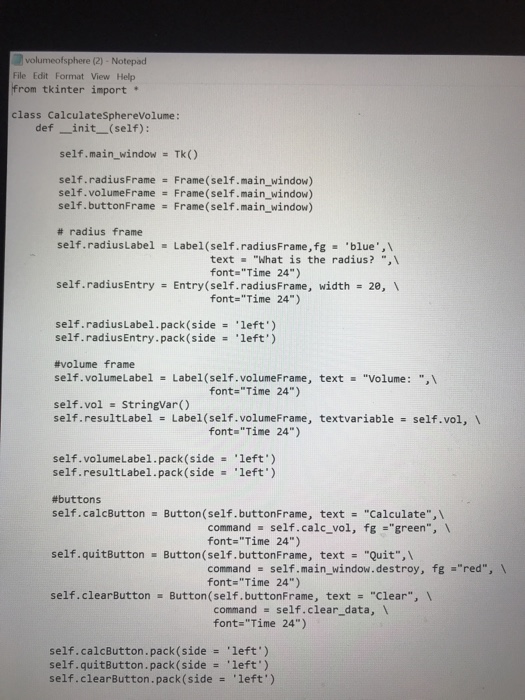
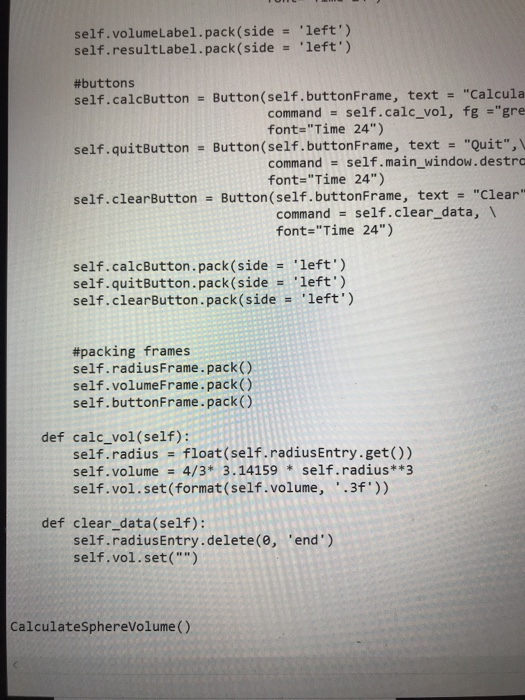
volumeofsphere (2) - Notepad File Edit Format View Help from tkinter import class CalculateSphereVolume def init_(self): self.main_ window Tk) self.radiusFrame Frame (self.main_window) self.volumeFrame Frame (self.main_window) self.buttonFrame Frame(self.main_window) # radius frame self.radiusLabel Label(self.radiusFrame,fg 'blue",\ - text "What is the radius? ",\ font-"Time 24") self.radiusEntry = Entry(self.radiusFrame, width- 2e, \ font-"Time 24") self .radiusLabel. pack(side 'left') self.radiusEntry.pack(side '1eft') #volume frame self.volumeLabe! = Label (self.volumeFrame, self.vo1 stringvar() self.re text- "Volume : "? font="Time 24") sultLabe1 = Label (sent.voimeeFrame, textvariable self.vol, \ self.volumeLabel.pack(side left.) self.resultLabel.pack (sideleft') #buttons self.calcButtonButton(self.buttonFrame, text "Calculate", command self.calc_vol, fg "green, font- "Time 24") self.quitButton Button(self.buttonFrame, text .Quit",\ command self.main_ window.destroy, fg "red", font-"Time 24") self.clearButton Button(self.buttonFrame, text "Clear"., = command self.clear_data, 1 font- Time 24") self.calcButton.pack(side self .quitButton. pack(side self-clearButton . pack(side left') .left.) left')
Step by Step Solution
There are 3 Steps involved in it

Get step-by-step solutions from verified subject matter experts
 Study Help