







Question: Hey how do I fix the error in this R studio code? the object 'pts' should be recognized bc i ran the require(tidyverse) with the
Hey how do I fix the error in this R studio code? the object 'pts' should be recognized bc i ran the require(tidyverse) with the data I need and it works for everything else. 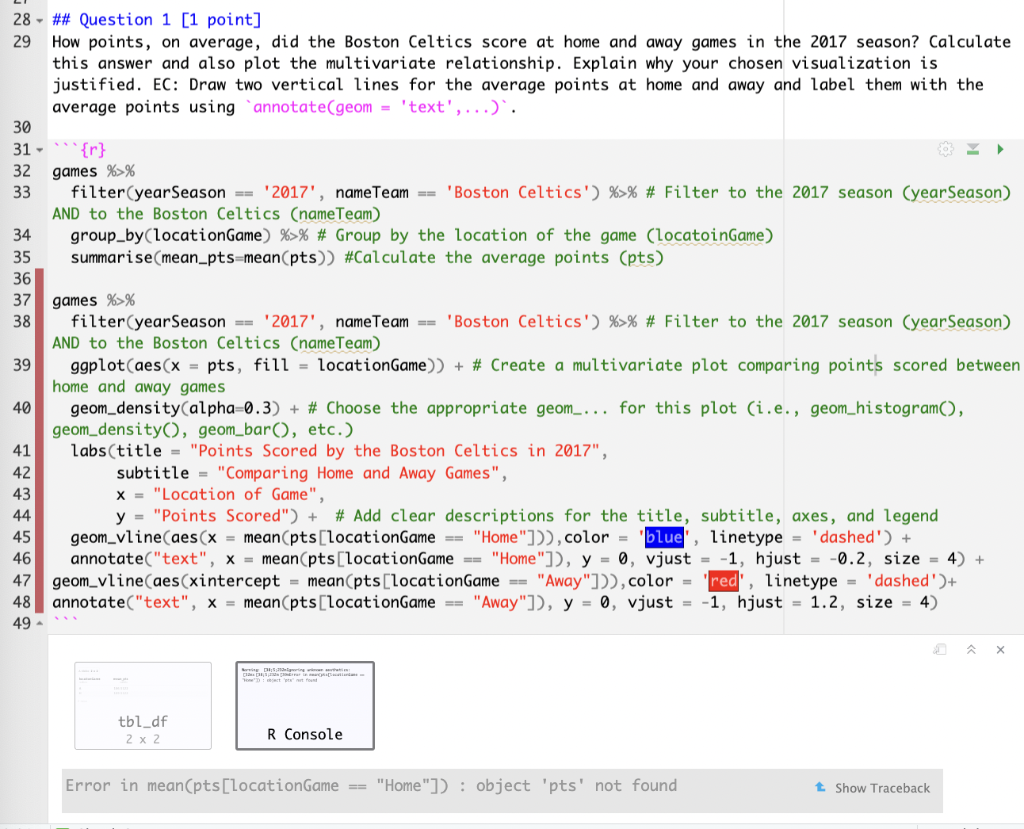
\#\# Question 1 [1 point] How points, on average, did the Boston Celtics score at home and away games in the 2017 season? Calculate this answer and also plot the multivariate relationship. Explain why your chosen visualization is justified. EC: Draw two vertical lines for the average points at home and away and label them with the average points using 'annotate(geom = 'text', ...)'. {r} games \%>\% filter (yearSeason == '2017', nameTeam == 'Boston Celtics') \% >% \# Filter to the 2017 season (yearSeason) AND to the Boston Celtics (nameTeam) group_by(locationGame) \%>\% \# Group by the location of the game (locatoinGame) summarise(mean_pts=mean(pts)) \#Calculate the average points (pts) games \%>\% filter (yearSeason == '2017', nameTeam == 'Boston Celtics') \%>\% \# Filter to the 2017 season (yearSeason) AND to the Boston Celtics (nameTeam) ggplot(aes(x=pts,fill= locationGame ))+ \# Create a multivariate plot comparing points scored betweer home and away games geom_density (alpha=0.3) + \# Choose the appropriate geom_... for this plot (i.e., geom_histogram(), geom_density(), geom_bar(), etc.) labs(title = "Points Scored by the Boston Celtics in 2017", subtitle = "Comparing Home and Away Games", x= "Location of Game", y= "Points Scored") + \# Add clear descriptions for the title, subtitle, axes, and legend geom_vline (aes(x=mean(pts[ locationGame == "Home"])), color = 'blue', linetype = 'dashed') + annotate("text", x=mean( pts[locationGame == "Home"]), y=0, vjust =1, hjust =0.2, size =4 ) + geom_vline(aes(xintercept = mean(pts[locationGame = "Away"])), color = 'red', linetype = 'dashed')+ annotate ("text", x= mean(pts[locationGame == "Away"]), y=0, vjust =1, hjust =1.2, size =4 )
Step by Step Solution
There are 3 Steps involved in it

Get step-by-step solutions from verified subject matter experts
 Study Help