







Question: Hi C# Programmers! I need your help, I've already created my WinForm I've designed it to be a LOGIN and REGISTER (all of them in
Hi C# Programmers!
I need your help, I've already created my WinForm I've designed it to be a LOGIN and REGISTER (all of them in one form)
but, I still wanna connect them to a database (SQL/MS Access) but I have no knowledge how do I create them and connect them to my C# community visual studio?
All the Inputs of my program is just (UserName, Password) for LOGIN
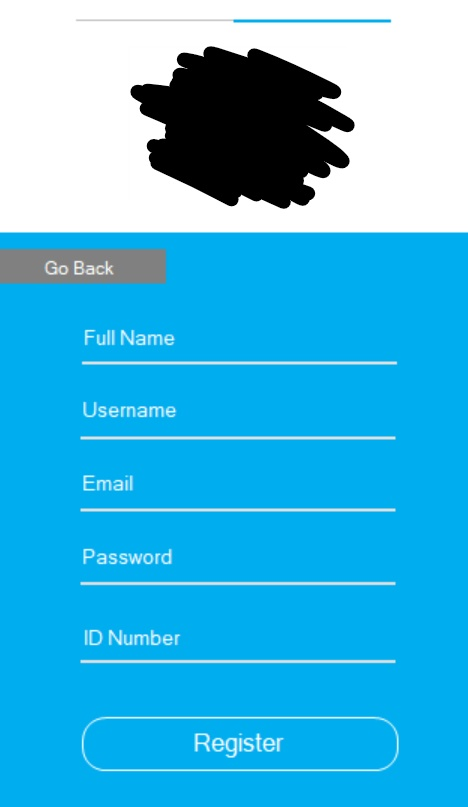
All the Inputs of my program is just ( First Name, Last Name, EmailAddress, NewUserName, NewPassword) for REGISTER
I understand it may require a lot of source codes (latterly hard work) but at least I need you to guide me what should I do? like go watch about how to create an MS Access database first and then go download your created data as a reference into your C# and like that...
thx
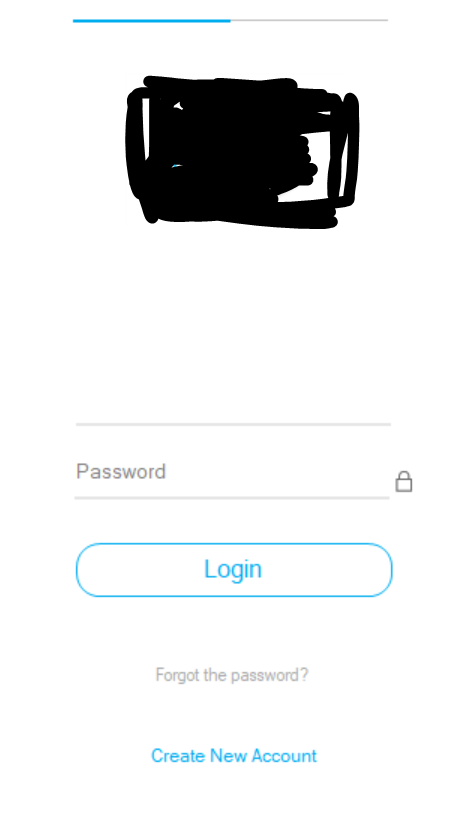
here's a picture of the LOGIN form
here's a picture of the REGISTER form
Source Code
namespace UI_LoginPage_3 { public partial class Form1 : Form {
//Create instance object Timer timer1 = new Timer(); Timer timer2 = new Timer(); Label logreg = new Label(); public Form1() { InitializeComponent();
this.Size = new Size (320, 560); pictureBox2.Image = Properties.Resources._lock; pictureBox2.Enabled = false; }
///
///
///
//line animation void line() { if (panel1.Left == 0) { bunifuSeparator2.LineThickness = 2; bunifuSeparator2.LineColor = Color.FromArgb(0, 173, 239); bunifuSeparator1.LineThickness = 1; bunifuSeparator1.LineColor = Color.Silver; } if (panel2.Left == 0) { bunifuSeparator2.LineThickness = 1; bunifuSeparator2.LineColor = Color.Silver; bunifuSeparator1.LineThickness = 2; bunifuSeparator1.LineColor = Color.FromArgb(0, 173, 239); } }
//slide panel int move_speed = 20; void reg() { if (panel2.Left > 0) { timer1.Start(); line();
panel1.Left -= move_speed; panel2.Left -= move_speed; if (panel2.Left == 0) { timer2.Stop(); } } } void log() { if (panel1.Left
panel2.Left += move_speed; panel1.Left += move_speed; if (panel1.Left == 0) { timer2.Stop(); } } }
//image of key void unlock() { if (textBox2.PasswordChar == '*') { textBox2.PasswordChar = '\0'; pictureBox2.Image = Properties.Resources.show; } else { textBox2.PasswordChar = '*'; pictureBox2.Image = Properties.Resources._lock; } } #endregion ///
textBox7.Text = string.Empty; } } void Leave7(object sender, EventArgs e) { if (textBox7.Text == string.Empty) {
textBox7.Text = "ID Number"; } } ///
logreg = lr; timer2.Start(); }
//Event of image private void lockun(object sender, EventArgs e) { unlock(); }
private void pictureBox1_Click(object sender, EventArgs e) {
}
private void label1_Click(object sender, EventArgs e) {
}
private void textBox1_TextChanged(object sender, EventArgs e) {
}
private void textBox6_TextChanged(object sender, EventArgs e) {
}
private void bunifuSeparator8_Load(object sender, EventArgs e) {
}
private void textBox5_TextChanged(object sender, EventArgs e) {
}
private void bunifuSeparator7_Load(object sender, EventArgs e) {
}
private void bunifuSeparator3_Load(object sender, EventArgs e) {
}
private void textBox2_TextChanged(object sender, EventArgs e) {
}
private void bunifuSeparator4_Load(object sender, EventArgs e) {
}
private void bunifuThinButton21_Click(object sender, EventArgs e) {
}
private void textBox3_TextChanged(object sender, EventArgs e) {
}
private void textBox7_TextChanged(object sender, EventArgs e) {
} } }
Password Login Forgot the password? Create New Account
Step by Step Solution
There are 3 Steps involved in it

Get step-by-step solutions from verified subject matter experts
 Study Help