







Question: Hi can you make a case part 2) Data Entry Program The goal of this assignment is to develop a computer program based on the
Hi can you make a case part 2)
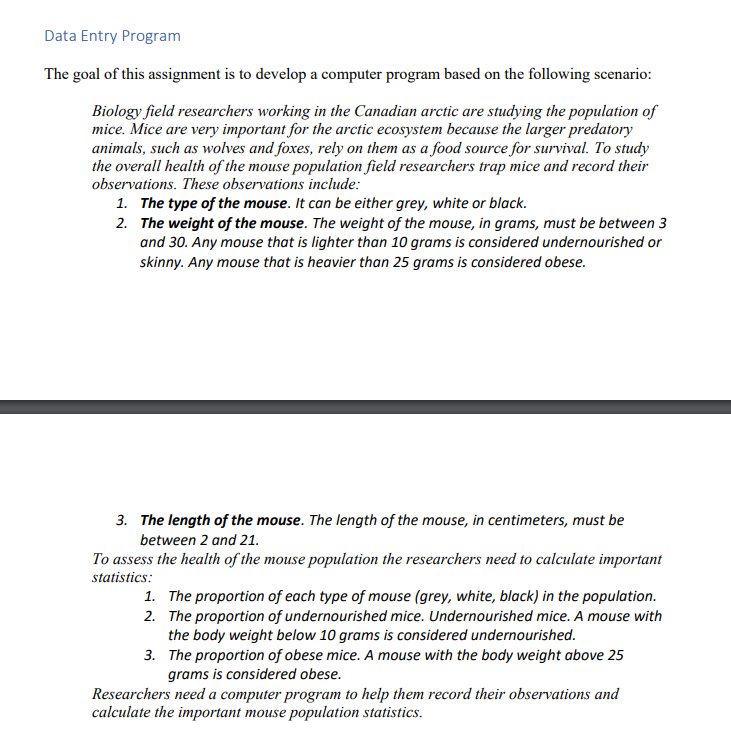
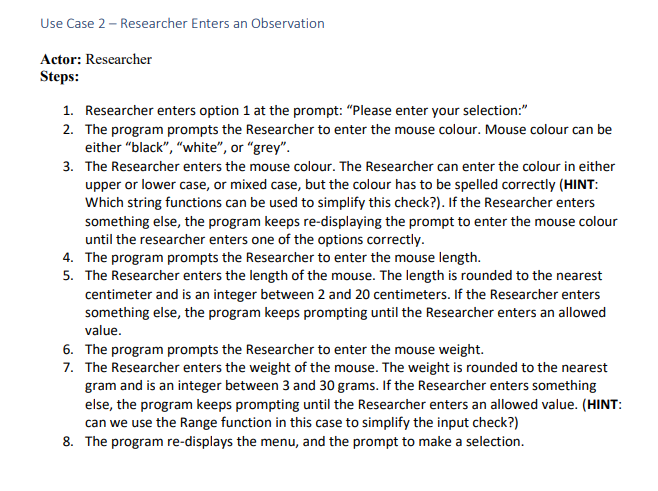
Data Entry Program The goal of this assignment is to develop a computer program based on the following scenario: Biology field researchers working in the Canadian arctic are studying the population of mice. Mice are very important for the arctic ecosystem because the larger predatory animals, such as wolves and foxes, rely on them as a food source for survival. To study the overall health of the mouse population field researchers trap mice and record their observations. These observations include: 1. The type of the mouse. It can be either grey, white or black. 2. The weight of the mouse. The weight of the mouse, in grams, must be between 3 and 30. Any mouse that is lighter than 10 grams is considered undernourished or skinny. Any mouse that is heavier than 25 grams is considered obese. 3. The length of the mouse. The length of the mouse, in centimeters, must be between 2 and 21. To assess the health of the mouse population the researchers need to calculate important statistics: 1. The proportion of each type of mouse (grey, white, black) in the population. 2. The proportion of undernourished mice. Undernourished mice. A mouse with the body weight below 10 grams is considered undernourished. 3. The proportion of obese mice. A mouse with the body weight above 25 grams is considered obese. Researchers need a computer program to help them record their observations and calculate the important mouse population statistics. Use Case 2 - Researcher Enters an Observation Actor: Researcher Steps: 1. Researcher enters option 1 at the prompt: "Please enter your selection." 2. The program prompts the Researcher to enter the mouse colour. Mouse colour can be either "black", "white", or "grey". 3. The Researcher enters the mouse colour. The Researcher can enter the colour in either upper or lower case, or mixed case, but the colour has to be spelled correctly (HINT: Which string functions can be used to simplify this check?). If the Researcher enters something else, the program keeps re-displaying the prompt to enter the mouse colour until the researcher enters one of the options correctly. 4. The program prompts the Researcher to enter the mouse length. 5. The Researcher enters the length of the mouse. The length is rounded to the nearest centimeter and is an integer between 2 and 20 centimeters. If the Researcher enters something else, the program keeps prompting until the Researcher enters an allowed value. 6. The program prompts the Researcher to enter the mouse weight. 7. The Researcher enters the weight of the mouse. The weight is rounded to the nearest gram and is an integer between 3 and 30 grams. If the Researcher enters something else, the program keeps prompting until the Researcher enters an allowed value. (HINT: can we use the Range function in this case to simplify the input check?) 8. The program re-displays the menu, and the prompt to make a selection
Step by Step Solution
There are 3 Steps involved in it

Get step-by-step solutions from verified subject matter experts
 Study Help