







Question: Hi, Could I please get step-by-step solution to this question please? (From An Introduction to Programming Using Visual Basic / 10th Edition by David I.
Hi,
Could I please get step-by-step solution to this question please?
(From An Introduction to Programming Using Visual Basic / 10th Edition by David I. Schneider; [Chapter 5.3, Exercise 10])
Thank you!
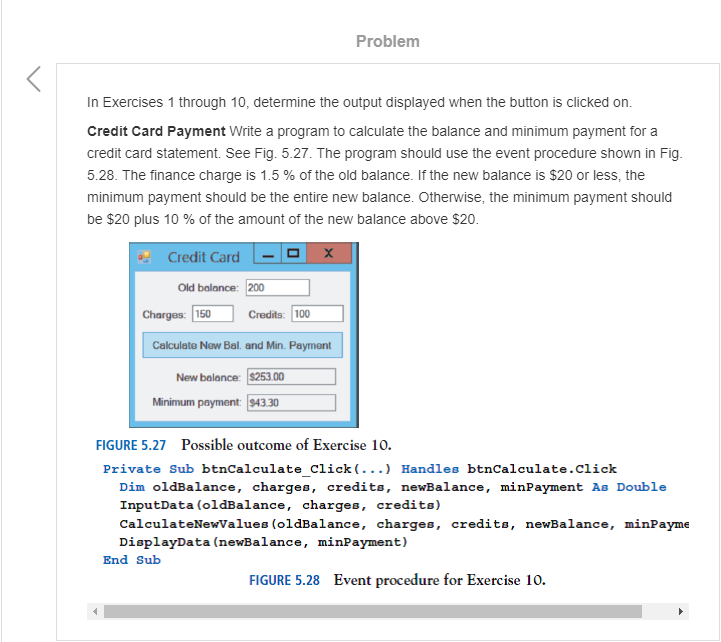
Problem In Exercises 1 through 10, determine the output displaved when the button is clicked on. Credit Card Payment Write a program to calculate the balance and minimum payment for a credit card statement. See Fig. 5.27. The program should use the event procedure shown in Fig. 5.28. The finance charge is 1.5 % of the old balance. If the new balance is $20 or less, the minimum payment should be the entire new balance. Otherwise, the minimum payment should be $20 plus 10 % of the amount of the new balance above $20. Credit Card-OX Old balance: 200 Charges: 150 Credits: 100 Celculato NowBal and Min. Paymor New belonce 1825 00 Minimum payment: 943.30 FIGURE 5.27 Possible outcome of Exercise 10 Private Sub btnCalculate Click(...) Handles btnCalculate.Click InputData (oldBalance, charges, credits) CalculateNewValues (oldBalance, charges, credits, newBalance, minPayme DisplayData (newBalance, minPayment) End Sub FIGURE 5.28 Event procedure for Exercise 10. Problem In Exercises 1 through 10, determine the output displaved when the button is clicked on. Credit Card Payment Write a program to calculate the balance and minimum payment for a credit card statement. See Fig. 5.27. The program should use the event procedure shown in Fig. 5.28. The finance charge is 1.5 % of the old balance. If the new balance is $20 or less, the minimum payment should be the entire new balance. Otherwise, the minimum payment should be $20 plus 10 % of the amount of the new balance above $20. Credit Card-OX Old balance: 200 Charges: 150 Credits: 100 Celculato NowBal and Min. Paymor New belonce 1825 00 Minimum payment: 943.30 FIGURE 5.27 Possible outcome of Exercise 10 Private Sub btnCalculate Click(...) Handles btnCalculate.Click InputData (oldBalance, charges, credits) CalculateNewValues (oldBalance, charges, credits, newBalance, minPayme DisplayData (newBalance, minPayment) End Sub FIGURE 5.28 Event procedure for Exercise 10
Step by Step Solution
There are 3 Steps involved in it

Get step-by-step solutions from verified subject matter experts
 Study Help