







Question: Hi everyone, I have a C programming problem. Answers are better with explanations. Background Materials: The Tasks: Part 1 Part 2: The Answers: The file
Hi everyone, I have a C programming problem. Answers are better with explanations.
Background Materials:
The Tasks:
Part 1
Part 2:
The Answers:

The file line-getter4D.c is as below:
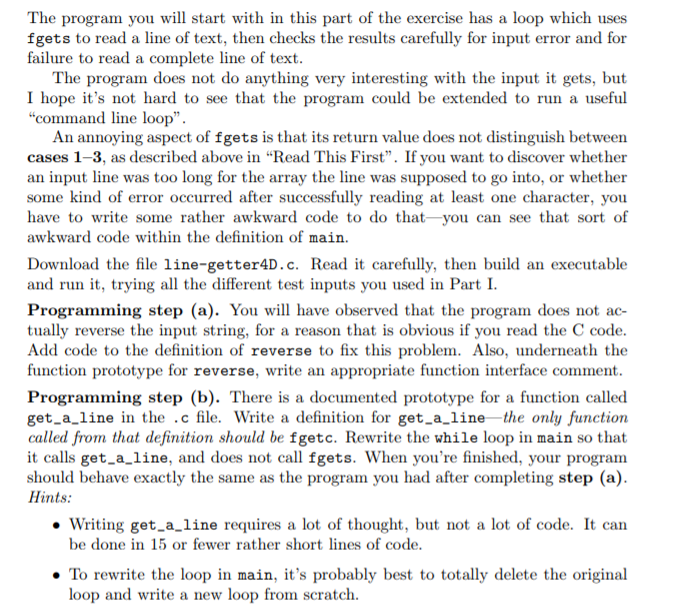
#include#include #define QUIT_LETTER 'q' // Again, in a practical program, this is a ridiculously small size // for an array that is supposed to hold a line of text. But it's // convenient for testing purposes. #define LINE_ARRAY_SIZE 10 int eat_til_newline(FILE *stream); // REQUIRES: stream is open for input. // PROMISES: Characters are read from stream and discarded until either a // ' ' has been read or an input error has occurred. // Return value is 0 if ' ' is read, and EOF for an error. int get_a_line(char *s, int size, FILE *stream); // Does what fgets does, using repeated calls to fgetc, but // provides a more useful return value than fgets does. // // REQUIRES // size > 1. // s points to the start of an array of at least size bytes. // stream is open for input. // PROMISES // Return value is EOF if input error occurred. // Otherwise, return value gives the index of the '\0' that // terminates the string in the array. void reverse(char *s); int main(void) { char line[LINE_ARRAY_SIZE]; int input_error = 0, len; while (1) { printf("Please enter a line of text. To quit, start it with %c. ", QUIT_LETTER); if (NULL == fgets(line, LINE_ARRAY_SIZE, stdin)) { // Case 4. fgets did not read even one char succesfully. input_error = 1; break; } if (line[0] == QUIT_LETTER) break; // Find out what fgets actually did, and react accordingly. len = strlen(line); if (line[len - 1] == ' ') { // Case 1: Yay! We read a complete line! line[len - 1] = '\0'; // Write '\0' over ' '. printf("The line, newline removed, was \"%s\".", line); reverse(line); printf(" In reverse, that is \"%s\". ", line); } else if (len == LINE_ARRAY_SIZE - 1) { // Case 2: Too much input. eat_til_newline(stdin); fputs("Input line ignored because it was too long! ", stdout); } else { // Case 3: Error after reading one or more chars. input_error = 1; break; } } // while (1) fputs(" Reason for quitting: ", stdout); if (input_error) fputs("unexpected input error. ", stdout); else printf("found %c at beginning of line. ", QUIT_LETTER); return 0; } int eat_til_newline(FILE * stream) { int c; do { c = fgetc(stream); } while (c != EOF && c != ' '); // Return EOF if c == EOF, otherwise return 0. return (c == EOF) ? EOF : 0; } void reverse(char *s) { // You need to add some code here! }
The file use-fgets4D.c is as below:
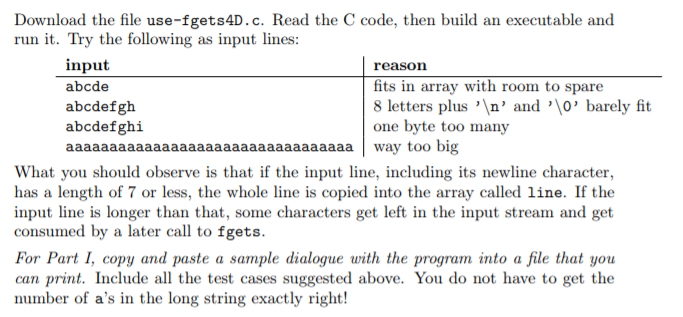
#include#define QUIT_LETTER 'q' // In a practical program, this is a ridiculously small size for an array to // hold a line of text. But it's convenient for this simple demonstration // program. #define LINE_ARRAY_SIZE 10 int main(void) { char line[LINE_ARRAY_SIZE]; char *fgets_rv; while (1) { printf("Please enter a line of text. To quit, start it with %c. ", QUIT_LETTER); fgets_rv = fgets(line, LINE_ARRAY_SIZE, stdin); if (fgets_rv == NULL || line[0] == QUIT_LETTER) break; printf(" Input line was \"%s\" ", line); } fputs(" Reason for quitting: ", stdout); if (fgets_rv == NULL) fputs("unexpected input error. ", stdout); else printf("found %c at beginning of line. ", QUIT_LETTER); return 0; }
Thanks a lot!
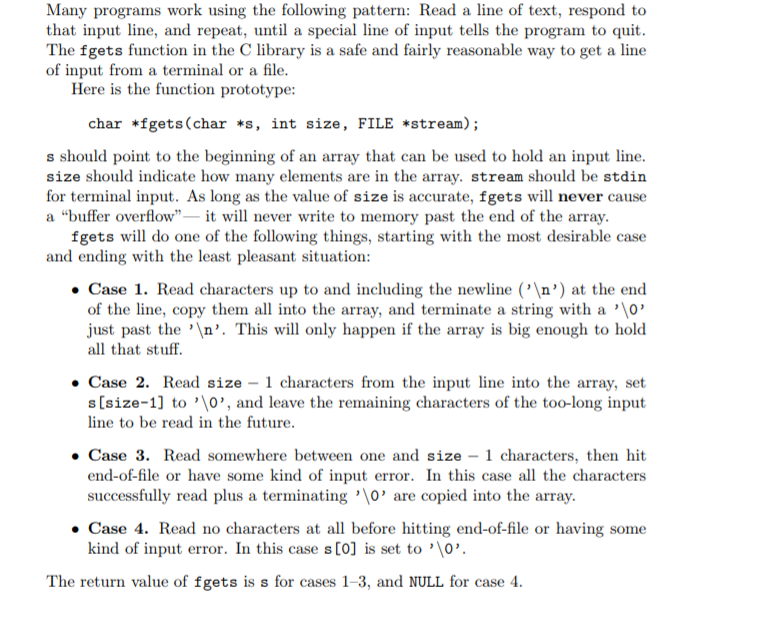
Many programs work using the following pattern: Read a line of text, respond to that input line, and repeat, until a special line of input tells the program to quit The fgets function in the C library is a safe and fairly reasonable way to get a line of input from a terminal or a file Here is the function prototype: char *fgets (char *s, int size, FILE *stream); s should point to the beginning of an array that can be used to hold an input line size should indicate how many elements are in the array. stream should be stdin for terminal input. As long as the value of size is accurate, fgets will never cause a "buffer overflow" it wll never write to memory past the end of the array. fgets l do one of the following things, starting with the most desirable case and ending with the least pleasant situation: . Case 1. Read characters up to and including the newline (' ') at the end of the ine, copy them all into the array, and terminate a string with a '0' just past the 'n'. This ll only happen if the array is big enough to hold all that stuff Case 2. Read size -1 characters from the input line into the array, set s[size-1] to '0', and leave the remaining characters of the too-long input line to be read in the future Case 3. Read somewhere between one and size - 1 characters, then hit end-of-file or have some kind of input error. In this case all the characters successfully read plus a terminating'0' are copied into the array . Case 4. Read no characters at all before hitting end-of-file or having some kind of input error. In this case s [0] is set to '10' The return value of fgets is s for cases 1-3, and NULL for case 4 Many programs work using the following pattern: Read a line of text, respond to that input line, and repeat, until a special line of input tells the program to quit The fgets function in the C library is a safe and fairly reasonable way to get a line of input from a terminal or a file Here is the function prototype: char *fgets (char *s, int size, FILE *stream); s should point to the beginning of an array that can be used to hold an input line size should indicate how many elements are in the array. stream should be stdin for terminal input. As long as the value of size is accurate, fgets will never cause a "buffer overflow" it wll never write to memory past the end of the array. fgets l do one of the following things, starting with the most desirable case and ending with the least pleasant situation: . Case 1. Read characters up to and including the newline (' ') at the end of the ine, copy them all into the array, and terminate a string with a '0' just past the 'n'. This ll only happen if the array is big enough to hold all that stuff Case 2. Read size -1 characters from the input line into the array, set s[size-1] to '0', and leave the remaining characters of the too-long input line to be read in the future Case 3. Read somewhere between one and size - 1 characters, then hit end-of-file or have some kind of input error. In this case all the characters successfully read plus a terminating'0' are copied into the array . Case 4. Read no characters at all before hitting end-of-file or having some kind of input error. In this case s [0] is set to '10' The return value of fgets is s for cases 1-3, and NULL for case 4
Step by Step Solution
There are 3 Steps involved in it

Get step-by-step solutions from verified subject matter experts
 Study Help