







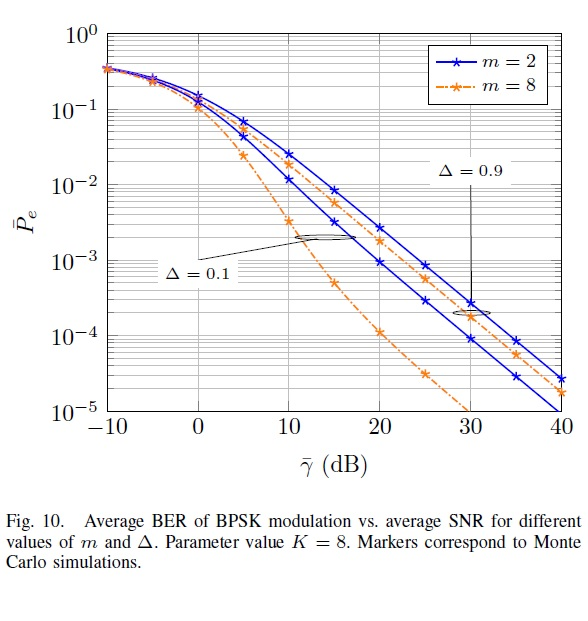
Question: Hi folks! I need to correct my code in order to reproduce this graph of this figure. -What I need: To insert those blue lines
Hi folks! I need to correct my code in order to reproduce this graph of this figure.
-What I need:
To insert those blue lines like the figure below that representing FTR fading model who has this two parameters:
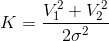
and

Please correct my code. Thank you.
------------------------------------------------------------------------------------------------------------------------------------------------------------------------------------------------------------------
Figure:
---------------------------------------------------------------------------------------------------------------------------------------------------------------------------------------------
My Matlab Code:
close all; clear all; clc;
N =1e6; randn('state',100); randn('state',200); M=8; K=5; divorder=1; EbNo = -10:5:40; BER_Ray=berfading(EbNo,'psk',M,divorder) BER_Rician = berfading(EbNo,'psk',2,1,K); BER = berawgn(EbNo,'psk',M,'nondiff');
%TX ip = randn(1,N)>0.5; % s = 2*ip-1; % BPSK 0 -> -1; 1 -> 1 n = 1/sqrt(2)*[randn(1,N) + 1i*randn(1,N)]; % Additive white Gaussian noise (AWGN), 0dB variance
for ii = 1:length(EbNo) y = s + 10^(-EbNo(ii)/20)*n; % additive white gaussian noise (AWGN)
%RX ipHat = real(y)>0;
nErr(ii) = size(find([ip- ipHat]),2);
end
simBer = (nErr/N); theoryBer = erfc(sqrt(10.^(EbNo/20)));
% plot 1
close all figure semilogy(EbNo,theoryBer,'b.-'); hold on semilogy(EbNo,simBer,'mx-'); axis([-10 40 1e-5 0.5]) grid on
hold on semilogy (EbNo,BER_Ray,'*-'); semilogy (EbNo,BER_Rician,'+-'); % plot 2 xlabel('Eb/No, dB'); ylabel('Bit Error Rate'); title('Bit error probability curve for BPSK modulation'); legend('m=2','m=8'); axis([-10 40 1e-5 .5]) grid on
= + = +
Step by Step Solution
There are 3 Steps involved in it

Get step-by-step solutions from verified subject matter experts
 Study Help