Question: Hi, I am a beginner C++ coder looking for help with a RPS.cpp program. Please help! Thank you. CS 210 Lab 5 Program Specifications Checkpoint
Hi, I am a beginner C++ coder looking for help with a RPS.cpp program. Please help!
 Thank you.
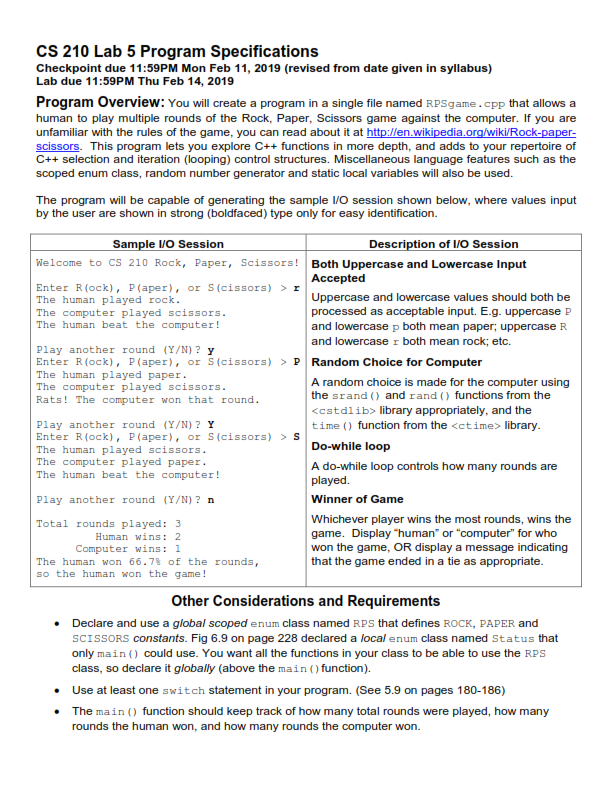
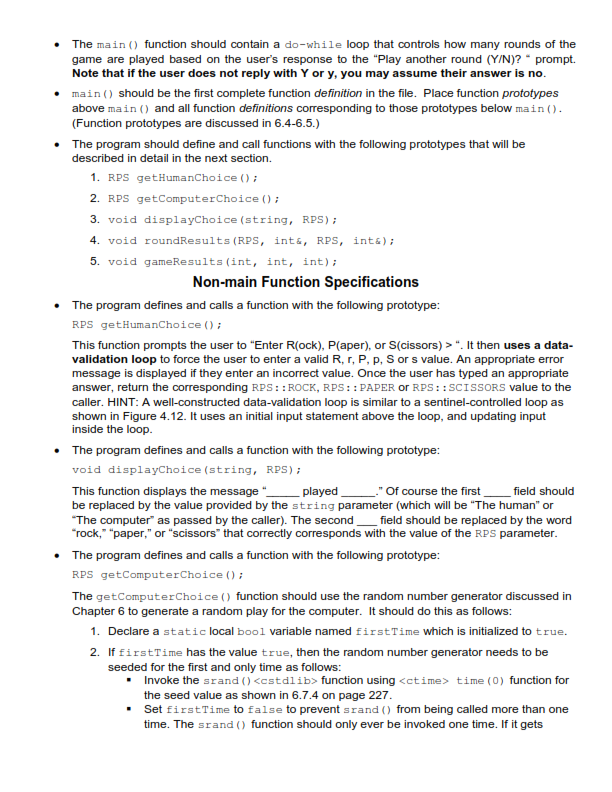
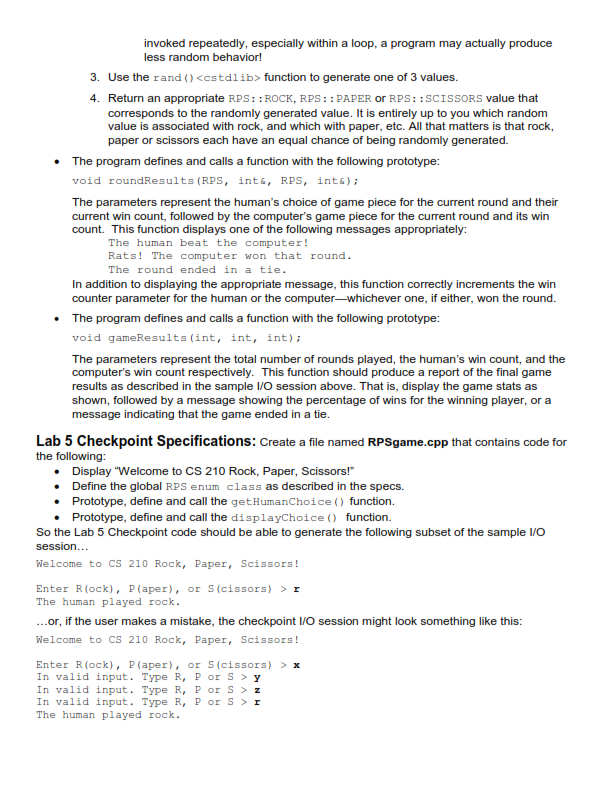
CS 210 Lab 5 Program Specifications Checkpoint due 11:59PM Mon Feb 11, 2019 (revised from date given in syllabus) Lab due 11:59PM Thu Feb 14, 2019 Program Overview: You will create a program in a single file named RPSgame.cpp that allows a human to play multiple rounds of the Rock, Paper, Scissors game against the computer. If you are unfamiliar with the rules of the game, you can read about it at scissors. This program lets you explore C+functions in more depth, and adds to your repertoire of C++ selection and iteration (looping) control structures. Miscellaneous language features such as the scoped enum class, random number generator and static local variables will also be used. //en.wikipedia The program will be capable of generating the sample I/O session shown below, where values input by the user are shown in strong (boldfaced) type only for easy identification. Sample IVO Session Description of IVO Session Welcome to Cs 210 Rock, Paper, Scissors Both Uppercase and Lowercase Input Enter R (ock), P(aper), or S(cissors) >r The human played rock The computer played scissors The human beat the computer! Accepted Uppercase and lowercase values should both be processed as acceptable input. E.g. uppercase P and lowercase p both mean paper, uppercase R and lowercase r both mean rock; etc. Play another round (YN) ? Y Enter R(ock), P (aper),or S(cissors)Random Choice for Computer The human played paper The computer played scissors Rats! The computer won that round Play another round (Y/N)? Y Enter R (ock), P(aper), or S(cissors) >S The human played scissors The computer played paper The human beat the computer! A random choice is made for the computer using the srand) and rand) functions from the library appropriately, and the time ) function from the library. Do-while loop A do-while loop controls how many rounds are Play another round (YN)? n Winner of Game Whichever player wins the most rounds, wins the game. Display "human" or "computer" for who won the game, OR display a message indicating Total rounds played:3 Human wins: 2 Computer wins: 1 that the game ended in a tie as appropriate The human won 66.7% of the rounds, so the human won the game! Other Considerations and Requirements Declare and use a global scoped enum class named RPS that defines ROCK, PAPER and SCISSORS constants. Fig 6.9 on page 228 declared a local enum class named Status that only main ) could use. You want all the functions in your class to be able to use the RPS class, so declare it globally (above the main )function) . Use at least one switch statement in your program. (See 5.9 on pages 180-186) . The main ) function should keep track of how many total rounds were played, how many rounds the human won, and how many rounds the computer won. The main ) function should contain a do-while loop that controls how many rounds of the game are played based on the user's response to the "Play another round (Y/N)' prompt. Note that if the user does not reply with Y or y, you may assume their answer is no . . main should be the first complete function definition in the file. Place function prototypes above main and all function definitions corresponding to those prototypes below main () (Function prototypes are discussed in 6.4-6.5.) The program should define and call functions with the following prototypes that will be described in detail in the next section. . 1. RPS getHumanChoice ) 2. RPS getComputerChoice ) 3. void displayChoice (string, RPS) 4. void roundResults (RPS, int&, RPS, int&) 5. void gameResults (int, int, int) Non-main Function Specifications The program defines and calls a function with the following prototype: RPS getHumanChoice)i This function prompts the user to "Enter R(ock), P(aper), or S(cissors)>". It then uses a data- validation loop to force the user to enter a valid R, r, P, p, S or s value. An appropriate error message is displayed if they enter an incorrect value. Once the user has typed an appropriate answer, return the corresponding RPS:: ROCK, RPS:: PAPER or RPS::SCISSORS value to the caller. HINT: A well-constructed data-validation loop is similar to a sentinel-controlled loop as shown in Figure 4.12. It uses an initial input statement above the loop, and updating input inside the loop . The program defines and calls a function with the following prototype: void displayChoice (string, RPS) . This function displays the message be replaced by the value provided by the string parameter (which will be "The human" or The computer as passed by the caller). The second field should be replaced by the word rock," "paper," or "scissors" that correctly corresponds with the value of the RPS parameter playedOf course the first field should The program defines and calls a function with the following prototype: RPS getComputerChoice) . The getComputerChoice () function should use the random number generator discussed in Chapter 6 to generate a random play for the computer. It should do this as follows: 1. Declare a static local boo1 variable named firstTime which is initialized to true 2. If firstTime has the value true, then the random number generator needs to be seeded for the first and only time as follows: Invoke the s rand ( ) function using time (0) function for the seed value as shown in 6.7.4 on page 227 . -Set firstTime to false to prevent srand ) from being called more than one time. The srand () function should only ever be invoked one time. If it gets invoked repeatedly, especially within a loop, a program may actually produce less random behavior! 3. Use the rand ) function to generate one of 3 values. 4. Return an appropriate RPS:: ROCK, RPS:: PAPER or RPS: :SCISSORS value that corresponds to the randomly generated value. It is entirely up to you which random value is associated with rock, and which with paper, etc. All that matters is that rock, paper or scissors each have an equal chance of being randomly generated. The program defines and calls a function with the following prototype: void roundResults (RPS, int&, RPS, int&) . The parameters represent the human's choice of game piece for the current round and their current win count, followed by the computer's game piece for the current round and its win count. This function displays one of the following messages appropriately: The human beat the computer! Rats! The computer won that round The round ended in a tie In addition to displaying the appropriate message, this function correctly increments the win counter parameter for the human or the computer-whichever one, if either, won the round. The program defines and calls a function with the following prototype: void gameResults (int, int, int) . The parameters represent the total number of rounds played, the human's win count, and the computer's win count respectively. This function should produce a report of the final game results as described in the sample VO session above. That is, display the game stats as shown, followed by a message showing the percentage of wins for the winning player, or a message indicating that the game ended in a tie Lab 5 Checkpoint Specifications: Create a file named RPSgame.cpp that contains code for the following: Display "Welcome to CS 210 Rock, Paper, Scissors!" Define the global RPS enum class as described in the specs. Prototype, define and call the getHumanChoice ) function. . Prototype, define and call the displayChoice function. So the Lab 5 Checkpoint code should be able to generate the following subset of the sample /O session... Welcome to CS 210 Rock, Paper, Scissors! Enter R (ock), P(aper), or S(cissors) >r The human played rock or, if the user makes a mistake, the checkpoint I/O session might look something like this Welcome to CS 210 Rock, Paper, Scissors! Enter R (ock), P(aper), or S(cissors) >x In valid input. Type R, Por sy In valid input. Type R, P orsz In valid input. Type R, P or sr The human played rock









 Study Help