







Question: Hi I am having trouble with the HTML and Javascript for the Find, Replace, Find and Replace and the submission of the translation button. Is
Hi I am having trouble with the HTML and Javascript for the Find, Replace, Find and Replace and the submission of the translation button. Is anybody able to assist?
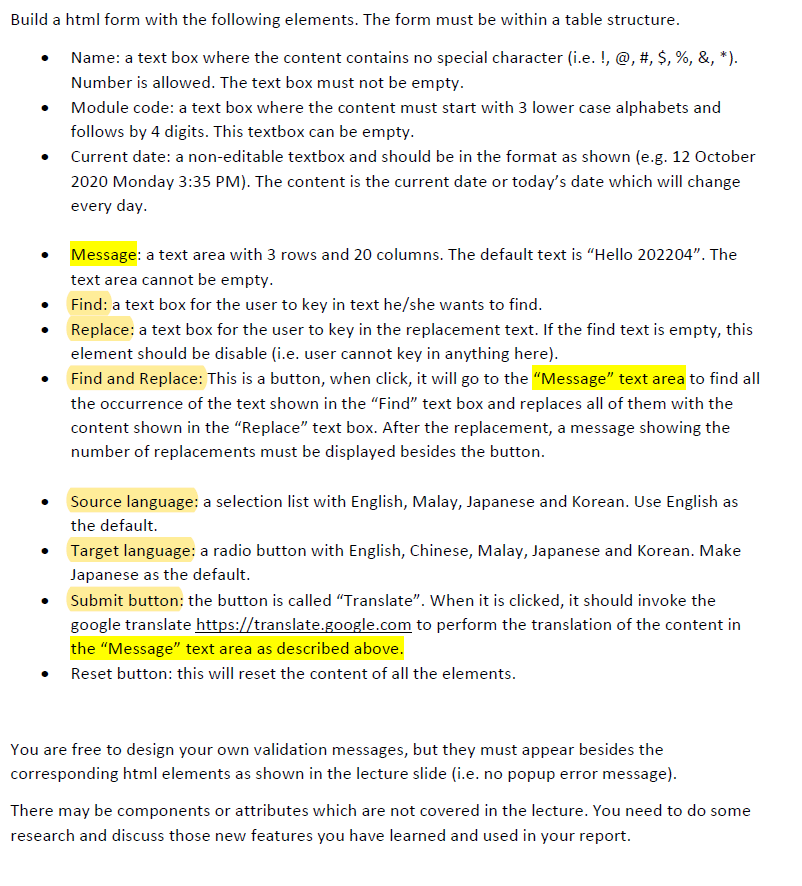
Build a html form with the following elements. The form must be within a table structure. Name: a text box where the content contains no special character (i.e. !, @, #, $, %, &, *). Number is allowed. The text box must not be empty. Module code: a text box where the content must start with 3 lower case alphabets and follows by 4 digits. This textbox can be empty. Current date: a non-editable textbox and should be in the format as shown (e.g. 12 October 2020 Monday 3:35 PM). The content is the current date or today's date which will change every day. Message: a text area with 3 rows and 20 columns. The default text is "Hello 202204". The text area cannot be empty. Find: a text box for the user to key in text he/she wants to find. Replace: a text box for the user to key in the replacement text. If the find text is empty, this element should be disable (i.e. user cannot key in anything here). Find and Replace: This is a button, when click, it will go to the "Message" text area to find all the occurrence of the text shown in the "Find" text box and replaces all of them with the content shown in the "Replace" text box. After the replacement, a message showing the number of replacements must be displayed besides the button. Source language: a selection list with English, Malay, Japanese and Korean. Use English as the default. Target language: a radio button with English, Chinese, Malay, Japanese and Korean. Make Japanese as the default. Submit button: the button is called "Translate". When it is clicked, it should invoke the google translate https://translate.google.com to perform the translation of the content in the "Message" text area as described above. Reset button: this will reset the content of all the elements. You are free to design your own validation messages, but they must appear besides the corresponding html elements as shown in the lecture slide (i.e. no popup error message). There may be components or attributes which are not covered in the lecture. You need to do some research and discuss those new features you have learned and used in your report.
Step by Step Solution
There are 3 Steps involved in it
To create the HTML form with the specified elements and functionality you can follow the structure below Ill include the necessary HTML and JavaScript code to achieve the Find Replace ... View full answer

Get step-by-step solutions from verified subject matter experts
 Study Help