







Question: Hi, I am taking a Data Structures & Algorithms class in Java this semester and I am confused with the second part of the assignment
Hi,
I am taking a Data Structures & Algorithms class in Java this semester and I am confused with the second part of the assignment that is dealing Arrays and merging/sorting them, so some help would be well appreciated!
Thank you!
Assignment Prompt:
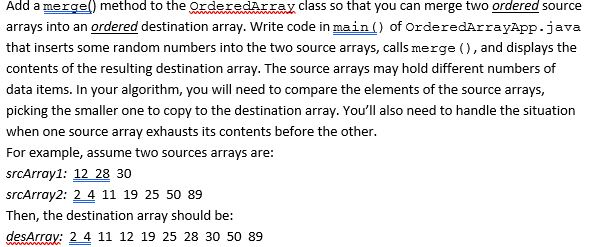
Note from the professor about assignment:
When you work on Problem 2 (adding a Merge() method), you should add this method in the class OrderedArray. The method heading could be:
public OrderedArray merge (OrderedArray srcArr1, OrderedArray srcArr2)
OR
public OrderedArray merge (OrderedArray other)
If you use the first method heading, it means to merge srcArr1 and srcArr2, then return the destArr
When you test it in the driver class OrderedArrayApp, you need to pass two OrderedArray reference variables as parameter and use one of them to call the method.
OrderedArray srcArr1 = new OrderedArray(10);
OrderedArray srcArr2 = new OrderedArray(5);
//code to call insert method to fill srcArr1 and srcArr2
OrderedArray destArr = srcArr1.merge(srcArr1, srcArr2);
/* you also could use
* OrderedArray destArr = srcArr2.merge(srcArr1, srcArr2);
*/
If you use the second method heading, it means to merge this and other, then return the destArr
When you test it in the driver class OrderedArrayApp, you use the reference variable of one OrderedArray to call the method and pass another OrderedArray reference variable as parameter.
OrderedArray srcArr1 = new OrderedArray(10);
OrderedArray srcArr2 = new OrderedArray(5);
//code to call insert method to fill srcArr1 and srcArr2
OrderedArray destArr = srcArr1.merge(srcArr2);
/* you also could use
* OrderedArray destArr = srcArr2.merge(srcArr1);
*/
OrderedArray Class Sample Code:
package orderedArray;
class OrderedArray { private long[] a; // ref to array a private int nElems; // number of data items //----------------------------------------------------------- public OrderedArray(int max) // constructor { a = new long[max]; // create array nElems = 0; } //----------------------------------------------------------- public int size() { return nElems; } //----------------------------------------------------------- public int find(long searchKey) { int lowerBound = 0; int upperBound = nElems-1; int curIn; while(true) { curIn = (lowerBound + upperBound ) / 2; if(a[curIn]==searchKey) return curIn; // found it else if(lowerBound > upperBound) return nElems; // can't find it else // divide range { if(a[curIn] value) // (linear search) break; for(int k=nElems; k>j; k--) // move bigger ones up a[k] = a[k-1]; a[j] = value; // insert it nElems++; // increment size } // end insert() //----------------------------------------------------------- public boolean delete(long value) { int j = find(value); if(j==nElems) // can't find it return false; else // found it { for(int k=j; k OrderedArrayApp Sample Code: package orderedArray; public class OrderedArrayApp { public static void main(String[] args) { int maxSize = 100; // array size OrderedArray arr; // reference to array arr = new OrderedArray(maxSize); // create the array arr.insert(77); // insert 10 items arr.insert(99); arr.insert(44); arr.insert(55); arr.insert(22); arr.insert(88); arr.insert(11); arr.insert(00); arr.insert(66); arr.insert(33); int searchKey = 55; // search for item if( arr.find(searchKey) != arr.size() ) System.out.println("Found " + searchKey); else System.out.println("Can't find " + searchKey); arr.display(); // display items arr.delete(00); // delete 3 items arr.delete(55); arr.delete(99); arr.display(); // display items again } // end main() }
Step by Step Solution
There are 3 Steps involved in it

Get step-by-step solutions from verified subject matter experts
 Study Help